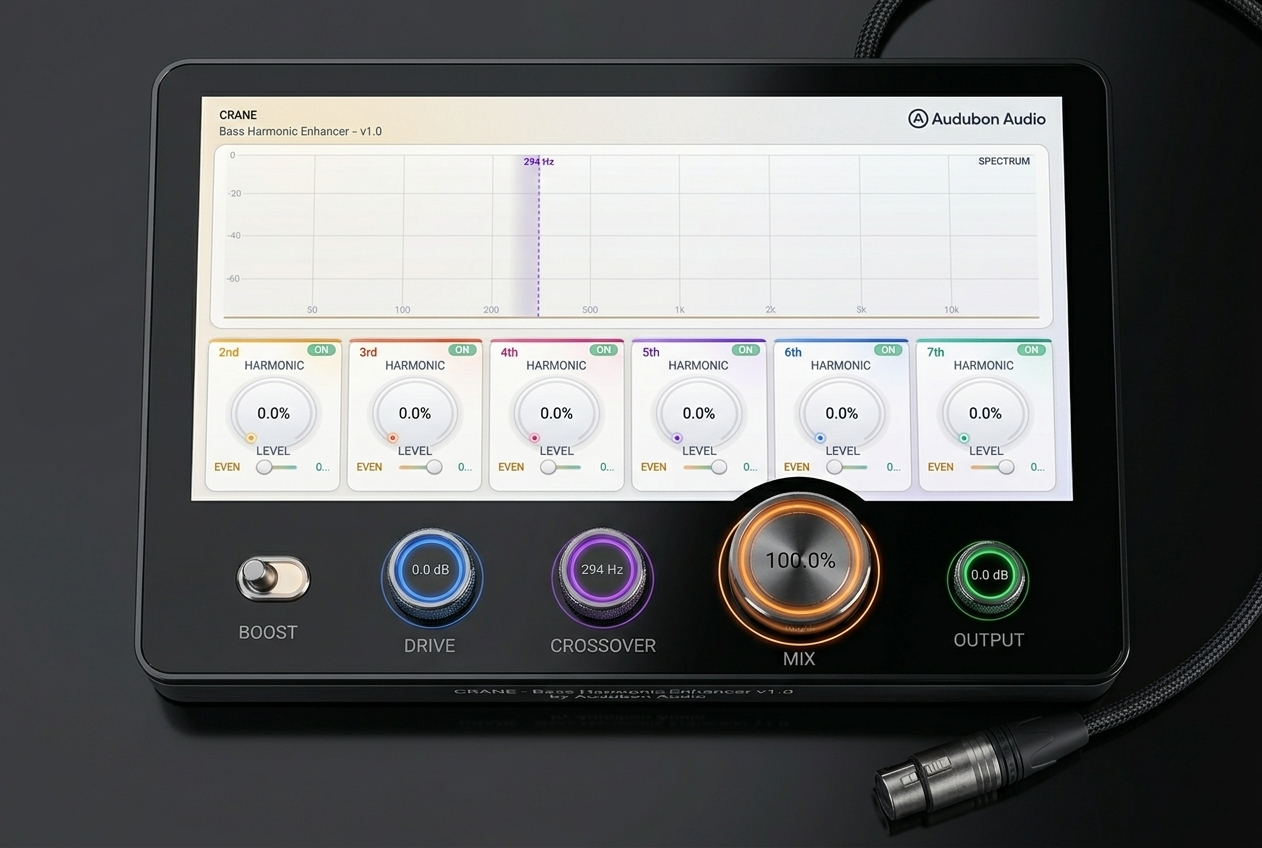
2nd
Warm Body
One octave above the fundamental. Adds fullness — the most euphonic harmonic. Start here for 808 sub enhancement.
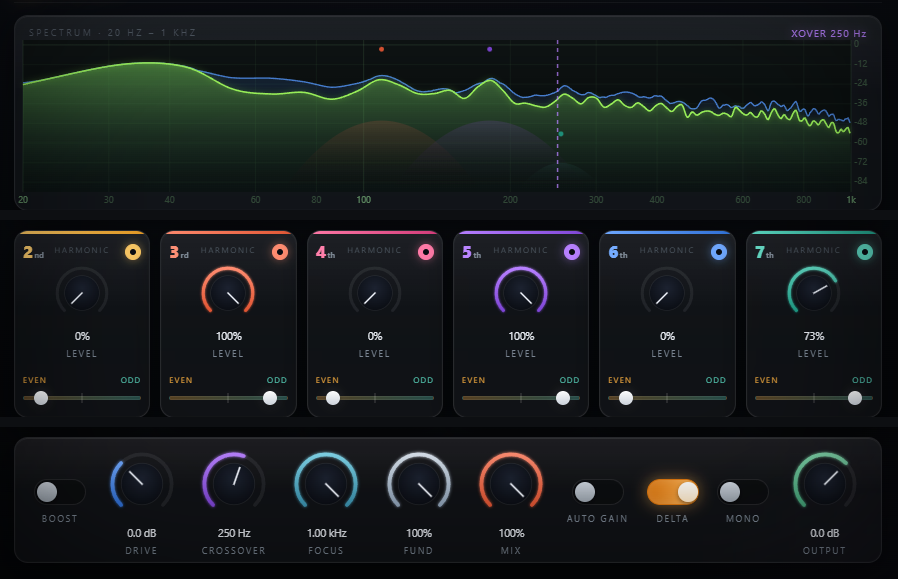
Six independently sculpted harmonic bands. A phase-coherent split. Four-times oversampled. Everything below the crossover gets bigger — everything above arrives untouched.
Crane is a six-band harmonic enhancer that adds warmth, definition, and presence exactly where you need it — below the crossover, nowhere else. Designed for dubstep, drum & bass, trap, and any production where the low end has to assert itself on small speakers.
A Linkwitz-Riley 4th-order crossover splits the signal, feeds the bass band through a Chebyshev harmonic generator at 4× oversample rate, then recombines it phase-coherently.
Six harmonic bands let you sculpt how the low end breathes, growls, or punches. Nothing is added above the crossover — the high band passes straight through, and the split reconstructs flat and phase-aligned, so there's no side-effect on the rest of your mix.
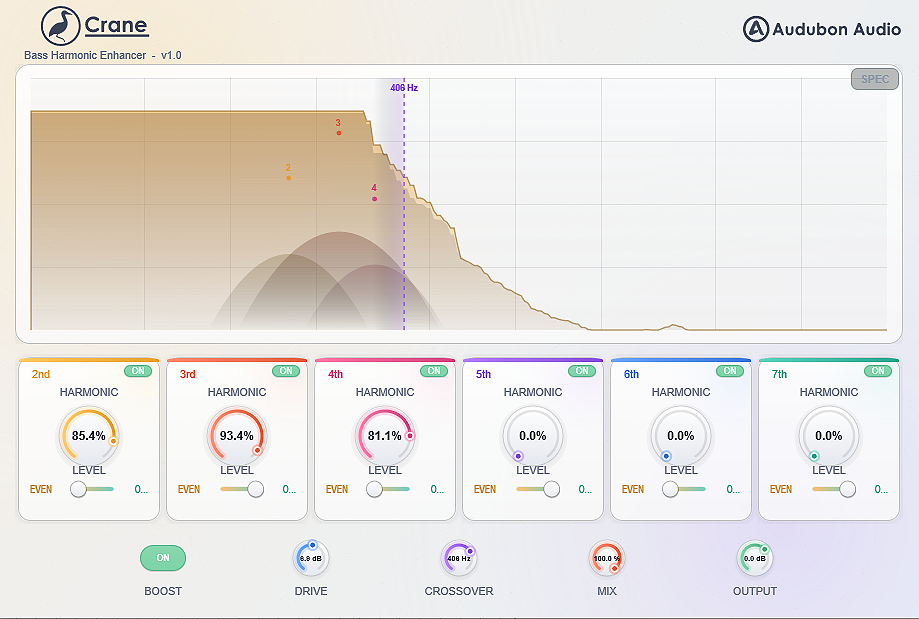
The live spectrum shows Crane's output as a real-time trace (green) with a peak-hold line (blue) behind it, from 20 Hz to 1 kHz — you see exactly what Crane is building, in real time.
The core of Crane is a Chebyshev harmonic generator, not a static distortion curve. Each Chebyshev order synthesizes exactly one harmonic of the bass — the 2nd through the 7th — so it adds those harmonics only, with nothing bleeding between them. Each band's Level knob sets how much of that harmonic is generated — zero to full, at 0.1% resolution.
Every band has an Even/Odd control that morphs the cell between adjacent harmonic orders — its even-order neighbour (rounder, tube-like) and its odd-order neighbour (grittier, more forward). Most sounds want something in between.
Each of the six bands has its own bypass toggle. Build harmonic texture incrementally, hear exactly what each component contributes, A/B individual harmonics during shaping without touching the Level knob.
The analyzer shows Crane's output as a live trace with a peak-hold line, from 20 Hz to 1 kHz. Harmonic bell markers rise on the display at each active band's frequency, and the purple crossover line is draggable directly on the display — set it by ear while watching the split.
2nd through 7th harmonic, each with its own Level knob, Even/Odd order morph, and bypass. Lower harmonics add body and warmth; higher harmonics add presence, shimmer, and air.
One octave above the fundamental. Adds fullness — the most euphonic harmonic. Start here for 808 sub enhancement.
An octave + a fifth up. Midrange presence; makes bass translatable to small speakers. Defining harmonic for growl bass.
Two octaves up. Adds impact and punch without as much apparent grit as the 3rd. Pairs well with the 2nd.
Two octaves and a major third. Adds shimmer and definition — particularly useful for wobble bass and modulated sounds.
High-frequency content generated from the bass — useful for presence in dense mixes where the fundamental is buried.
The highest available harmonic. Adds upper-frequency extension to bass material. Use at low levels — texture, not weight.
The industry standard for phase-coherent band splitting. When the low band and high band are summed at the output, the crossover region is flat and phase-aligned. No comb filtering, no cancellation at the split point.
From sub-only processing to almost the entire bass range, including upper harmonics of bass instruments. The control uses a logarithmic taper so fine adjustment is easy at low frequencies, where it matters most.
The high-band signal runs through the complementary high-pass straight to the output stage — no harmonic generation, no saturation, nothing added above the crossover. Low and high sum back to a flat, phase-aligned response.
A harmonic generator produces partials that, at nominal sample rate, fold back into the audible spectrum as inharmonic artifacts. Crane runs the generator at 4× the host rate, pushing alias products far above 20 kHz before downsampling with a steep halfband IIR filter.
Even Chebyshev orders carry a DC term — a constant offset that wastes headroom and can cause downstream clipping. An 18 Hz high-pass on the generated harmonics removes it before they recombine with the clean bands.
Only the harmonic-generator path is oversampled; the clean low and high bands run on a separate zero-latency path and reconstruct exactly. Crane reports no plugin delay, so it sits on parallel buses alongside dry tracks with no time offset.
Drive and Boost set how hard the generator is pushed; Crossover and Focus set where it works; Fundamental, Auto Gain, Delta, and Mono refine the result; Mix and Output shape the final blend.
Pre-generator gain. More drive pushes more of the bass into the harmonic generator. 3–6 dB is usually enough; higher values push every harmonic band harder at once.
The split point. 80–120 Hz for sub-only (808s). 200–300 Hz for full bass-band processing. 400–600 Hz when you want the entire bass instrument range processed.
A low-pass on the generator's input only — the clean output is untouched. Lowering it feeds the generator a purer sub, so complex or chordal bass produces clean harmonics instead of intermodulation. Default 1000 Hz is fully open (transparent).
Level of the clean low band underneath the harmonics. Keep it up for weight; pull it down and lean on the harmonics for the psychoacoustic "missing fundamental" trick — the ear rebuilds the pitch from the 2nd–5th on speakers that can't reproduce the sub.
Scales how much of the generated harmonics blend in — the clean bands stay put, so no setting combs or notches the crossover. At 100% you hear the full harmonic addition; pull back for gentler enhancement.
Automatic level compensation on the enhanced low band — as you add harmonics or drive, Crane trims the enhanced band to hold a steady level, so louder never fools you into thinking it's better. A/B honestly.
Solos the added harmonics — you hear only what Crane is generating, at the current Mix. The fastest way to check exactly what each band is contributing and to spot harshness before it hits the mix.
Folds the low band to mono before the generator, so the harmonics are mono too. Keeps the bottom end phase-solid and centred on club and vinyl systems while your highs stay stereo.
Final trim. Harmonic enhancement raises RMS — use Output to compensate and maintain consistent loudness for A/B. Useful when feeding a limiter that needs a stable input.
A global harmonic multiplier. Off: 1.5× scale. On: 2.5×. The quick way to shift between subtle enhancement and heavy saturation without adjusting every Level knob. Ideal for drop automation.