Mallard.
Draw the duck.
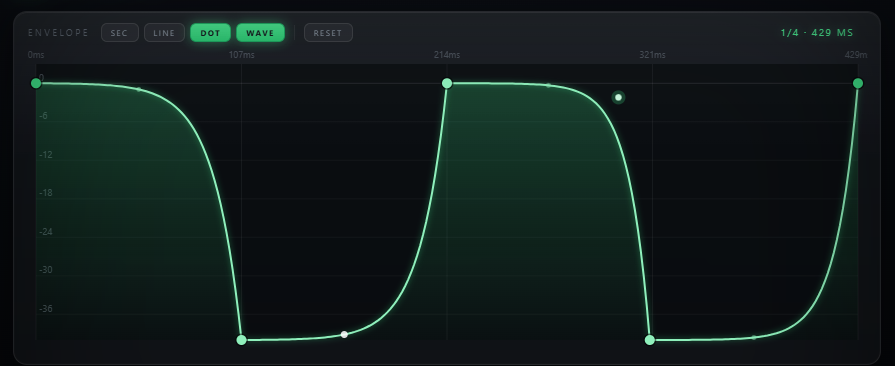
Draw any envelope shape directly on the canvas. Sync it to your BPM. Let it repeat every bar. Mallard turns your sidechain from a reflex into a design decision.
Sidechain compression you design yourself.
Mallard replaces the compressor-and-kick-sidechain workflow with a direct approach: draw the exact gain reduction curve you want on a canvas, sync it to your project BPM, and let it loop. No detector, no threshold — just the shape you drew.
Traditional sidechain compression reacts to an audio signal — Mallard executes a predetermined shape. You decide what the ducking looks like before the music plays, with unlimited points and full control over every curve.
This makes Mallard ideal for anything where the duck shape matters as much as the timing — stutters, rhythmic gates, pumping synths in time with complex polyrhythms, or any case where a compressor's attack and release curves aren't expressive enough.
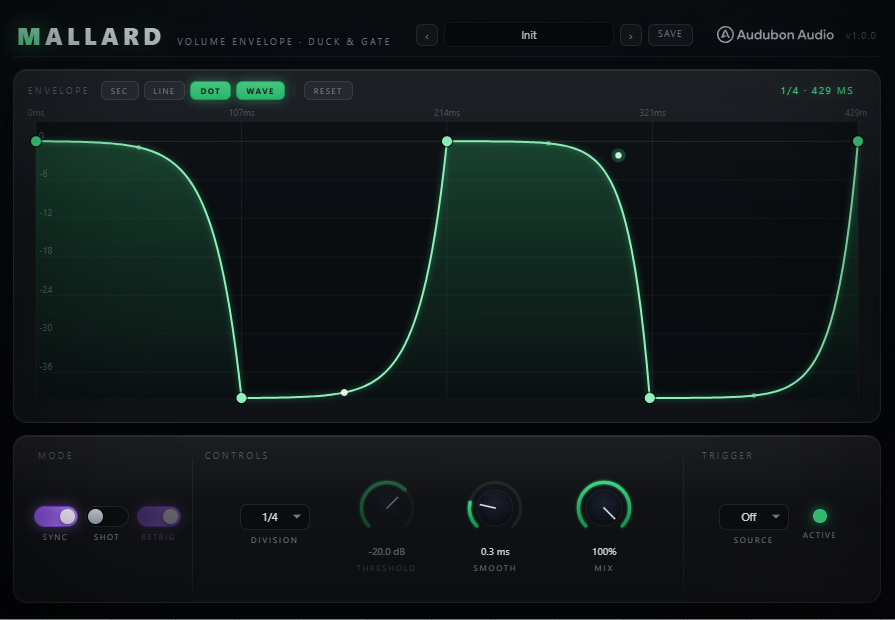
A canvas for gain. Paint with volume.
The envelope canvas is the entire plugin. Click to place points, drag to reshape the curve between them. Every point and curve segment updates the gain reduction output in real time as you draw.
Place points anywhere on the canvas. Drag the curve segment between two points to control the interpolation — linear, concave, or convex. Unlimited points means you can construct any gain reduction shape, from a simple one-dip duck to multi-stage rhythmic patterns.
The envelope's total duration can be locked to a musical division of the host BPM. As you change tempo in your DAW or use tempo automation, Mallard follows. The shape stays proportionally identical regardless of speed.
The envelope repeats continuously on the sync division you choose. On 1 bar: the shape loops every bar. On 1/4: it repeats every beat. The loop point is seamless — the last point and the first point are always connected.
Drag the corner of the plugin window to resize it from 500×280 to 1200×700 pixels. The canvas scales with the window — more screen space means more precise point placement and a clearer view of your envelope shape.
Every curve, exactly where you want it.
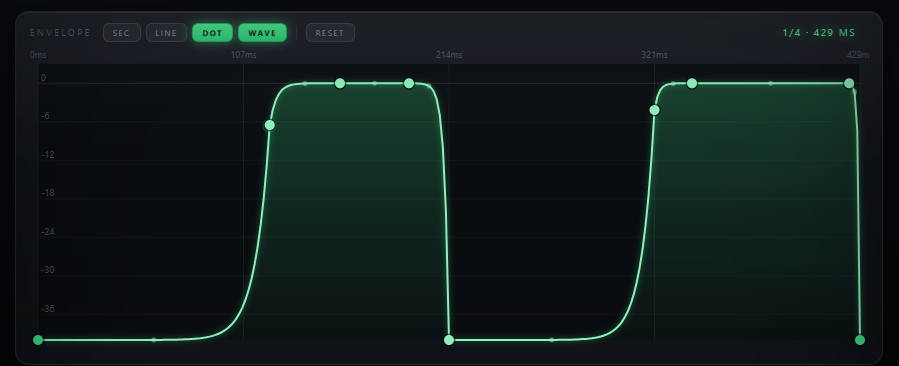
There's no cap on how many points you can place. A simple duck needs two or three. A complex multi-stage stutter might use twenty. The canvas handles any number of points without performance impact.
Between any two adjacent points, drag the midpoint of the segment up or down to bend the interpolation from linear into a curve. Concave curves feel natural for release; convex curves create abrupt attack-style shapes.
Right-click any existing point to remove it. The envelope reconnects automatically between the surrounding points. No undo needed — reshaping is fast enough that you can iterate freely without worrying about your edit history.
Seven divisions. One tempo.
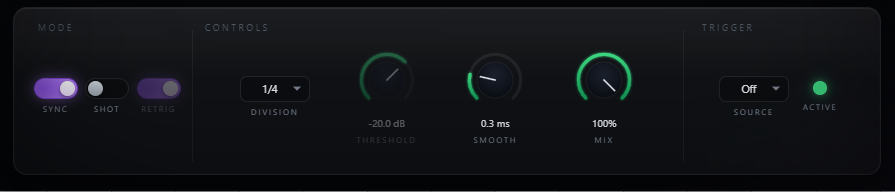
Seven musical divisions cover everything from 16th-note gating to two-bar breathing shapes. Pick the division that matches your pattern's musical context — Mallard calculates the exact duration in milliseconds from the host tempo.
Disable sync and set a precise duration manually — from 50 ms for ultra-fast gating effects up to 10 seconds for long, evolving volume shapes. Free mode ignores the host tempo entirely.
If your project uses tempo automation, Mallard follows it. A shape that takes exactly one bar at 120 BPM will still take exactly one bar at 140 BPM — the loop stretches and compresses with the tempo map.
More screen. More precision.
The plugin window is freely resizable from 500×280 pixels up to 1200×700. The envelope canvas scales with every resize — more pixels means more precise point placement, especially when working on dense envelopes with many points close together.
Compact enough to sit alongside other plugins in a crowded DAW UI. Still fully usable for simple one or two-point envelopes.
Full-screen precision for complex envelopes. At maximum size, individual points are easily distinguishable and segment curves are clearly visible.
The canvas always fills the plugin window. Envelope point positions are stored as normalized coordinates — resizing never moves your points or changes the shape.
Everything that shapes the shape.
Beyond the canvas itself, Mallard has a focused set of controls for timing, depth, and mix — enough to tune the effect without adding complexity.
Toggle between BPM-synced mode (choose 1/16 through 2 bars) and free mode. In free mode the Duration knob is active. In sync mode the duration is calculated automatically from the host BPM.
Active only in free mode. Sets the total time from the start of the envelope to its loop point. The entire shape is stretched or compressed to fit this duration.
Scales the entire envelope's gain reduction range. At 100% the canvas's lowest point reaches maximum reduction. At 50% the same shape produces half the depth — useful for blending the effect into a mix.
Dry/wet blend. At 100% the full envelope is applied. Pull back for a subtler effect without changing the drawn shape — ideal for A/B comparison while building the envelope.
Shifts the loop start point relative to the host's beat grid. 50% means the envelope starts halfway through the sync division. Useful for offsetting Mallard against other synced elements in your arrangement.
Draw once. Loop forever.