Audubon · Plugins
VLT-001  ·  Released v1.1
Vulture full plugin UI
NEW · VST3 INSTRUMENT EST. 2026 · AUDUBON AUDIO
Spectral Hybridiser

Vulture.
Two sounds, one instrument.

Drop two samples. Vulture rebuilds them in the spectral domain and morphs one into the other — magnitude and phase — then hands the result back to a playable, polyphonic sampler with a clean, comb-free sub.

Under development · v1.1.0
$39
Format
VST3 Instrument · Win 64 · macOS Universal
Engine
STFT 4096 · 75% overlap
Sources
2 A + B slots
Sub Split
60–200 Hz · mono
License
Royalty-free commercial OK
01 — Overview

A sampler that lives
between two sounds.

Vulture is a two-slot hybrid sampler. Load a sample into A and another into B, and Vulture merges them in the frequency domain into a single new instrument you play across the keyboard. Not a crossfade — a true spectral morph that takes the magnitude and phase of both sources and blends them into something neither one was alone.

VST3 Instrument Spectral Morph 2-Source Hybrid Polyphonic Clean Sub

A 4096-point STFT analyses both samples at 75% overlap, morphs them magnitude-and-phase, and recombines the result into a playable, repitched, loopable instrument.

Because the merge happens in the spectral domain, you get genuinely new timbres — a vocal that breathes like a pad, a drum loop that carries the harmonic skeleton of a synth. The whole render runs off the audio thread, so loading samples and turning the Morph knob stays smooth even on big files, and a single mono sub source keeps the low end tight and phase-coherent no matter what the morph is doing up top.

Vulture full plugin interface
Plugin · full interface
02 — The Engine

Spectral morphing with two-knob control.

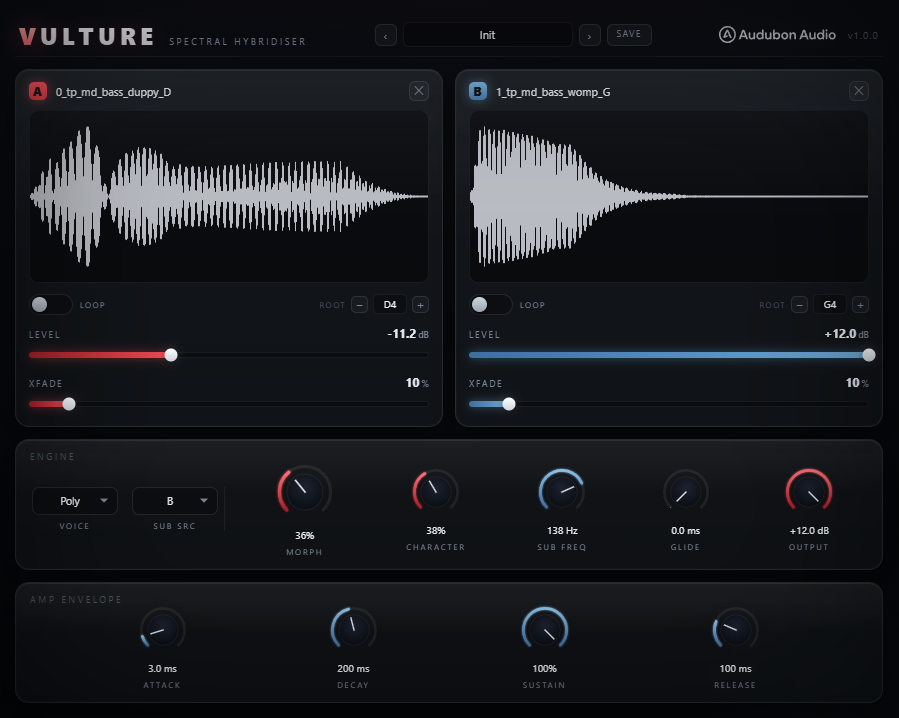
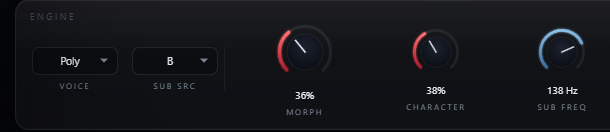
Morph decides whose voice you hear; Character decides how the two spectra are combined. Everything else — repitch, looping, the sub split — is built around getting those two samples to merge cleanly.

Vulture full plugin UI showing A/B slots and knob row
Morph — A → B

A single position between your two sources. At 0% you hear sample A; at 100% you hear sample B; everywhere in between is a real spectral interpolation of both. Automate it across a phrase and the instrument visibly transforms from one sound into the other.

Character — Union / Intersect

Controls how the two spectra meet. Toward 0 (union) you keep the full, fat sum of both sounds. Toward 1 (intersect) you keep only the frequencies the two share — a tighter, more focused hybrid that emphasises common harmonic content.

4096-pt STFT

A 4096-sample analysis window with 75% overlap gives fine spectral resolution and smooth reconstruction — enough detail to separate the body of one sound from the air of another without smearing transients into mush.

Off-Thread Render

The morph is pre-computed on a background thread, then streamed by the voice. Load a new sample or nudge Morph and Vulture re-renders quietly in the background — no audio dropouts, no UI freeze, even on long stereo files.

03 — Sample Slots

Slot A. Slot B. Drag, drop, play.

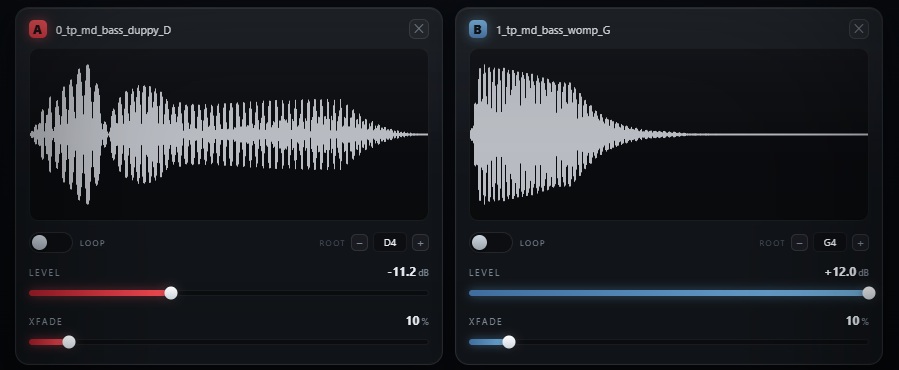
Each slot is a self-contained sampler with its own level, root note, and loop. Drop any audio file straight onto the waveform — Vulture repitches both sources to a common root so a C on your keyboard always plays a C.

A·B
Drag & Drop Loading

Drop a WAV, AIFF, FLAC or MP3 directly onto either waveform. The file is cached with the project, so state recall always finds your sample.
Per slot≤ 48 MB
Root Note

Tell Vulture the pitch each sample was recorded at. Both sources are repitched to a common root before the merge, so the two stay in tune with each other and with the keyboard.

Per slot0–127
Loop Region

Switch a slot from Oneshot to Loop and drag the start/end brackets right on the waveform. Hold a key and the loop sustains indefinitely — turn any one-shot into a pad.

Per slotOneshot · Loop
Loop Crossfade

An adjustable crossfade smooths the loop seam, blending the end of the region back into its start so sustained notes hold without clicks, pops, or an audible loop point.

Per slot0–100%
Per-Slot Level

Independent gain on each source, −24 to +12 dB. Balance a loud drum loop against a quiet vocal before they merge, so the morph lands where you want it.

Per slot−24…+12 dB
Live Waveform

Each slot draws its sample as a waveform with the loop region shaded and brackets you can grab. See exactly what you loaded and where the loop sits at a glance.
Per slotDrag brackets
04 — The Clean Sub

Morph the top.
Keep the bottom solid.

Vulture sub source and sub frequency controls
A — Mono Sub
One Source, Folded to Mono

Spectral morphing can smear phase in the low end, where it does the most damage. So Vulture pulls the sub band from a single source and folds it to mono — the low end is built from one clean signal and can never comb-filter against itself.

B — Sub Freq
60–200 Hz Crossover

Set where the clean sub hands off to the morphed top. The split is applied at playback at a fixed real frequency, so the sub always lands at the same pitch region regardless of which note you play up the keyboard.

C — Sub Source
Auto · A · B

Choose which sample owns the low end. Auto picks the source with the most low-band energy for you; force A or B when you know exactly which sound should anchor the bottom of the hybrid.

05 — Voicing

Plays like an instrument. Not a sample player.

Vulture voice mode and glide controls
A — Voice Mode
Poly · Mono · Legato

Play full polyphonic chords, switch to Mono for tight single-note lines, or Legato to retrigger only on separated notes — overlapping notes glide instead of restarting. The right mode for pads, basses, and leads alike.

B — Glide
Portamento, 0–2000 ms

In Mono and Legato modes, Glide slides pitch from note to note. From a fast 5 ms scoop to a slow two-second sweep — essential for expressive bass slides and lead phrasing.

C — Repitch to Root
In-Tune Across the Keyboard

Both sources are repitched to a shared root before merging, so the hybrid tracks the keyboard musically. Set each slot's Root note and a played C is always a C — no detune between A and B.

06 — Global Controls

Five knobs that shape the whole hybrid.

Morph and Character build the sound; Sub Freq and Glide shape how it plays; Output trims the result on the way out.

Vulture global knob row
Morph
0 → 100 %

The position between source A and source B. 0% is pure A, 100% is pure B, and everything between is a true spectral blend. Double-click resets to the 50/50 midpoint.

Character
0 → 100 %

Union to intersect. Low keeps the full combined spectrum (fat, broad); high keeps only the shared frequencies (tight, focused). The texture control for the merge.

Sub Freq
60 → 200 Hz

The crossover between the clean mono sub and the morphed top band. Lower for sub-only anchoring, higher to keep more of the low-mids clean and phase-coherent.

Glide
0 → 2000 ms

Portamento time for Mono and Legato modes. Zero for instant pitch changes; raise it for slides between notes. No effect in Poly mode.

Output
−24 → +12 dB

Final level trim on the merged instrument. Compensate for loud source material or match the hybrid's level to the rest of your session.
07 — Workflow

From two samples to a new sound, in seven moves.

Vulture A/B slots loaded Vulture full plugin view
01
Load Vulture on a MIDI instrument track, then drop a sample onto slot A — a vocal, a synth, a drum loop, anything.
02
Drop a contrasting sample onto slot B. The bigger the difference between the two sources, the more dramatic the morph.
03
Set each slot's Root note so both samples play in tune with the keyboard, then balance them with the per-slot Level bars.
04
Sweep the Morph knob to find the blend you like — or automate it across a phrase to transform A into B in real time.
05
Dial Character from union toward intersect to move between a fat combined sound and a tight, shared-frequency hybrid.
06
Pick the Sub Source and set Sub Freq so the low end stays clean and solid underneath the morph.
07
Choose a Voice mode — Poly for pads and chords, Mono or Legato with Glide for basses and leads — and play.
08 — Specifications

Everything, on one page.

Format
VST3 instrument (synth / sampler)
Platform
Windows 10 / 11 · macOS 10.13+ (Universal — Apple Silicon & Intel) · 64-bit
Version
1.1.0
Sources
2 sample slots (A + B) · drag-and-drop loading
Merge engine
STFT spectral morph · magnitude + phase
FFT size
4096 samples · 75% overlap (1024 hop)
Morph
0–100% · A → B spectral interpolation
Character
0–100% · union → intersect blend
Sub source
Auto (by low-band energy) · A · B
Sub crossover
60–200 Hz · mono · applied at playback
Per-slot controls
Level (−24…+12 dB), Root (0–127), Loop mode, Loop start/end, Loop crossfade
Voice modes
Poly · Mono · Legato
Glide
0–2000 ms (Mono / Legato)
Output Gain
−24 to +12 dB
Rendering
Off-thread (background re-render) · no audio-thread allocation
MIDI
MIDI input · plays chromatically across the keyboard
Max sample size
48 MB per slot (drag-and-drop)
State save
Full settings + cached samples saved with DAW project
09 — Fine Print

Documentation.

DAW
Any VST3-compatible host — Ableton Live 11+, FL Studio 20+, Reaper, Cubase, Studio One, Bitwig, and others. Load on a MIDI instrument track. VST3 only — Logic Pro and GarageBand load Audio Units, not VST3, so they are not supported.
Operating System
Windows 10 or 11 (64-bit) — the editor uses WebView2, which is built into Windows 11 and most current Windows 10 installs. macOS 10.13 High Sierra or later — one Universal build runs natively on both Apple Silicon and Intel Macs.
Format
VST3 instrument only. Triggered by MIDI — drop it on an instrument track and play it from your keyboard or piano roll.
CPU
The heavy spectral analysis runs once per sample change on a background thread, not per voice — playback itself is light. Re-rendering briefly spikes one core when you load a sample or move Morph.
Recommended Setup
Start with two contrasting one-shots, Morph at 50%, Character at 0%, Sub Source on Auto. Set each slot's Root, then explore from there.
Updates
Current release 1.1.0. Free updates for all future 1.x releases.
v1.1.0 — Update check, from the logo
The Audubon Audio wordmark in Vulture’s header is now a button. Click it and Vulture asks audubonaudio.com one question — which build is current — then shows that number beside the one you are running, with a link straight to the members area if there is something newer and a plain “you have the current version” if there is not. If it cannot reach us it says so rather than claiming you are up to date. This is the only moment Vulture touches the internet, it happens only on that click, and nothing about you goes with it — no serial, no licence, no machine id, not even your version or operating system. The comparison happens on your own machine.
v1.0.0 — Initial Release
First public release. Two-slot spectral morph sampler, 4096-point STFT engine, Morph and Character controls, clean mono sub with Auto/A/B source, per-slot looping with crossfade, Poly/Mono/Legato voicing with glide, and off-thread rendering.
Full User Guide
Step-by-step walkthrough of loading samples, the Morph and Character engine, the clean sub, looping, voicing, and workflow tips for building hybrid instruments from any two sounds.
Open User Guide →
Personal & Commercial Use
Use Vulture in any project — music production, mixing, sound design, post-production, broadcast, and live performance. No royalties, no project restrictions.
Single User
One license per user. Install on the computers you personally own or operate.
Serial Activation
Your license includes a unique serial number tied to your email. Your serial and download are permanently accessible in your Members Area.
Free Updates
All 1.x updates are free. Your serial activates the current version and all future updates in the 1.x line.
No Redistribution
The plugin binaries may not be shared, resold, or redistributed. Each user must obtain their own license.
V
Vulture Spectral Hybridiser · VST3 Instrument
$39