01
Init
Neutral starting point — Natural Minor, All Genres, default deck. A blank slate to build your own key/scale/genre combination.
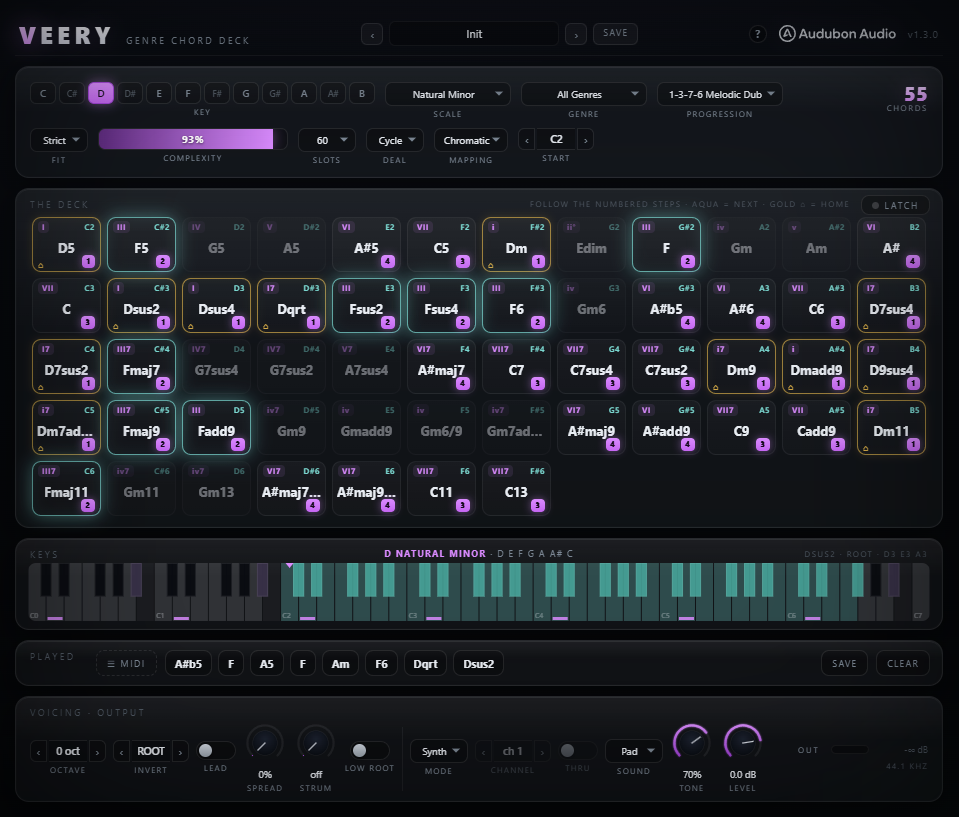
A chord-playing instrument. Pick a key, a scale, and a genre — the deck fills with every chord that fits, your parameters shrink it to a playable set, and the survivors are dealt onto your keyboard. Every key you press fires a full chord through the built-in 64-voice synth, out as MIDI, or both.
Veery is the Audubon family's first instrument. It receives MIDI and plays full chords. Choose KEY, SCALE, and GENRE, and the Harmony Engine assembles every chord that belongs — then your Complexity, Slots, and Fit controls trim that pool to a hand you can actually play. The survivors are dealt one-per-key from a START note, so a single finger triggers a complete, in-key voicing. No music theory required to sound like a record.
A Cthulhu-style chord player: one key, one full chord — always in key, always in genre.
Under the hood sits the Raven Harmony Engine's salvaged library — a 50-chord dictionary, 38 scales with real interval and degree data, and 33 genre chord-sets plus an unfiltered All Genres mode. For every combination the engine deals a fresh deck onto your keyboard: press a mapped key (or click an on-screen pad) and Veery plays that chord through its polysynth, streams it to your DAW as MIDI, or does both at once. Voicing, strumming, and a guidance layer turn the deck into a playable, theory-aware sketchpad.
The engine is pure music theory — no audio yet. On any change to KEY, SCALE, GENRE, FIT, COMPLEXITY, SLOTS, DEAL, MAPPING, or START it rebuilds the whole deck on the message thread and hands the audio thread a fresh snapshot. Every emitted chord is guaranteed to fit the scale you chose.
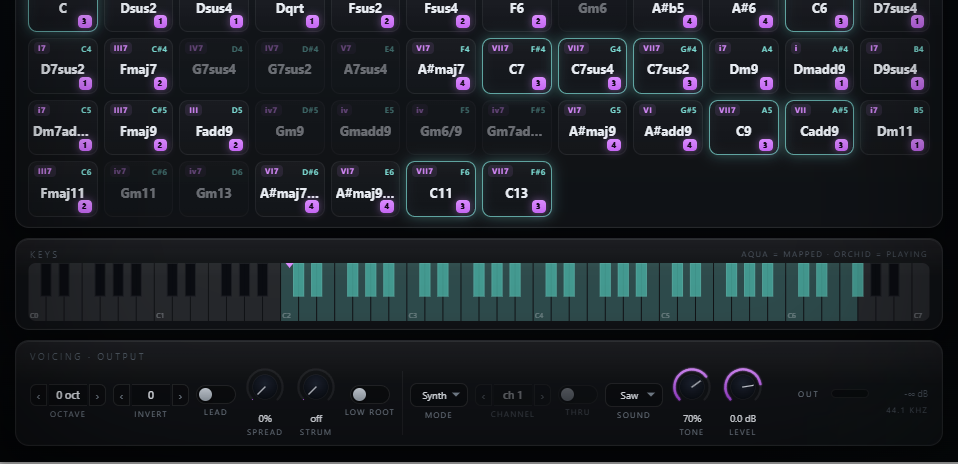
For every scale degree crossed with every chord in the 50-chord dictionary, the engine runs a fit test. Strict keeps only chords where every tone lands in the scale. Borrow allows the root in-scale plus at most one colour tone outside it — that's how brostep and flamenco reach a 7#9 or 7b9 without leaving the key behind.
Each of the 33 genres carries a characteristic set of chord symbols. Pick Neo Soul and the deck fills with maj9, m11, 7#9 colour; pick UK Drill and it collapses to sparse minor triads and add9s. All Genres applies no filter. A built-in fallback guarantees the deck is never empty for any key / scale / genre combination.
Every chord has a rank — power chords at 0, triads at 1, up through 11ths and altered dominants at 5. The COMPLEXITY knob sets the highest rank admitted, and it's monotone: turning it up only ever adds chords. SLOTS then caps the deck to 12, 24, 36, 48, or 60 keys, keeping the strongest survivors — anything past the cap moves onto the next bank, paged with the ‹ › arrows above the deck, so nothing is ever thrown away.
DEAL orders the survivors — Cycle round-robins the degrees at rising complexity so adjacent keys walk the scale, Stack groups every chord of degree I, then ii (classic Cthulhu style). MAPPING then lays them onto keys from START: Chromatic uses every semitone, White Keys uses white keys only so you never hit a blank pad.
Voicing is applied at trigger time, not baked into the deck — so you can reshape how chords sound without rebuilding a thing. Incoming velocity carries to every note of the chord.
OCTAVE (−2..+2) transposes the whole chord. INVERT (−3..+3) rotates chord tones — positive lifts the lowest notes up an octave. LOW ROOT drops the chord's root an octave below everything else for an 808-friendly foundation. Together they place a chord exactly where it sits best in the arrangement.
SPREAD (0–100%) opens the voicing deterministically — it progressively lifts the second-from-top, then fourth-from-top tones up an octave, a drop-2 then drop-2&4 style. At 0% the chord is close and compact; higher settings give a wide, pianistic open voicing without changing which notes are played.
STRUM (0–60 ms) staggers chord onsets low-to-high through a sample-accurate scheduler — events can land in later processing blocks for a natural, guitar-like roll. Release is never strummed, so chords cut cleanly. At 0 ms every note fires together as a block.
The LATCH pill on the deck turns a tap into a toggle: press a pad or key once and the chord sustains, press again to release. Hold a chord hands-free while you reach for SOUND, TONE or INVERT, or just sit on it and read the glow — built for sustained-pad genres and for anyone working mouse-only. Gliding across the keyboard strip and dragging a pad out as MIDI both stay momentary on purpose, so an export gesture never leaves a chord stuck on.
The guidance layer only marks pads — it never plays, orders, or writes notes for you. Someone with no theory training can stumble into progressions that sound like records; a trained player gets a fast, theory-aware sketchpad. Changing a guide never rebuilds the deck.
The PROG selector holds 14 classic degree patterns — Pop Axis 1-5-6-4, Lament 6-4-1-5, Doo-Wop 1-6-4-5, 2-5-1 Jazz, House Vamp, Synthwave 6-5-4-5, EDM Anthem 1-6-3-7, Trap Lift, Epic Minor, Andalusian and more. They're positional, so they read correctly in any key, scale, or genre. Member pads wear a step badge; every other pad dims but stays playable.
After each chord you play, the pads that "sound right next" breathe aqua. With a progression active they're the next step(s) in the loop, wrapping at the end — just follow the breadcrumbs. With no guide, a functional-harmony flow table lights the tasteful successors (I → IV V vi ii, V → I vi IV, and so on) for free-roaming with taste. Running underneath both is the gold ⌂ home pad — a permanent landmark on the tonic that never dims, and pulses when the chord you just played is pulling back to it, so you always know where a phrase can land.
Turn on VOICE LEAD and, at trigger time, the engine auditions every inversion and keeps the one whose centre of pitch lands closest to the chord you played before — consecutive chords stop leaping octaves and start sounding like a real player. Manual INVERT is ignored (and greyed) while it's on; the first chord after silence uses the plain voicing.
MODE routes every triggered chord to the built-in synth, straight out as MIDI, or both at once. It defaults to Synth so Veery makes sound the moment you load it — no routing required.

A gate-based polysynth with 64 voices and six sounds — Saw, Piano, Pad, Pluck, Sub, and Strings — each rebuilt from the Raven recipes with its own ADSR and a one-pole low-pass whose cutoff follows the TONE knob. Saw, Pad, and Strings get a subtle dual-oscillator detune. Fixed per-voice gain with a soft-clip guard means no pumping as chords stack. Sustain pedal (CC64) is held.
In MIDI Out or Both mode, chord notes are emitted on the chosen CHANNEL (1–16). Note-offs are reference-counted per pitch, so two held keys sharing a note never cut each other off. CCs, pitch bend, and aftertouch pass through. THRU optionally lets unmapped incoming notes pass instead of being dropped.
The on-screen pads and the mini piano strip inject presses through the exact same lock-free path as hardware MIDI — so clicking a pad also drives the MIDI output. Rebuild the deck, change channel, or reset transport while notes are held and Veery fast-releases its voices and flushes matching note-offs, so nothing hangs.
New in v1.2 — every chord you trigger is remembered, named, and one drag away from living in your project. No recording pass, no piano-roll transcription: the exact voicing that sounded is the file you drop.
Press a pad and it plays; drag off the pad and it exports. The chord leaves as a standard .mid any DAW accepts — voiced exactly as it would sound right now (Octave, Invert or Voice Lead's pick, Spread, Low Root), one 4/4 bar at your session tempo, with your STRUM roll baked into the note timing.
Every chord you actually trigger lands in the PLAYED lane as a chip — consecutive repeats collapse, so a jam reads back as a progression. Hold a chip to audition the exact voicing that was recorded; drag it out for that one chord, or grab the ☰ MIDI grip to drag the whole lane as one progression, one chord per bar at host tempo. SAVE writes the same file through a dialog; CLEAR starts a new take.
The keys panel reads out what just sounded — symbol, the inversion that was actually applied (including Voice Lead's auto pick), and the exact pitches. The keyboard tints every in-scale key, marks the roots, and brightens the precise notes sounding right now — spin INVERT while holding a pad and watch the notes physically walk. The spell line writes your key out in full (C Natural Major · C D E F G A B), and INVERT reads ROOT / 1ST / 2ND / 3RD, the way players say it.
Twenty-four parameters across the deck, voicing, guidance, and output. Everything the engine reads is here — nothing is computed in the UI; the C++ engine is the single source of truth.
The root of the scale. Twelve choices, one per pitch class. Sets the tonal centre the whole deck is built around.
From Major and the seven modes through Harmonic/Melodic Minor, pentatonics, Blues, the diminished and whole-tone families, exotic and world scales, out to Bebop. Every deck chord fits the chosen scale.
Filters the deck to a style's characteristic chord vocabulary. All Genres applies no filter and shows every fitting chord.
Strict: every chord tone in the scale. Borrow: root in-scale plus at most one colour tone outside, unlocking altered dominants and idiomatic tension.
Sets the highest chord rank admitted, from dyads and triads up to 11ths, 13ths, and altered chords. Monotone — raising it only ever adds chords to the deck.
Caps how many chords are dealt onto keys. Fewer slots = a tight, focused hand; more slots = a wider palette across the keyboard.
When more chords survive the filters than Slots allows, the overflow is paged into banks. Step through them with the ‹ › arrows above the deck; the bar hides itself when everything fits on one page.
Cycle round-robins degrees at rising complexity so adjacent keys walk the scale. Stack groups all chords per degree — the classic Cthulhu layout.
Chromatic deals onto every semitone. White Keys deals onto white keys only, so you can play without ever hitting an unmapped pad.
The lowest MIDI note the deck is dealt from. Keys above 127 are dropped. Move it to place the deck where your controller or clips live.
Overlays a positional degree pattern as pad badges and drives the good-next glow. Display-only — never rebuilds the deck or writes notes.
Transposes the whole triggered chord by whole octaves.
Rotates chord tones; positive values lift the lowest notes up an octave. Ignored (and greyed) while Voice Lead is on.
Auto-picks the inversion whose centroid sits closest to the previous chord, for smooth, player-like voice motion.
Deterministic open voicing — progressively lifts inner tones an octave for a drop-2, then drop-2&4 style.
Adds the chord's root an octave below the voicing — an 808-friendly bass anchor.
Sample-accurate low-to-high onset stagger. Release is never strummed. 0 ms fires the whole chord as a block.
Turns a tap into a toggle — a pad or key press sustains the chord until you press it again. Keyboard-strip glides and drag-to-export gestures stay momentary so they never leave a chord stuck on.
Routes triggered chords to the internal synth, out as MIDI, or both simultaneously.
The channel chord notes are emitted on in MIDI Out and Both modes.
When on, unmapped incoming notes pass through instead of being dropped.
Chooses the synth voice: Saw, Piano, Pad, Pluck, Sub, or Strings — each with its own envelope and character.
Scales the one-pole low-pass cutoff on every voice — darker to brighter across all six sounds.
Output level of the internal synth. MIDI output is unaffected.
The salvaged Raven Harmony Engine library, verified against the shipping code. Every genre carries its own characteristic chord vocabulary; every scale carries real interval and degree data the fit test reads directly.
Neo Soul · Lo-Fi Hip Hop · Jazz / Fusion · Gospel · Soul / Funk · Modern R&B · Dark Trap · Bossa Nova · Melodic Techno · Deep House · Progressive House · Tech House · Future Bass · Trance · Ambient · Drum & Bass · Liquid DnB · Afro House · Hyperpop · Brostep / Riddim · Melodic Dubstep · UK Bassline · UK Garage · Salsa / Son · Flamenco · Samba · Reggaeton · UK Drill · Synthwave · Acid House · Downtempo · Psytrance · Amapiano — plus All Genres for no filter.
From power chords and triads through sus, 6ths, quartal/quintal, the full seventh family, extended 9/11/13 voicings, and altered dominants (7b9, 7#9, 7b5, 7#5, 7#11, 7b13) out to specialist colours like maj9#11, m6/9, m7add11, and dimMaj7 — each placed into the genre sets where it's idiomatic.
Major · Natural Minor · Dorian · Phrygian · Lydian · Mixolydian · Locrian · Harmonic & Melodic Minor · Pentatonic Major/Minor · Blues · Whole Tone · Diminished · Lydian & Phrygian Dominant · Super Locrian · Lydian Aug · Dorian ♭2 · Half-Whole & Whole-Half Dim · Harmonic Major · Hungarian Minor · Double Harmonic · Hirajoshi · Iwato · In · Insen · Yo · Persian · Enigmatic · Prometheus · Tritone · Neapolitan Major/Minor · Spanish Phrygian · Bebop Major/Dominant — plus All Notes, the full chromatic: every chord in the dictionary becomes reachable, with flat-based numerals on the pads.
Pop Axis 1-5-6-4 · Lament 6-4-1-5 · Doo-Wop 1-6-4-5 · Anthem 4-5-1-6 · Jazz 2-5-1 · Rock & Rap 1-4-5 · House Vamp 1-4 · Synthwave 6-5-4-5 · EDM Anthem 1-6-3-7 · Festival 1-7-6-7 · Trap Lift 1-6-7 · Epic Minor 1-4-6-5 · Melodic Dub 1-3-7-6 · Andalusian 1-7-6-5.
Most presets ship with a matching progression guide and Voice Lead pre-armed, so the very first pad you click already steers you toward a musical next move.
Neutral starting point — Natural Minor, All Genres, default deck. A blank slate to build your own key/scale/genre combination.
Lush m9 pad territory with a Melodic Dub guide — the plugin's namesake twilight sound. Wide, songwriterly, and immediately in-key.
Neo-soul extended voicings over a 2-5-1 guide. Rich sevenths and ninths that sit under vocals or Rhodes.
Sparse, aggressive minor and altered colour with a Trap Lift guide. Built for heavy, tension-forward drops.
Warm maj7/m9 house vocabulary over a House Vamp two-chord shuttle. Endlessly loopable.
Big, bright mainstage motion on an EDM Anthem 1-6-3-7 guide. Made for supersaw stacks and festival leads.
Dusty maj7/m7 lo-fi hip-hop colour on a 2-5-1 guide. Instant boom-bap chord beds.
Bright add9/sus supersaw stacks dealt in Stack order over a Pop Axis guide. The signature future-bass chord move.
Minimal minor triads and add9s with an Andalusian cadence guide. Dark, spacious UK-drill harmony.
Open sus, quartal, and add9 textures with no rigid guide — free-roam with the functional-harmony glow. Endless pad beds.
Bright major triads and add9s on a Doo-Wop 1-6-4-5 guide. Nostalgic, radio-ready pop motion.
Retrowave triads and sus colours over a 6-5-4-5 loop. Neon, driving, unmistakably 80s.
Smooth m9/maj9 liquid DnB voicings on a Melodic Dub guide. Rolling, emotive, dancefloor-ready.
.lic file onto the activation window. Activation is stored on the machine, so it only happens the first time. Your download and serial stay accessible in your Members Area. Full steps are in the User Guide.