Audubon · Plugins
STR-001  ·  Released v1.1
Starling full plugin UI
NEW · VST3 PLUGIN EST. 2026 · AUDUBON AUDIO
Vowel / Formant Morph Filter

Starling.
The bass that talks back.

Four bandpass filters tuned to measured F1–F4 vocal formants, morphing through A E I O U in Bass, Tenor, Alto, or Soprano voice. Drive tanh to give the filters something to carve, then let the LFO, envelope follower, or Morph knob do the talking — synced to tempo, reactive to dynamics, or both at once.

Under development · v1.1.0
$19
Format
VST3 Fx · Win 64 · macOS Universal
Voices
4 Bass · Tenor · Alto · Soprano
Formants
F1–F4 per vowel, measured
Morph Sources
3 Knob · LFO · Envelope
License
Royalty-free commercial OK
01 — Overview

Vowel talk. On every note.

A sub bass has almost no energy at the 600–3000 Hz range where vowels live. The tanh Drive stage manufactures the harmonic series the formant bank then carves into shape — the same technique a voice uses, built from the same acoustic measurements. The result is a talking, singing, morphing bass that doesn't just sound processed, it sounds alive.

VST3 Formant Filter Talking Bass Tempo Sync Auto-Wah

Three independent morph sources add together: the Morph knob anchors the vowel position, the LFO scans a 64-point drawable path (tempo-synced or free), and a bipolar envelope follower pushes the vowel on every dynamics hit. Stack all three, or use just the one you need.

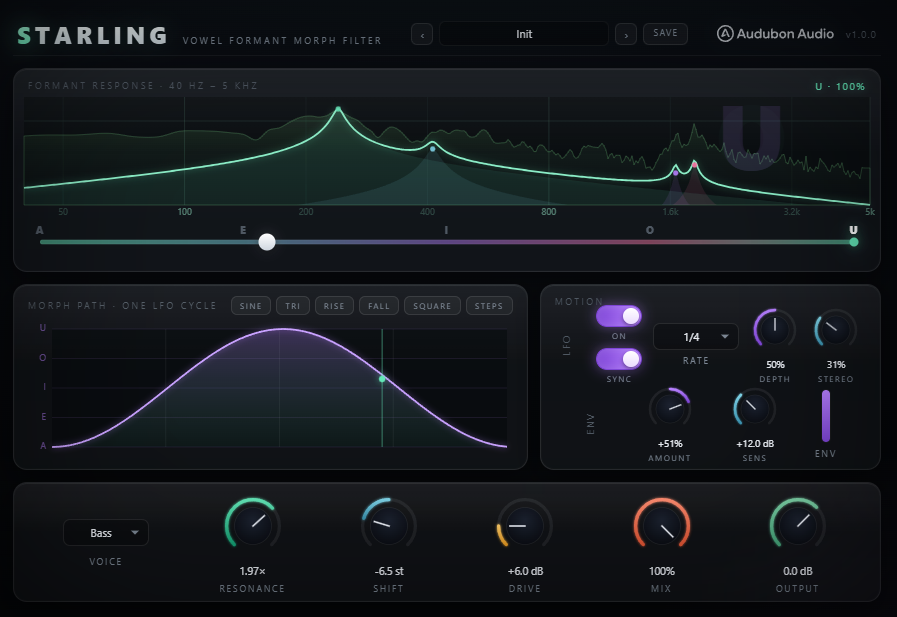
The hero panel shows the interpolated formant response curve in real time — every morph source moves the peaks live as you turn knobs. The A–E–I–O–U morph strip underneath tracks the LFO position as it plays. The drawn morph path is saved with your session and with every preset.

Starling full plugin UI
Plugin · full interface
02 — The Engine

Four filters. Tuned to measured vowel science.

Each vowel is defined by four resonant bandpass filters (F1–F4), each with a centre frequency, relative level (dB), and bandwidth drawn from classic sung-voice acoustic measurements — the same tables every formant synthesizer since CSound has shipped.

Starling live formant response and spectrum display
🎵
Measured Voice Tables

F1–F4 formant data for Bass, Tenor, Alto, and Soprano voices across all five vowels — the acoustic foundation of every sung word, applied to your bass.

Geometric Interpolation

Frequencies interpolate geometrically (in cents, not Hz), so a constant morph sweep sounds like a constant number of semitones per second — the way a real mouth moves between vowels.

tanh Drive → Filter Bank

Input is soft-clipped by a tanh stage before the filters, generating the harmonic series the vowel bank then carves. The dry path stays untouched for the Mix blend.

👁
Live Formant Response

The hero panel draws the interpolated filter response for the current vowel position in real time, with a spectrum analyser underneath — every morph source updates it instantly.

03 — Four Voices

Four voices. Five vowels each.

The Voice control selects which measured formant table is used. Each voice has a distinct resonant register — Bass sits lowest, Soprano highest. The Morph position glides through A E I O U within whichever voice you pick, and all three morph sources operate in that voice's register.

1
Bass

The deepest voice table — lowest formant centres, widest bandwidths. F1 sits around 250–600 Hz. The most recognisable "talking bass" vowel character, the default for dubstep and DnB.
VoiceDefault
2
Tenor

Slightly higher formant positions than Bass — more midrange presence without the brightness of the female voices. Works well on tighter synth basses where Bass sounds too dark.

VoiceMid-range
3
Alto

Higher formant centres and wider bandwidths than Tenor — a broader, more diffuse vowel shape. Suits full-mix use or when the vowel needs to blend rather than cut through.

VoiceBroad
4
Soprano

The highest formant positions — sharp, nasal vowel articulation. F2 can exceed 2000 Hz, giving a bright, piercing talking quality that cuts through dense mixes.
VoiceBright
04 — LFO & Drawable Path

Draw the wobble. Lock it to the grid.

Starling drawable morph path editor
A — 64-Point Drawable Path
The LFO Shape Is the Path You Draw

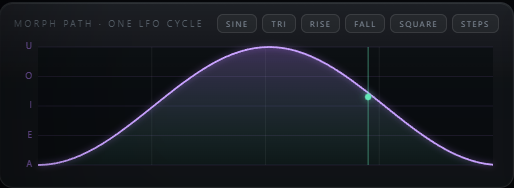
Freehand-draw any morph curve in the path editor. Six shape chips stamp common forms instantly: sine, triangle, ramp up, ramp down, square, and vowel steps (A→E→I→O→U as a staircase that snaps to each vowel position). The path is saved with the session and with user presets.

B — 12 Tempo-Sync Rates
4/1 Down to 1/32, Plus Dotted & Triplet

Full division table: 4/1, 2/1, 1/1, 1/2, 1/4, 1/8, 1/16, 1/32, 1/4., 1/8., 1/4T, 1/8T. Locks to the host's PPQ position when the transport rolls — restart-safe and deterministic. Freewheels at session tempo when the transport is stopped.

C — Depth & Stereo
How Much the Path Takes Over; How Wide It Spreads

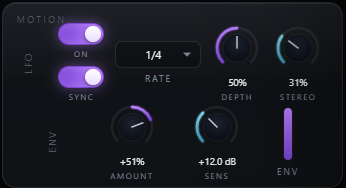
Depth (0–100%) crossfades the Morph knob toward the LFO path — at 0%, only the knob controls the vowel; at 100%, the path takes over entirely. Stereo offsets the right channel's path phase: 100% = half a cycle, so left says one vowel while right says another.
05 — Envelope Follower

The bass plays. The vowel reacts.

Starling LFO and envelope follower controls
A — Bipolar Amount ±100%
Hits Push the Vowel Either Way

Positive amount pushes the vowel toward U on peaks; negative pushes toward A. Zero is fully inactive with no signal touching the morph position. Layer the envelope against the LFO for a vowel that's reactive to dynamics as well as time.

B — 8 ms / 150 ms Ballistics
Fast Enough for a Note, Slow Enough Not to Flutter

Stereo-linked peak detector with fixed 8 ms attack and 150 ms release — quick enough to catch a note attack, slow enough to ignore individual waveform cycles at bass rates. The result sounds like playing, not like buzzing.

C — Sensitivity 0–36 dB
Drive the Detector from Any Level

Sensitivity pre-gains the signal going into the detector so a quiet synth patch can drive the envelope as fully as a loud one — a 36 dB range covering the full studio headroom spread.

06 — Global Controls

Tone, shape, and output — all on one panel.

Drive and Resonance shape the character of the formant peaks. Formant Shift moves all four centres together. Mix and Output finish the blend and level.

Starling full control layout
Morph
0 → 100 %

Vowel position along A→E→I→O→U. LFO and envelope amounts add to this anchor; at 0% and LFO off, the vowel is locked at A.

Drive
0 → 36 dB

Pre-gain into the tanh stage, which generates harmonics for the filter bank to carve. Default 6 dB — raise it to hear the vowels deepen and saturate.

Resonance
0.25× → 4.0×

Multiplies each formant's natural Q. Below 1× = wider and wetter; above 1× = narrower and more nasal. The vowel character is preserved; only the sharpness changes.

Formant Shift
±12 semitones

Moves all four formant centres together in semitones, constant-Q (bandwidths scale with frequency). Simulate a smaller head or a larger resonant body without changing the vowel identity.

Mix
0 → 100 %

Dry/wet blend, default 100% (fully wet). Reduce for a subtler vowel colouration blended behind the original sound.

Output
−24 → +12 dB

Final trim. The filter bank applies a fixed +6 dB wet makeup before the Mix blend; use Output to match loudness against bypass.

07 — Factory Presets

Eight starting points. Your edits save too.

Each preset is a complete configuration — voice, morph path shape, LFO rate, Drive, Resonance, and envelope amount — saved together. User presets also store the drawn path, so a custom wobble shape you work out for a track is never lost.

1
Init

Sine-sweep LFO, Bass voice, LFO on at 1/4 sync, 50% depth. The clean zero-point for building any talking-bass patch from scratch.

PathSine
2
Yoi Yoi

Square path snapping between E and O in eighth notes, 60% depth, Resonance 1.8× — the classic "yoi yoi" vowel stutter. Morph anchors at 60% so the snap stays between E and O.

PathSquare
3
Talking Sub

Ramp-down path (U→A sweep) every beat. Heavy Drive at 14 dB, −3 st Formant Shift, 25% envelope amount — the "wow" that reacts to dynamics as well as time.

PathRamp Down
4
Wah Wobble

Slow full-sweep wah, half-bar (1/2) sync rate, Resonance 2.2× — exaggerated narrow peaks for a classic wah-wah character.

PathSine
5
Robot Steps

Vowel-staircase path on a Tenor voice, every bar: A→E→I→O→U in five even steps. Resonance 2.6×, Drive 12 dB — mechanical, precise, and in-your-face.

PathVowel Steps
6
Auto Wah Talk

LFO off. Envelope amount 80%, Sensitivity 18 dB, Resonance 1.8× — every note hit pushes the vowel, purely reactive to playing dynamics. Classic auto-wah behaviour.

SourceEnvelope
7
Vowel Air

Slow free-running LFO at 0.28 Hz (unsynced), 35% depth, 45% Mix, Resonance 0.8×. A barely-there drifting vowel colour that sits behind the sound rather than leading it.

SourceFree LFO
8
Formant Freeze

LFO off, Morph at 25% (between A and E), Resonance 1.6×. Static talk-box colouration with no movement. Automate the Morph knob manually for a dramatic vowel sweep at a drop.

SourceManual
08 — Workflow

From insert to talking bass, in six steps.

Starling full plugin UI Starling A-E-I-O-U morph strip
01
Insert Starling on a bass or synth track. Raise Drive to 10–15 dB — the tanh stage manufactures the harmonics the filter bank needs. At default, Mix is 100% wet so you hear the vowel immediately.
02
Pick a Voice — Bass for the deepest talking character, Tenor for more midrange presence, Alto for a broader vowel, Soprano for a bright piercing edge. Watch the response display shift as you change voices.
03
Set the LFO Sync Rate to match your track — 1/4 for a quarter-note wah, 1/8 for eighth-note stutters, 1/4T for a triplet feel. Or draw a custom path in the path editor for a unique shape.
04
Add envelope follower amount (positive value) to make every note hit push the vowel — the auto-wah effect that reacts to dynamics rather than just time. Raise Sensitivity if the detector isn't catching quiet passages.
05
Adjust Resonance. Above 2× is narrow and nasal — very in-your-face. Below 1× is wide and smooth, a subtler colouration. Formant Shift moves the whole register up or down in semitones.
06
Mix back in some dry signal if the full vowel is too much, and trim Output to level-match against your bypassed signal. Try Stereo above 50% for a talking bass that moves across the field.
09 — Specifications

Everything, on one page.

Format
VST3
Category
Fx · Filter
Platform
Windows 10 / 11 · macOS 10.13+ (Universal — Apple Silicon & Intel) · 64-bit
Version
1.1.0
Voice
Bass · Tenor · Alto · Soprano (selectable)
Vowels
A E I O U — 5 positions per voice
Filter bank
4 parallel TPT-SVF bandpass filters (F1–F4), smoothed at sub-block cadence
Morph
0 – 100% (A→U); Morph knob + LFO depth + envelope amount sum to final position
LFO rates
Free 0.02–20 Hz; synced: 4/1, 2/1, 1/1, 1/2, 1/4, 1/8, 1/16, 1/32, 1/4., 1/8., 1/4T, 1/8T
Morph path
64-point drawable; shape chips: sine, triangle, ramp ↑, ramp ↓, square, vowel steps
LFO Depth
0 – 100% crossfade from Morph knob to drawn path
Stereo
0 – 100% R-channel path phase offset (100% = half cycle)
Envelope
Bipolar ±100%, stereo-linked peak, 8 ms attack / 150 ms release; Sensitivity 0–36 dB
Drive
0 – 36 dB pre-gain into tanh shaper; default 6 dB
Resonance
0.25 – 4.0× formant Q multiplier; default 1.0×
Formant Shift
±12 semitones, constant-Q (bandwidths scale with centre frequency)
Mix / Output
0 – 100% dry/wet blend · −24 to +12 dB output trim
Latency
0 samples (no oversampling)
MIDI
Not required
State save
Full settings + drawn morph path saved with DAW project and with user presets
10 — Fine Print

Documentation.

DAW
Any VST3-compatible host — Ableton Live 11+, FL Studio 20+, Reaper, Cubase, Studio One, Bitwig, and others. VST3 only — Logic Pro and GarageBand load Audio Units, not VST3, so they are not supported.
Operating System
Windows 10 or 11 (64-bit) — the editor uses WebView2, which is built into Windows 11 and most current Windows 10 installs. macOS 10.13 High Sierra or later — one Universal build runs natively on both Apple Silicon and Intel Macs.
Format
VST3 effect. Insert on any mono or stereo channel — bass instruments, synths, or full busses where talking, morphing formant colour is wanted.
Latency
Zero samples — Starling has no oversampling and no lookahead; it never introduces latency regardless of host buffer settings.
Recommended Setup
Start with Bass voice, Drive 10–12 dB, LFO synced at 1/4, Depth 80%, Resonance 1.5×. Try Yoi Yoi or Talking Sub as jump-off presets.
Updates
Current release 1.1.0. Free updates for all future 1.x releases.
v1.1.0 — Update check, from the logo
The Audubon Audio wordmark in Starling’s header is now a button. Click it and Starling asks audubonaudio.com one question — which build is current — then shows that number beside the one you are running, with a link straight to the members area if there is something newer and a plain “you have the current version” if there is not. If it cannot reach us it says so rather than claiming you are up to date. This is the only moment Starling touches the internet, it happens only on that click, and nothing about you goes with it — no serial, no licence, no machine id, not even your version or operating system. The comparison happens on your own machine.
v1.0.0 — Initial Release
First public release. Four parallel TPT-SVF bandpass filters tuned to classic sung-voice F1–F4 formant measurements across Bass / Tenor / Alto / Soprano voices and five vowels (A E I O U). Geometric frequency interpolation, tanh drive stage, three morph sources (Morph knob, 64-point drawable LFO path at 12 tempo-sync rates, bipolar envelope follower), Formant Shift, Resonance, Stereo phase offset, Mix, Output. Eight factory presets.
Full User Guide
Step-by-step walkthrough of the formant bank, voice tables, the three morph sources, the drawable LFO path, and workflow recipes for dubstep, DnB, and trap talking bass.
Open User Guide →
Personal & Commercial Use
Use Starling in any project — music production, mixing, sound design, post-production, broadcast, and live performance. No royalties, no project restrictions.
Single User
One license per user. Install on the computers you personally own or operate.
Serial Activation
Your license includes a unique serial number tied to your email. Your serial and download are permanently accessible in your Members Area.
Free Updates
All 1.x updates are free. Your serial activates the current version and all future updates in the 1.x line.
No Redistribution
The plugin binaries may not be shared, resold, or redistributed. Each user must obtain their own license.
S
Starling Formant Filter · VST3
$19
