What Starling does: Starling is a formant morph filter for talking bass. It runs four parallel resonant bandpass filters (F1–F4) tuned to the measured vowel formants of A E I O U across four voices (Bass, Tenor, Alto, Soprano). A tanh Drive stage manufactures harmonics from the input — a sub bass has almost no energy in the 600–3000 Hz range where vowels live, so Drive gives the filters something to carve. Three modulation sources control the vowel position: the Morph knob sets an anchor, the LFO scans a drawable 64-point path (synced to tempo or free), and a bipolar envelope follower reacts to dynamics.
Interface Overview
1
The Formant Display & Morph Strip
The hero panel shows the interpolated formant response curve for the current vowel position — four peaks (F1–F4) whose heights and positions move as the vowel changes. A spectrum analyser sits underneath. The A–E–I–O–U strip below the display tracks the LFO playhead in real time.
Response Curve
Live display
Shows the combined frequency response of all four bandpass filters — updated every 32-sample sub-block as morph sources change.
Morph Strip
A E I O U
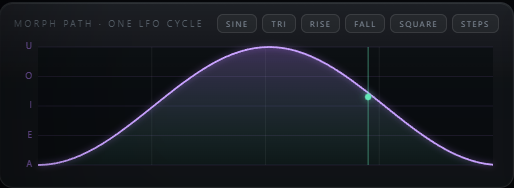
Visual playhead showing the current LFO position along the vowel sequence. The emerald dot moves with the LFO; the thumb shows the Morph knob anchor.

2
Voice & Morph
Voice selects which formant table is used. Morph sets the vowel anchor (A→U). The LFO adds motion around this anchor.
Voice
Bass / Tenor / Alto / Soprano
Selects the formant measurement table. Bass has the lowest centres; Soprano the highest and sharpest.
Morph
0 – 100%
Vowel anchor along A→E→I→O→U. At 0% (A) with LFO off, the vowel is locked. At 100% (U), it's locked at the darkest, most closed vowel.
Resonance
0.25 – 4.0×
Multiplies each formant's natural Q. Above 1× = narrower, more nasal; below 1× = wider, smoother.
Formant Shift
±12 semitones
Moves all four formant centres together, constant-Q. Positive = smaller head / brighter; negative = larger body / darker.

3
LFO & Drawable Morph Path
The LFO scans a 64-point drawable morph path. Depth controls how much the path takes over from the Morph knob. Six shape chips stamp common shapes.
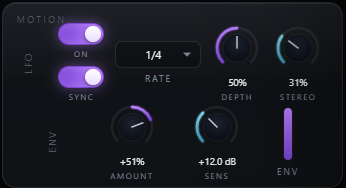
LFO On / Sync
On by default; synced by default
Toggle the LFO on/off and between synced-to-tempo and free-running modes. Synced mode locks to the host PPQ when the transport is playing.
Rate / Sync Rate
0.02 – 20 Hz / 4/1 … 1/8T
Free rate (Hz) or one of 12 sync divisions. Default: 1/4 synced — one full vowel sweep per beat.
Depth
0 – 100%
Crossfades from the Morph knob position toward the LFO path. At 0%, the LFO has no effect. At 100%, the path takes over entirely.
Stereo
0 – 100%
Offsets the right channel's LFO phase. 100% = half a cycle — left and right vowels are opposite, creating a wide talking movement across the field.
4
Envelope Follower
The envelope follower adds a dynamic, playing-responsive layer to the morph. Turn it on to make note hits push the vowel — the auto-wah trick where the sound reacts to how you play, not just the clock.
Env Amount
−100 to +100%
Positive pushes toward U on peaks; negative pushes toward A. Zero is fully inactive. Combine with LFO for layered motion.
Env Sensitivity
0 – 36 dB
Pre-gain to the detector. Increase if the detector isn't catching quiet passages; decrease if it's over-reacting to low-level noise.
5
Drive & Tone
Drive is the most important tone control. A sub bass has no energy at formant frequencies — Drive saturates the input with tanh to create the harmonics the filter bank carves into vowel shapes.
Drive
0 – 36 dB
Pre-gain into the tanh stage. Default 6 dB. Raise to 10–18 dB for a strong vowel character; above 24 dB adds a saturated, distorted edge.
Resonance
0.25 – 4.0×
The sharpness of the formant peaks. 1× = measured natural Q; 2× = nasal and narrow; 0.5× = broad and smooth.
Formant Shift
±12 semitones
Shifts all formants up or down in pitch without changing the vowel. +6 st sounds like a smaller, brighter voice; −6 st sounds larger and darker.

6
Mix & Output
The final blend and level controls.
Mix
0 – 100%
Dry/wet blend, default 100% wet. Reduce to blend the vowel colouration behind the original signal without losing the clean low end.
Output
−24 to +12 dB
Final trim. The filter bank has a +6 dB wet makeup before the blend — use Output to level-match against your bypassed signal.
Typical Workflow
A
Drive First, Then Choose a Voice
Insert Starling on a bass or synth track. Raise Drive to 10–15 dB — you'll hear the vowel snap into focus as harmonics appear. Then pick a Voice: Bass for deep dubstep character, Tenor for more presence, Soprano for something bright and cutting.
B
Lock the Wobble Rate
Set Sync Rate to match your track. For dubstep: 1/4 for a quarter-note wah, 1/8 for eighths, 1/4T for a triplet wobble. Watch the morph strip playhead — it shows exactly where in the vowel sequence the LFO is. Draw a custom morph path if you want a non-standard shape.
C
Add Envelope for Dynamics
Set Env Amount to +40–80% and raise Sensitivity until the envelope meter reacts to your note attacks. Now every note hit pushes the vowel position on top of the LFO — the vowel follows the music rather than just the clock.
D
Finesse with Resonance & Mix
Raise Resonance above 1.5× for a sharper, more nasal wah — or lower it below 1× for a broad, smooth colouration. Use Stereo (50–80%) on a stereo bass for a wide wobble that moves across the field. Blend back with Mix and trim Output to match bypass level.