Audubon · Plugins
SNP-001  ·  Released v1.1
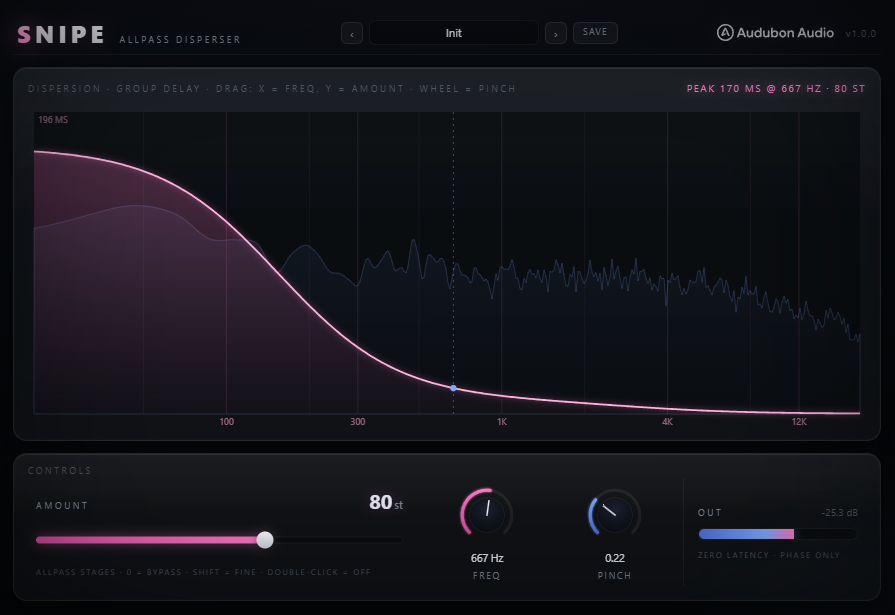
Snipe full plugin UI
NEW · VST3 PLUGIN EST. 2026 · AUDUBON AUDIO
Allpass Disperser

Snipe.
Bend phase, not magnitude.

A kHs-Disperser-style chain of up to 128 allpass stages rotates phase around a centre frequency without touching your EQ curve at all. The frequency-dependent group delay this creates is the sound of 808 zips, rounded kicks, and laser risers.

One-time · v1.1.0
$19
Free, full plugin. The output dips to silence every 30 seconds until you enter a serial — buying removes it, no reinstall needed.
Format
VST3 Fx · Win 64 · macOS Universal
Stages
0–128 continuous, clickless
Latency
Zero time-domain, deterministic
Signal
Bass-Safe mono-safe, phase-coherent
License
Royalty-free commercial OK
01 — Overview

An EQ changes level. This changes time.

An allpass disperser doesn't touch magnitude at all — every frequency passes through at the same level it came in at. What it does instead is delay different frequencies by different amounts, rotating phase around a centre frequency. That frequency-dependent group delay is what produces the classic dispersion "zip."

VST3 Allpass Disperser Zero Latency Bass-Safe Mono-Safe

Deterministic and phase-coherent by design — the same input always produces the same output, with no randomization and nothing that could cause phase cancellation across a stereo or mono sum.

Snipe was forked from an earlier random-phase spectral blur approach that turned out too muddy for bass work. This is the real allpass architecture instead — a time-domain chain of identical 2nd-order stages, exactly what dedicated hardware and software dispersers use.

Snipe full plugin UI
Plugin · full interface
02 — The Engine

Up to 128 identical stages, chained.

Each stage is a 2nd-order allpass filter tuned to the same centre frequency. Chaining more of them steepens the phase rotation around that centre — more stages, more dispersion.

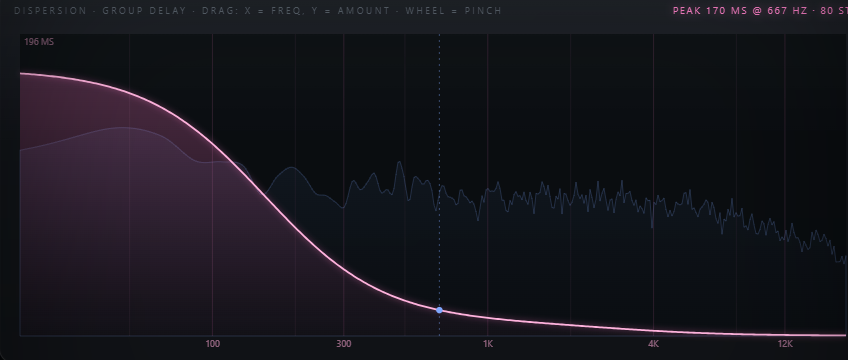
Snipe live group-delay response display
128 Allpass Stages

A kHs-Disperser-style chain of identical 2nd-order stages, all time-domain — the same architecture dedicated hardware/software dispersers use.

Group Delay, Not Gain

The live display shows the group-delay response over the spectrum — how much each frequency is time-shifted, not how loud it is.

Continuous, Clickless

Amount interpolates between stage counts smoothly rather than jumping in whole-stage steps, so automating it never clicks or zippers.

0
True Bypass at Zero

Amount at 0 stages is a true, bit-exact bypass — no dispersion filter is in the signal path at all.

03 — What It's For

One effect. A lot of sounds.

The same phase-rotation trick, tuned to different centre frequencies and stage counts, covers a surprising range of bass-music staples.

Zip
808 Zips

The classic dispersion sweep on a sub hit — a fast phase rotation that reads as a pitch-like zip without ever touching pitch or EQ.
Kick
Rounded Kicks

A gentler setting smooths a kick's transient shape by spreading its phase relationships, without changing its tonal balance.

Rise
Laser Risers

Automate Freq across a build for a swept dispersion effect that reads as movement, layered on top of whatever else is rising.

Safe
Bass-Safe by Design

Because magnitude is never touched, Snipe is safe to leave on a bass bus without worrying about tonal or mono-compatibility side effects.
04 — Amount

Zero to 128 stages, one drag.

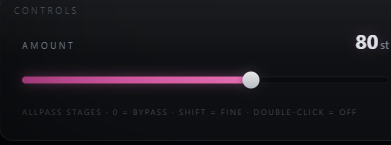
Snipe Amount control set to a high stage count
A — Stage Count
0 – 128, Continuous

Sets how many allpass stages are chained. Low values give a subtle phase nudge; high values give a dramatic sweep-like dispersion.

B — Zero Is Bypass
0 = True Bypass

At Amount 0, no filtering happens at all — the signal passes through completely untouched.

C — Drag the Display
Y-Axis on the Hero View

The hero display doubles as the control surface — drag vertically to set Amount directly on the group-delay curve you're watching.
05 — Freq & Pinch

Where it happens. How tight.

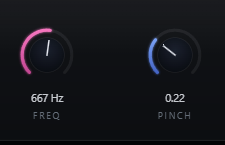
Snipe Freq and Pinch controls
A — Freq
20 Hz – 20 kHz Centre

The frequency around which phase rotates. Drag horizontally on the hero display, or use the Freq control directly.

B — Pinch
Per-Stage Q, 0.05 – 3

Narrows or widens each stage's effect around the centre frequency. Scroll the wheel on the hero display to adjust it without moving your cursor.

C — One Display, Three Controls
Drag, Wheel, Double-Click

X-axis drag sets Freq, Y-axis drag sets Amount, mouse wheel sets Pinch, and a double-click turns the whole effect off — the entire plugin lives in one interactive view.

06 — Global Controls

Three controls. That's the whole plugin.

Snipe is deliberately minimal — everything it does comes from these three parameters, all reachable from the one interactive display.

Snipe full control layout
Amount
0 → 128 stages

How many allpass stages are chained — the main intensity control. 0 is true bypass.

Freq
20 Hz → 20 kHz

The centre frequency phase rotates around.

Pinch
0.05 → 3

Per-stage Q — how narrow or wide the effect sits around Freq.

07 — Workflow

From insert to zip, in four moves.

Snipe full plugin UI Snipe dispersion curve on a peak
01
Insert Snipe on a sub, kick, or riser element — anywhere a phase-only effect could add movement.
02
Set Freq to the centre of the note or region you want to affect, watching the group-delay curve update live.
03
Drag Amount up on the display until you hear the zip or roundness you're after — small moves go a long way.
04
Scroll to adjust Pinch for a tighter or wider effect, then automate Freq or Amount for risers and sweeps.
08 — Specifications

Everything, on one page.

Format
VST3
Category
Fx · Phase / Dispersion
Platform
Windows 10 / 11 · macOS 10.13+ (Universal — Apple Silicon & Intel) · 64-bit
Version
1.1.0
Engine
Up to 128 identical 2nd-order allpass stages, time-domain
Amount
0 – 128 stages, continuous and clickless, 0 = true bypass
Freq
20 Hz – 20 kHz centre frequency
Pinch
0.05 – 3 per-stage Q
Interaction
Drag (Freq/Amount) · wheel (Pinch) · double-click (off) on the live display
Magnitude response
Untouched at every setting — allpass, not EQ
Behavior
Deterministic, phase-coherent, bass-safe, mono-safe
Latency
0 samples, always
State save
Full settings saved with DAW project
09 — Fine Print

Documentation.

DAW
Any VST3-compatible host — Ableton Live 11+, FL Studio 20+, Reaper, Cubase, Studio One, Bitwig, and others. VST3 only — Logic Pro and GarageBand load Audio Units, not VST3, so they are not supported.
Operating System
Windows 10 or 11 (64-bit) — the editor uses WebView2, which is built into Windows 11 and most current Windows 10 installs. macOS 10.13 High Sierra or later — one Universal build runs natively on both Apple Silicon and Intel Macs.
Format
VST3 effect. Insert on any mono or stereo channel where phase movement is wanted without touching tone.
Latency
Always zero — the allpass chain is entirely time-domain, no lookahead or oversampling involved.
Recommended Setup
Start with Freq around 120 Hz, Amount low, and Pinch near 0.7 (the default) for a classic sub zip, then push further to taste.
Updates
Current release 1.1.0. Free updates for all future 1.x releases.
v1.1.0 — Update check, from the logo
The Audubon Audio wordmark in Snipe’s header is now a button. Click it and Snipe asks audubonaudio.com one question — which build is current — then shows that number beside the one you are running, with a link straight to the members area if there is something newer and a plain “you have the current version” if there is not. If it cannot reach us it says so rather than claiming you are up to date. This is the only moment Snipe touches the internet, it happens only on that click, and nothing about you goes with it — no serial, no licence, no machine id, not even your version or operating system. The comparison happens on your own machine.
v1.1.0 — Flat magnitude at every Amount
Amount is continuous, and whenever it landed between two whole stages the part-engaged stage was blended in dry/wet instead of run through. Blending a signal with its own phase-rotated copy subtracts rather than rotates: at the centre frequency an allpass is exactly 180 degrees, so the blend collapsed to a dip sitting right on the Freq control — about 6 dB a quarter of the way between stages, and a complete null half way. Set Snipe on a sub and it was cancelling the fundamental itself. The partial stage is now a true allpass that ramps in by pole radius, so Amount moves group delay only and the magnitude stays flat at every setting. The cascade also runs its coefficients and filter state in double precision now: at 20–60 Hz the filter poles crowd the unit circle, where single precision was adding a noise floor of its own with 96% of it below 80 Hz.
v1.0.0 — Initial Release
First public release. Up to 128 time-domain 2nd-order allpass stages with continuous, clickless Amount, 20 Hz–20 kHz Freq, and 0.05–3 Pinch (per-stage Q), all controllable directly from the live group-delay display — zero latency, deterministic, bass-safe.
Full User Guide
Step-by-step walkthrough of the interactive display, Amount, Freq, Pinch, and workflow recipes for zips, rounded kicks, and risers.
Open User Guide →
Personal & Commercial Use
Use Snipe in any project — music production, mixing, sound design, post-production, broadcast, and live performance. No royalties, no project restrictions.
Single User
One license per user. Install on the computers you personally own or operate.
Serial Activation
Your license includes a unique serial number tied to your email. Your serial and download are permanently accessible in your Members Area.
Free Updates
All 1.x updates are free. Your serial activates the current version and all future updates in the 1.x line.
No Redistribution
The plugin binaries may not be shared, resold, or redistributed. Each user must obtain their own license.
S
Snipe Allpass Disperser · VST3
$19