Audubon ยท Plugins
SHR-001  ยท  Released v1.1
Shrike full plugin UI
NEW ยท VST3 PLUGIN EST. 2026 ยท AUDUBON AUDIO
Growl Engine ยท Self-FM Distortion

Shrike.
Make it growl.

A key-tracked self-FM growl engine feeding a resonant comb filter and a four-shape waveshaper. Bass that snarls in tune with what you play, not just distortion bolted onto it.

Under development ยท v1.1.0
$29
Format
VST3 Fx ยท Win 64 ยท macOS Universal
Engine
Self-FM + Comb + Shaper
Pitch Track
Auto ยท MIDI ยท Manual
Shapes
4 Smooth ยท Tube ยท Fold ยท Clip
License
Royalty-free commercial OK
01 โ€” Overview

Distortion that tracks your pitch.

Shrike feeds the input into a self-FM oscillator that follows the note you're playing โ€” automatically from the signal, from incoming MIDI, or locked to a manual frequency โ€” then runs the result through a resonant comb filter and a four-shape waveshaper. The growl moves with the music instead of sitting at a fixed pitch underneath it.

VST3 Self-FM Comb Filter Waveshaper Key Tracking

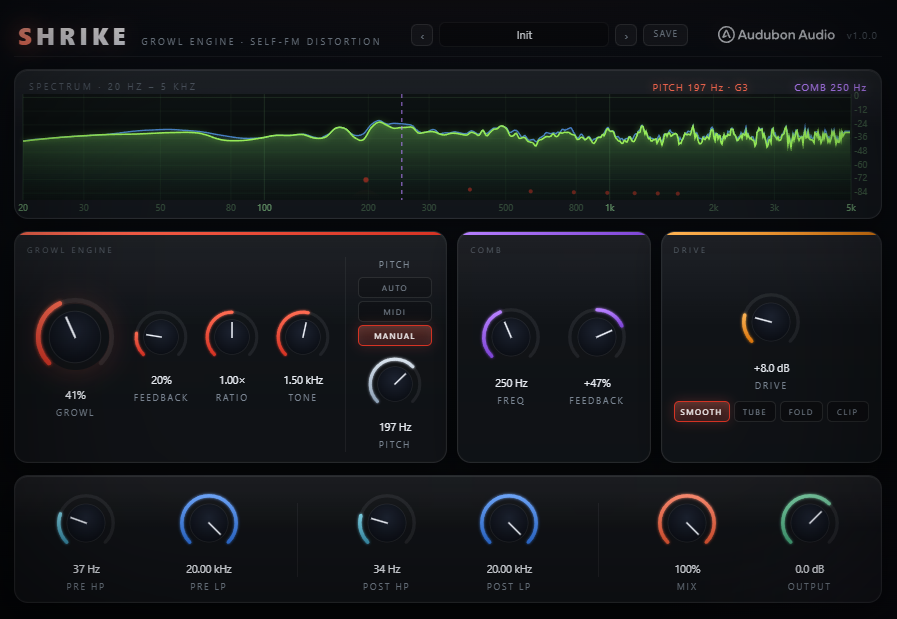
Three panels, left to right: the Growl Engine generates the self-FM character and tracks pitch; the Comb filter adds resonant, metallic edge; Drive and Shape push it into distortion. A live output spectrum and pitch readout sit across the top of the plugin.

Because the FM carrier tracks the input note, the growl's harmonic content shifts with your bassline instead of staying static โ€” low notes get a low growl, high notes get a higher one, just like a real snarling amp would react differently across the neck.

Shrike full plugin UI
Plugin ยท full interface
02 โ€” The Growl Engine

Self-FM, locked to the note.

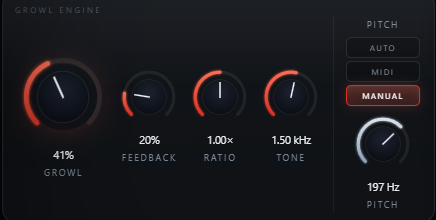
Growl sets how hard the self-FM modulator drives the signal; Feedback pushes the FM into rawer, less predictable territory. Ratio and Tone shape the modulator's relationship to the tracked pitch.

Shrike Growl Engine panel with Growl, Feedback, Ratio, Tone and Pitch knobs
โ—‰
Growl

The main macro โ€” how hard the self-FM modulator drives the input. Low for a subtle edge, high for a full snarl.

โ†ป
Feedback

Feeds the modulator back into itself for a rawer, less predictable growl the harder you push it.

โˆถ
Ratio

Sets the modulator frequency as a multiple of the tracked pitch โ€” 0.25ร— to 4ร— โ€” for inharmonic or harmonic growl character.

โ—
Tone

Colors the modulator itself, independent of the tracked pitch โ€” brighter or darker growl texture.

03 โ€” Pitch & Shape

Three ways to track. Four ways to clip.

Pitch Source decides what the self-FM modulator follows. Shape decides what the final waveshaper does to it.

A
Auto

Tracks pitch directly from the incoming audio signal โ€” no MIDI needed. The default, and the simplest way to get in-tune growl.
Pitch SourceAudio-tracked
M
MIDI

Tracks the note-on pitch from incoming MIDI instead โ€” useful when Shrike sits on a MIDI-driven bass or synth channel.

Pitch SourceMIDI-tracked
N
Manual

Locks the modulator to one fixed pitch (20โ€“500 Hz) regardless of what's playing โ€” a static growl character on purpose.

Pitch SourceFixed
S
Smooth

The gentlest of the four shapes โ€” rounds peaks without hard edges.

ShapeGentle
T
Tube

Warm, asymmetric saturation reminiscent of overdriven valve gain stages.

ShapeWarm
F/C
Fold & Clip

Fold wraps peaks back on themselves for a harsher, more complex spectrum; Clip is the hardest and most aggressive of the four.
ShapeAggressive
04 โ€” Comb Filter

Metallic edge, dialed to taste.

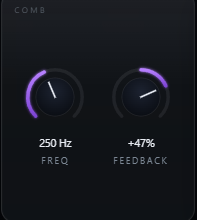
Shrike Comb filter panel with Freq and Feedback
A โ€” Freq
40 Hz โ€“ 4 kHz

Sets the comb's base frequency โ€” low for a growling resonant hum sitting under the note, higher for a thinner, more metallic character.

B โ€” Feedback
โˆ’95% to +95%

Positive feedback reinforces the comb's resonant peaks for a hollow, robotic edge; negative feedback thins it out differently. Zero is comb off.

C โ€” Placement
Between Engine and Drive

The comb sits after the growl engine and before the waveshaper, so its resonance gets distorted along with everything else โ€” not a separate effects tail.

05 โ€” Filtering

Shape it before and after.

Shrike Pre and Post filter knobs
A โ€” Pre HP / Pre LP
Shape What Hits the Growl

Filter the signal before it reaches the growl engine โ€” tighten up the low end going in, or tame harsh highs so the FM has less to chew on.

B โ€” Post HP / Post LP
Clean Up What Comes Out

Filter after the distortion stage to control the harmonics the growl and shaper generate โ€” keep sub weight clean, or roll off fizz on top.

C โ€” Mix & Output
Blend and Level-Match

Mix blends the processed growl against the dry input; Output trims the final level so A/B comparisons stay fair.

06 โ€” Global Controls

The controls that finish the sound.

Drive pushes into the waveshaper; the four filters bracket it; Mix and Output bring it back into the mix.

Shrike full control layout
Drive
0 โ†’ 36 dB

Gain into the waveshaper. Combine with Shape to move from a light edge to a fully clipped growl.

Pre HP / LP
20 Hz โ€“ 20 kHz

Bracket what reaches the growl engine and comb filter.

Post HP / LP
20 Hz โ€“ 20 kHz

Bracket what leaves the distortion stage before Mix.

Mix
0 โ†’ 100 %

Blends the processed signal against the dry input for parallel-style growl.

Output
โˆ’24 โ†’ 12 dB

Final trim after everything else, for level-matched A/B comparisons.

07 โ€” Workflow

From insert to snarl, in six moves.

Shrike full plugin UI Shrike Comb filter panel
01
Insert Shrike on a bass, synth, or vocal channel โ€” anywhere a pitch-tracked growl could add character.
02
Leave Pitch Source on Auto and raise Growl until the self-FM character is audible under the note.
03
Add Feedback in small amounts for a rawer edge, and try Ratio away from 1ร— for a more inharmonic growl.
04
Bring in the Comb filter โ€” start with Freq low and Feedback modest for a resonant hum under the note.
05
Push Drive and try each Shape โ€” Smooth or Tube for character, Fold or Clip for full aggression.
06
Trim Pre/Post filtering to keep the low end clean, then balance with Mix and match levels with Output.
08 โ€” Specifications

Everything, on one page.

Format
VST3
Category
Fx ยท Distortion
Platform
Windows 10 / 11 ยท macOS 10.13+ (Universal โ€” Apple Silicon & Intel) ยท 64-bit
Version
1.1.0
Engine
Key-tracked self-FM growl + resonant comb + 4-shape waveshaper
Growl / Feedback
0 โ€“ 100% each
Ratio
0.25ร— โ€“ 4ร— modulator-to-pitch ratio
Tone
100 Hz โ€“ 8 kHz modulator color
Pitch Source
Auto (audio-tracked) ยท MIDI ยท Manual (20โ€“500 Hz)
Comb Freq / Feedback
40 Hz โ€“ 4 kHz ยท โˆ’95% to +95%
Drive
0 โ€“ 36 dB into the waveshaper
Shape
Smooth ยท Tube ยท Fold ยท Clip
Pre / Post filters
HP + LP, 20 Hz โ€“ 20 kHz, both sides of the distortion stage
Mix / Output
0 โ€“ 100% dry/wet ยท โˆ’24 to +12 dB trim
Oversampling
4ร— internal, fixed
State save
Full settings saved with DAW project
09 โ€” Fine Print

Documentation.

DAW
Any VST3-compatible host โ€” Ableton Live 11+, FL Studio 20+, Reaper, Cubase, Studio One, Bitwig, and others. VST3 only โ€” Logic Pro and GarageBand load Audio Units, not VST3, so they are not supported.
Operating System
Windows 10 or 11 (64-bit) โ€” the editor uses WebView2, which is built into Windows 11 and most current Windows 10 installs. macOS 10.13 High Sierra or later โ€” one Universal build runs natively on both Apple Silicon and Intel Macs.
Format
VST3 effect. Accepts MIDI input for the MIDI pitch-tracking mode; Auto and Manual modes work without any MIDI connected.
CPU
Self-FM engine, comb filter, and waveshaper with fixed 4ร— oversampling โ€” light enough to run several instances per session.
Recommended Setup
Start with Pitch Source on Auto, Growl around 25%, Feedback low, Drive around 8 dB, Shape on Smooth. Then explore Comb and the other Shapes.
Updates
Current release 1.1.0. Free updates for all future 1.x releases.
v1.1.0 โ€” Update check, from the logo
The Audubon Audio wordmark in Shrike’s header is now a button. Click it and Shrike asks audubonaudio.com one question — which build is current — then shows that number beside the one you are running, with a link straight to the members area if there is something newer and a plain “you have the current version” if there is not. If it cannot reach us it says so rather than claiming you are up to date. This is the only moment Shrike touches the internet, it happens only on that click, and nothing about you goes with it — no serial, no licence, no machine id, not even your version or operating system. The comparison happens on your own machine.
v1.0.0 โ€” Initial Release
First public release. Key-tracked self-FM growl engine (Growl, Feedback, Ratio, Tone) with Auto/MIDI/Manual pitch tracking, resonant Comb filter, Drive into a 4-shape waveshaper (Smooth/Tube/Fold/Clip), Pre and Post HP/LP filtering, Mix, and Output, with fixed 4ร— oversampling.
Full User Guide
Step-by-step walkthrough of the Growl Engine, pitch tracking, Comb filter, Shape types, filtering, and workflow recipes for tuned growl and full-on distortion.
Open User Guide โ†’
Personal & Commercial Use
Use Shrike in any project โ€” music production, mixing, sound design, post-production, broadcast, and live performance. No royalties, no project restrictions.
Single User
One license per user. Install on the computers you personally own or operate.
Serial Activation
Your license includes a unique serial number tied to your email. Your serial and download are permanently accessible in your Members Area.
Free Updates
All 1.x updates are free. Your serial activates the current version and all future updates in the 1.x line.
No Redistribution
The plugin binaries may not be shared, resold, or redistributed. Each user must obtain their own license.
S
Shrike Growl Engine ยท VST3
$29