What Shrike does: Shrike runs the input through a self-FM oscillator that tracks pitch — automatically from the audio, from incoming MIDI, or locked to a manual frequency — then through a resonant comb filter and a four-shape waveshaper (Smooth, Tube, Fold, Clip). Because the modulator follows the note, the growl's character shifts with your playing instead of sitting at one fixed pitch.
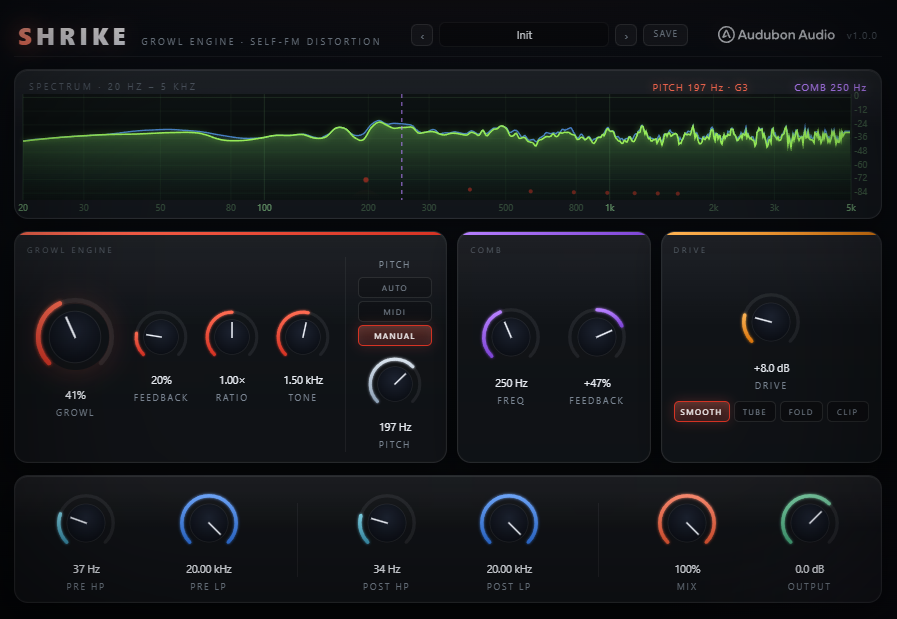
Interface Overview
1
Growl Engine Panel
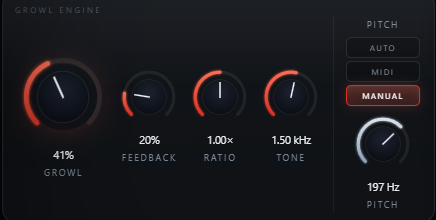
The red panel on the left is the core of the plugin — a self-FM modulator that tracks pitch and drives the growl.
Growl
0 – 100%
The main macro. How hard the self-FM modulator drives the input.
Feedback
0 – 100%
Feeds the modulator back into itself for a rawer, less predictable growl.
Ratio
0.25× – 4×
The modulator's frequency as a multiple of the tracked pitch.
Tone
100 Hz – 8 kHz
Colors the modulator itself, independent of the tracked pitch.
2
Pitch Source
Sets what the self-FM modulator tracks. Shown in the Growl Engine panel next to the main knobs.
Auto
Default
Tracks pitch directly from the incoming audio — no MIDI needed.
MIDI
Note-tracked
Tracks the note-on pitch from incoming MIDI — useful on MIDI-driven channels.
Manual
20 – 500 Hz
Locks the modulator to one fixed pitch, regardless of what's playing.
3
Comb Filter Panel
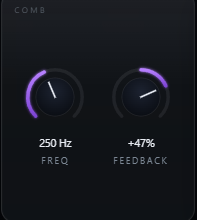
The violet panel adds resonant, metallic character between the growl engine and the distortion stage.
Freq
40 Hz – 4 kHz
The comb's base frequency. Low for a resonant hum under the note, higher for a thinner, metallic edge.
Feedback
−95% to +95%
Positive reinforces the comb's resonant peaks; negative thins it differently. Zero is comb off.
4
Drive & Shape
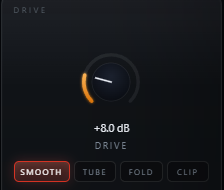
The amber panel pushes the signal into distortion, with four waveshaper characters to choose from.
Drive
0 – 36 dB
Gain into the waveshaper.
Shape
4 types
Smooth (gentle), Tube (warm, asymmetric), Fold (harsher, wraps peaks), Clip (hardest, most aggressive).
5
Filtering, Mix & Output
The bottom row brackets the distortion stage and finishes the sound.
Pre HP / Pre LP
20 Hz – 20 kHz
Filters what reaches the growl engine and comb filter.
Post HP / Post LP
20 Hz – 20 kHz
Filters what leaves the distortion stage before Mix.
Mix
0 – 100%
Blends the processed signal against the dry input.
Output
−24 to +12 dB
Final level trim for fair A/B comparisons.

Typical Workflow
A
Insert and Set the Growl
Insert Shrike on a bass, synth, or vocal channel. Leave Pitch Source on Auto and raise Growl until the self-FM character is audible under the note.
B
Push Feedback and Ratio
Add Feedback in small amounts for a rawer edge, and move Ratio away from 1× for a more inharmonic growl character.
C
Add Comb Resonance
Bring in the Comb filter — start with Freq low and Feedback modest for a resonant hum sitting under the note.
D
Push Drive and Balance the Mix
Push Drive and try each Shape — Smooth or Tube for character, Fold or Clip for full aggression. Trim Pre/Post filtering to keep the low end clean, then balance with Mix and match levels with Output.