Audubon · Plugins
SHW-001  ·  Released v1.1
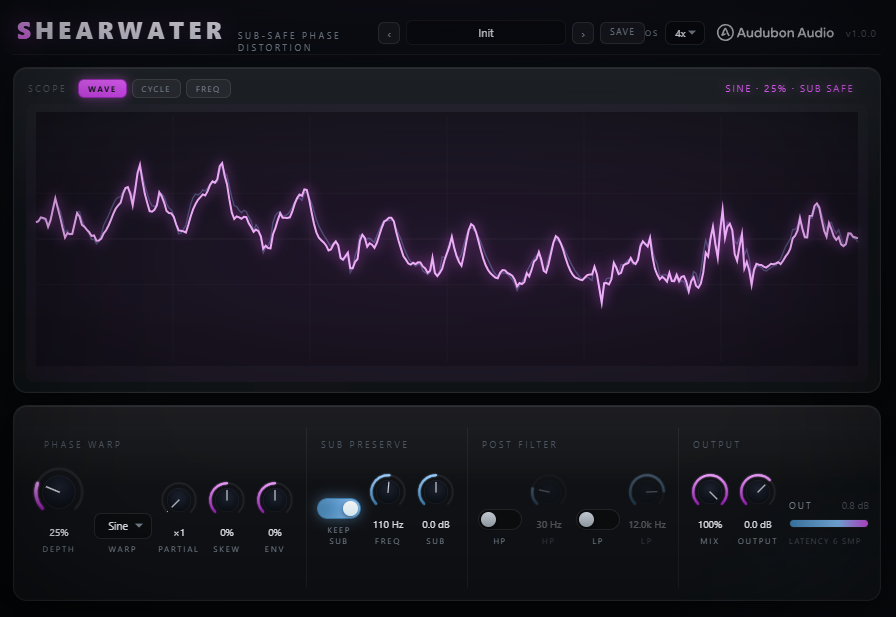
Shearwater full plugin UI
NEW · VST3 PLUGIN EST. 2026 · AUDUBON AUDIO
Sub-Safe Phase Distortion

Shearwater.
Bend the phase. Keep the sub.

Casio-CZ-style phase distortion on live audio — the growl tracks your pitch because the warp rides the signal's own phase. Low latency, four warp shapes, oversampled so it stays clean when pushed, and the same mix-safe sub preserve so the low end stays put while the tops snarl.

Under development · v1.1.0
$29
Format
VST3 Fx · Win 64 · macOS Universal
Warps
4 Sine to Hollow
Engine
Phase low latency
Pitch Track
Built-in no tracker
License
Royalty-free commercial OK
01 — Overview

Movement on top. Weight underneath.

Phase distortion warps a sound's timing, not its amplitude — so instead of clipping into fizz, it grows vowel-like formants and a growl that follows whatever note you play. Shearwater runs that engine on live audio and pairs it with the same mix-safe Sub Preserve, so the phase mangling never touches the mono low end a bass lives on.

VST3 Phase Distortion Pitch-Locked Sub-Safe 4 Warps

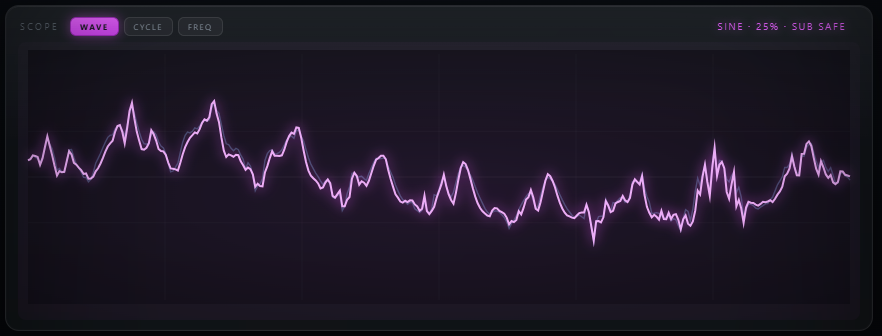
Three views tell you exactly what's happening: WAVE shows the clean signal against the warped output, CYCLE draws one carrier cycle with the phase-bend curve underneath, and FREQ shows the spectrum with the protected sub region shaded and the post-filter responses overlaid.

Because the warp is keyed to the signal's own instantaneous phase, every new harmonic lands exactly on a multiple of what you're playing — pitch-tracked growl with no pitch tracker to mistrack, and no latency. Turn on only what the track needs.

Shearwater plugin interface
Plugin · full interface
02 — The Engine

Bends the phase, not the amplitude.

The band is split into an analytic in-phase/quadrature pair, its instantaneous phase is warped by a bounded shape, and the signal is re-assembled as a single-sideband rotation. That's phase modulation on live audio — sidebands, not hard edges, so there's nothing to alias and nothing to oversample.

Shearwater WAVE view showing the clean signal against the phase-warped output
Pitch-Locked Harmonics

The warp rides the signal's own phase, so every harmonic it adds lands exactly on a multiple of your note — a tracking growl with no pitch tracker to chase or mistrack.

Anti-Aliased

Pushed hard, the phase rotation throws sidebands past Nyquist. So it's oversampled — but only the rotation, never the splitter, so the low-end quadrature stays intact. Low latency, no pre-ringing.

Carrier-Matched Mix

The dry and preserved-sub paths run the same carrier allpass as the warped band, so all three recombine phase-coherently — no comb filtering as you blend.

👁
The Picture Never Lies

The CYCLE view's JavaScript mirrors the actual DSP warp code exactly — the clean cosine against the phase-bent one is literally what's happening to the audio.

03 — Four Warps

Four shapes. Four ways to bend a cycle.

Each Warp is the periodic function that bends the phase — pick the character first, then set Depth for how far, Partial for how sharp, and Skew for the lean.

1
Sine

The smoothest bend — symmetric sidebands and a rounded, vowel-like growl. The classic CZ starting point.
WarpSmooth
2
Fold

A triangle bend — brighter and edgier, pushing more energy into the upper sidebands.

WarpBright
3
Rip

An asymmetric bend that leans the formant energy to one side — aggressive, sync-like snarl.

WarpAsymmetric
4
Hollow

A squared-off bend — odd-heavy and hollow, the squarish talkbox character.
WarpHollow
04 — Sub Preserve

Split it out. Add it back untouched.

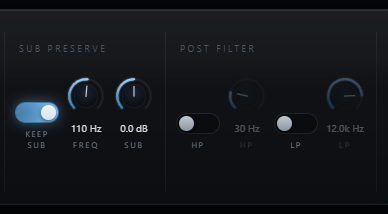
Shearwater Sub Preserve section with Keep Sub, Sub Freq and Sub Gain
A — LR4 Crossover
Only the Band Above Gets Warped

A Linkwitz-Riley crossover splits the input; only the high band is phase-warped. The untouched sub is added back afterward, pristine — phase mangling never reaches the mono low end.

B — Phase-Coherent Dry
No Comb Filtering, Ever

The dry-for-mix signal is the allpass-reconstructed input, so the sub stays phase-coherent across the entire Mix range — no notching as you blend.

C — Sub Freq & Gain
40 – 300 Hz, ±12 dB

Set the crossover to sit right above your fundamental, and optionally boost the preserved sub back in with Sub Gain.
05 — Post Filters, Skew & Env

Clean the growl. Shape how it moves.

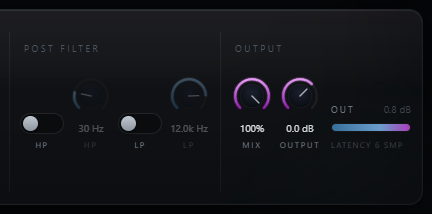
Shearwater Post Filter HP and LP controls beside the Mix and Output stage
A — Post HP / LP
12 dB/oct, on the Warped Band Only

Gentle filters that sit before the sub is re-added — high-pass the growl's low mud out, or tame fizz up top, without ever touching the preserved sub.

B — Skew
Lean the Sidebands

Skew rotates the warp against the carrier cycle, throwing the sidebands asymmetric — the difference between a symmetric vowel and a nasal, one-sided snarl. A DC blocker keeps it clean, out of the path at Depth 0.

C — Env
Make the Growl Breathe

Env ties Depth to the input level. Push it positive and the warp opens as you dig in; pull it negative and the growl blooms on the decay for a reverse, swelling motion.

06 — Global Controls

Six controls shape the warp.

Depth, Partial and Skew set the bend; Env makes it move with the note; Mix and Output finish the blend.
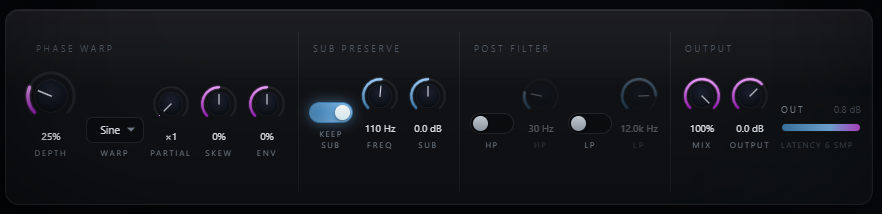
Shearwater control row: Phase Warp, Sub Preserve, Post Filter and Output
Depth
0 → 100 %

How far the phase is bent — from a subtle vowel at low settings to a full-cycle scream up top.

Partial
×1 → ×8

Which harmonic of the signal's phase drives the warp. Higher = sharper, sync-like formant peaks that still track the pitch.

Skew
−100 → 100 %

Rotates the warp against the carrier for sideband asymmetry. Zero is symmetric, with the DC blocker's effect vanishing at Depth 0.

Env
−100 → 100 %

Envelope into Depth. Positive opens the warp with the note; negative blooms it on the decay.

Mix
0 → 100 %

Dry/wet blend. The dry is carrier-matched to the warped band, so it stays comb-free at every setting.

Output
−24 → 12 dB

Final trim for level-matched comparisons against bypass.

07 — Workflow

From insert to grit, in six moves.

Shearwater full plugin interface Shearwater WAVE scope with the view chips
01
Insert Shearwater on a bass, synth, or drum bus — Sub Preserve is on by default, so the low end starts protected.
02
Pick a Warp — Sine for smooth vowels, Fold for bright edge, Rip for sync-like snarl, Hollow for talkbox — and raise Depth.
03
Turn Partial up for sharper, sync-style formants, and use Skew to lean the sidebands to one side.
04
Set Sub Freq right above your fundamental so only the harmonics get warped, and use Sub Gain to taste.
05
Dial Env so the growl breathes with your playing, and clean the band with Post HP/LP — watch the FREQ view to see what's happening.
06
Balance with Mix and trim Output. Check the CYCLE view to see exactly how far the phase is being bent.
08 — Specifications

Everything, on one page.

Format
VST3
Category
Fx · Distortion
Platform
Windows 10 / 11 · macOS 10.13+ (Universal — Apple Silicon & Intel) · 64-bit
Version
1.1.0
Engine
Analytic I/Q phase distortion, single-sideband re-assembly
Depth
0 – 100% peak phase deviation (0 – 6 rad)
Warp
Sine · Fold · Rip · Hollow
Partial
×1 – ×8 harmonic of the carrier phase
Skew / Env
±100% sideband lean · ±100% envelope-to-depth
Pitch tracking
Inherent — harmonics land on the input's own multiples
Sub Preserve
On/off, LR4 crossover, carrier-matched dry, on by default
Sub Freq / Gain
40 – 300 Hz crossover · ±12 dB
Post HP / LP
On/off · 20–500 Hz · 1–20 kHz, 12 dB/oct, off by default
Mix / Output
0 – 100% · −24 to +12 dB trim
Oversampling
Off · 2× · 4× (default) · 8× — IIR polyphase on the phase rotation only
Latency
A few samples (reported); 0 with Oversampling Off
State save
Full settings saved with DAW project
09 — Fine Print

Documentation.

DAW
Any VST3-compatible host — Ableton Live 11+, FL Studio 20+, Reaper, Cubase, Studio One, Bitwig, and others. VST3 only — Logic Pro and GarageBand load Audio Units, not VST3, so they are not supported.
Operating System
Windows 10 or 11 (64-bit) — the editor uses WebView2, which is built into Windows 11 and most current Windows 10 installs. macOS 10.13 High Sierra or later — one Universal build runs natively on both Apple Silicon and Intel Macs.
Format
VST3 effect. Insert on any mono or stereo channel where distortion needs to leave the low end alone.
Latency
A few samples at the default 4× oversampling (IIR polyphase, no pre-ringing), reported so your host compensates automatically. Set Oversampling to Off for true zero latency.
Recommended Setup
Start with Sub Preserve on, Warp Sine, Depth around 30%, Partial ×2, Sub Freq around 110 Hz. Then explore the other warps, Partial and Skew.
Updates
Current release 1.1.0. Free updates for all future 1.x releases.
v1.1.0 — Update check, from the logo
The Audubon Audio wordmark in Shearwater’s header is now a button. Click it and Shearwater asks audubonaudio.com one question — which build is current — then shows that number beside the one you are running, with a link straight to the members area if there is something newer and a plain “you have the current version” if there is not. If it cannot reach us it says so rather than claiming you are up to date. This is the only moment Shearwater touches the internet, it happens only on that click, and nothing about you goes with it — no serial, no licence, no machine id, not even your version or operating system. The comparison happens on your own machine.
v1.0.0 — Initial Release
First public release. Analytic-I/Q phase-distortion engine with four warp shapes (Sine, Fold, Rip, Hollow), Depth, Partial (×1–×8), Skew and Env, pitch-locked with anti-alias oversampling (Off/2×/4×/8×). LR4 Sub Preserve crossover with carrier-matched dry reconstruction, Post HP/LP on the warped band, Mix, and Output.
Full User Guide
Step-by-step walkthrough of the four warps, Depth/Partial/Skew/Env, Sub Preserve, Post filters, and workflow recipes for pitch-locked growl that keeps the low end.
Open User Guide →
Personal & Commercial Use
Use Shearwater in any project — music production, mixing, sound design, post-production, broadcast, and live performance. No royalties, no project restrictions.
Single User
One license per user. Install on the computers you personally own or operate.
Serial Activation
Your license includes a unique serial number tied to your email. Your serial and download are permanently accessible in your Members Area.
Free Updates
All 1.x updates are free. Your serial activates the current version and all future updates in the 1.x line.
No Redistribution
The plugin binaries may not be shared, resold, or redistributed. Each user must obtain their own license.
S
Shearwater Phase Distortion · VST3
$29