What Shearwater does: Shearwater is a phase-distortion effect built for bass. Instead of bending a sound's amplitude like a clipper, it bends its phase — the same trick as a Casio CZ synth, but running on your live audio. Because the warp is keyed to the signal's own instantaneous phase, the harmonics it grows always land on multiples of the note you play, so the growl tracks your pitch with no pitch tracker and very low latency. Sub Preserve keeps the mono low end out of the warp entirely, so bass stays solid while the tops snarl.
Interface Overview
1
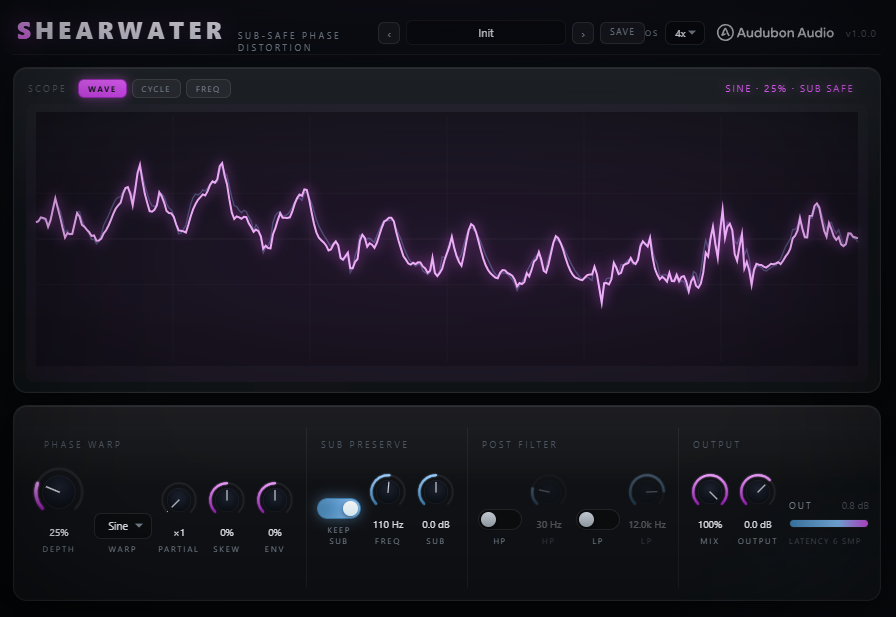
WAVE, CYCLE & FREQ Views
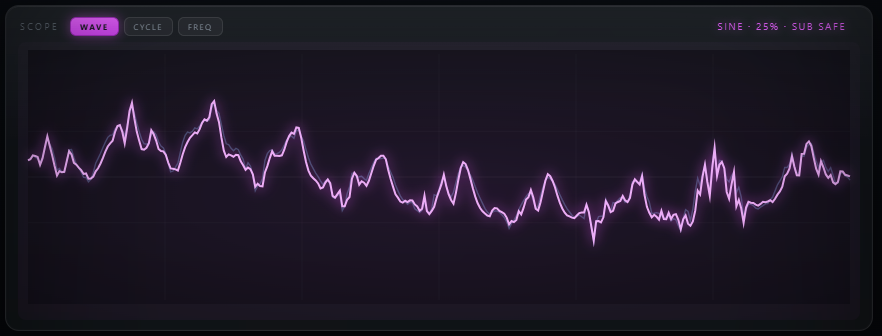
Three view chips at the top switch what the display shows.
WAVE
Live waveform
The clean signal (ice) against the phase-warped output (fuchsia) — how the shape of the wave is being bent in real time.
CYCLE
One carrier cycle
A clean cosine vs the phase-warped cosine, with the phase-deviation curve drawn underneath. The code that draws it is the code that processes the audio.
FREQ
Spectrum
The output spectrum with the protected sub region shaded and the Post HP/LP responses overlaid.
2
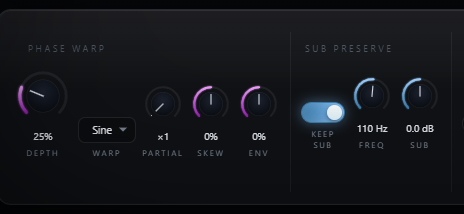
Depth, Warp, Partial, Skew & Env
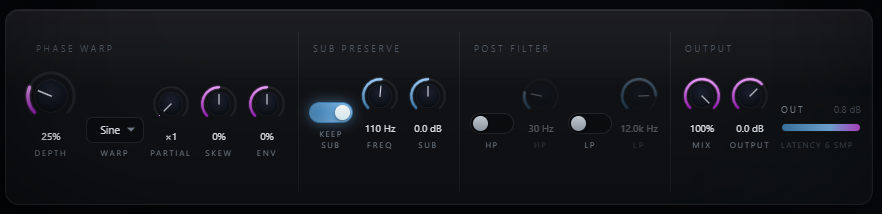
These five controls are the phase-warp engine — how far the phase bends, what shape it bends to, and how it moves.
Depth
0 – 100%
How far the phase is bent — subtle vowel at low settings, full scream up top.
Warp
4 shapes
Sine (smooth), Fold (bright), Rip (asymmetric snarl), Hollow (talkbox) — the periodic curve that bends the phase.
Partial
×1 – ×8
Which harmonic of the phase drives the warp. Higher = sharper, sync-like formant peaks that still track pitch.
Skew
−100 to 100%
Leans the sidebands to one side for asymmetry. Symmetric at 0, DC-blocked otherwise.
Env
−100 to 100%
Ties Depth to input level. Positive opens the warp as you dig in; negative blooms it on the decay.
3
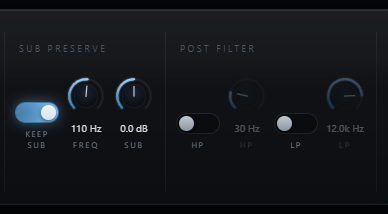
Sub Preserve
On by default. Splits the input with an LR4 crossover so only the band above Sub Freq gets phase-warped.
Sub Preserve
On / Off
The untouched sub is added back after the warp, carrier-matched so it stays phase-coherent across the whole Mix range.
Sub Freq
40 – 300 Hz
The crossover point. Set it just above your track's fundamental.
Sub Gain
−12 to 12 dB
Boosts the preserved sub back in, independent of Depth.
4
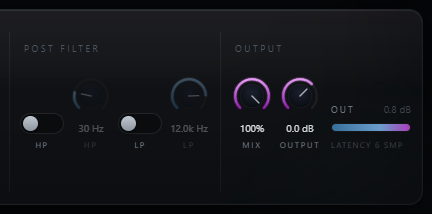
Post HP / LP
Gentle 12 dB/oct filters that clean up the warped band before the sub is re-added — off by default.
Post HP
20 – 500 Hz
High-passes the growl's low mud without touching the preserved sub.
Post LP
1 – 20 kHz
Low-passes the warped band to tame fizz on top.
5
Mix, Output & Oversampling
The final blend, level trim, and the anti-aliasing quality setting (in the top bar).
Mix
0 – 100%
Dry/wet blend. The dry is carrier-matched to the warped band, so it stays comb-free at every setting.
Output
−24 to +12 dB
Final trim for level-matched A/B against bypass.
OS
Off / 2× / 4× / 8×
Oversampling for the phase rotation. 4× (default) is clean for most settings; reach for 8× at extreme Partial + Depth on Fold/Hollow. Off = true zero latency.
Typical Workflow
A
Insert and Pick a Warp
Insert Shearwater on a bass, synth, or drum bus — Sub Preserve is on by default, so the low end is protected from the start. Pick a Warp and raise Depth.
B
Shape the Growl
Turn Partial up for sharper, sync-style formants, and use Skew to lean the sidebands. Then set Sub Freq just above your fundamental so only the harmonics get warped, and bring the sub back with Sub Gain.
C
Clean Up with Post Filters
Check the FREQ view — if the warped band needs cleanup, turn on Post HP or Post LP. Both apply only to the warped band, never the preserved sub.
D
Add Motion and Finish
Dial Env so the growl breathes with your playing, and watch the CYCLE view to see exactly how far the phase is bent. Balance with Mix and trim Output for a level-matched A/B against bypass.