Audubon · Plugins
RVN-001  ·  Released v1.4
Raven Spectral Compressor plugin UI
NEW · VST3 PLUGIN EST. 2026 · AUDUBON AUDIO
Spectral Compressor

Raven.
Reshape the spectrum.

512 independent frequency bands, each with its own compressor. Raven measures the magnitude of every FFT bin and moves it toward a target spectral curve — pulling loud bands down, lifting quiet ones up, or doing both at once.

Coming soon · v1.4.0
$29
Format
VST3 Win 64 · macOS Universal
Bins
512 1024-pt FFT
Curve
3 shapes Flat · Sloped · OTT
Latency
≈23 ms PDC-reported
License
Royalty-free commercial OK
01 — Overview

A compressor that reshapes the spectrum,
not just the level.

512 independent frequency bands, each with its own compressor. Raven measures the magnitude of every FFT bin and moves it toward a target spectral curve — pulling loud bands down, lifting quiet ones up, or doing both at once. The result is a reshaped frequency balance rather than a compressed dynamics curve.

VST3 Per-Bin STFT Upward + Downward Three Curve Shapes Auto Gain

Raven runs a weighted overlap-add STFT and treats every one of its 512 frequency bins as an independent compressor — not band-averaged groups, not broadband RMS.

Bins above the target curve are pulled down; bins below it are lifted up — either direction alone, or both at once, scaled by a single Compression depth macro. The target itself is a shaped spectral curve (Flat, Sloped, or OTT) you can tilt and offset, so you're sculpting frequency balance directly rather than reacting to a single broadband threshold.

Raven Spectral Compressor plugin UI
Plugin · full interface
02 — The Engine

A compressor in every bin.

Raven runs a weighted overlap-add STFT (Hann window, 75% overlap) and applies independent attack/release ballistics and a gain calculation to every one of its 512 frequency bins per frame — not band-averaged groups, not broadband RMS. Each bin is a separate compressor.
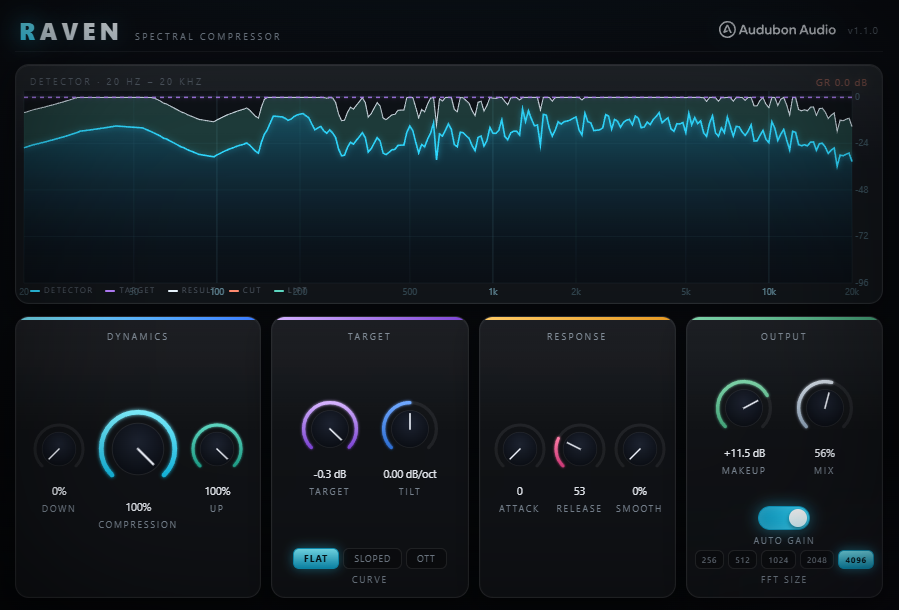
Raven spectral compressor interface with target curve and analyzer
Per-Bin Detection

The envelope follower runs separately on each FFT bin's magnitude. A cross-bin smoothing pass lets you trade surgical precision for a more cohesive feel — 0% means every bin is completely independent, 100% means neighbouring bins pull each other into alignment.

dB-Domain Ratio Law

Gain is computed as (target/detected)^amount — a true compression slope on both sides of the threshold. At amount 0.5 you get an effective 2:1 ratio; at 1.0 the bin is flattened exactly to target. Unlike a multiply-law, there is no hidden ceiling that collapses dynamics at moderate settings.

Bidirectional in One Pass

Downward and upward compression run simultaneously in the same STFT frame. Bins above target are attenuated using the Downward amount; bins below target are lifted using the Upward amount. A low-noise gate prevents near-silence from being boosted.

WOLA Architecture

Hann window applied at analysis and synthesis (WOLA), hop = N/4, overlap-add normalization. The pipeline introduces a latency of exactly one FFT window, reported to the host for automatic PDC compensation. At the default 1024-point FFT this is approximately 23 ms at 44.1 kHz.

03 — Target Curve

The spectral shape you're aiming for.

The Target sets the threshold level in dB and the Curve sets its spectral shape. The compressor pushes every bin toward this target — not toward a flat line, but toward a shaped reference that matches the spectral balance you want.

Flat

Uniform threshold at the Target level across all bins. Every frequency band has equal weight. Use as a starting point, or when you want the same compression depth across the whole spectrum.

Sloped

A heavier threshold in the lows, lighter in the highs. Models the natural spectral balance of well-mixed bass content. Downward mode here tames sub buildup while leaving the top-end detail alone.

OTT

Over-the-top style compression: steep downward in the highs and upward in the lows simultaneously. Pushes transient detail forward while thickening the sub — the multiband-style sound of heavy processing without the band-seam artefacts.

Tilt

Rotates the chosen curve around 1 kHz by ±6 dB per octave. Positive tilt raises the high-frequency target, making downward compression bite harder in the lows; negative tilt does the reverse. Trim the spectral weighting without switching curves.

04 — Upward & Downward

Two directions, one pass.

Raven upward and downward compression controls
A — Downward
Downward (Cut)

The familiar compressor direction. Bins that exceed the target are attenuated proportionally — the farther above the target, the more gain reduction. At Downward 0.5 you get an effective 2:1 ratio; at 1.0 the bin is clamped to the target. The GR meter tracks only downward reduction so upward lift never reads as "compression."

B — Upward
Upward (Lift)

Bins below the target are boosted toward it. Where a traditional compressor leaves quiet bands alone, Raven can pull them up — evening out an uneven spectral balance, adding low-mid body to a thin bass, or making every harmonic contribute. The same ratio law applies: 0.5 ≈ 2:1 lift, 1.0 flattens to target.

C — Compression
Master Depth Macro

A single depth macro (0–100%) that scales both Upward and Downward amounts simultaneously in the DSP without writing back to the individual dials. Pull it back to blend the effect. Push it to 100% for maximum effect, then use the individual ratio dials to bias toward one direction.

05 — Ballistics & Smoothing

Shape the feel of the compression.

Raven attack, release, and smoothing controls
A — Attack
Attack

0–200 dial, mapped geometrically to 0–280 ms per-bin envelope time. Default 40 (≈10 ms). At 0, the envelope is instantaneous — Raven behaves like a spectral clipper that hard-limits each bin to the target. Above 0, transients pass through the threshold before the envelope catches up, giving headroom and punch.

B — Release
Release

0–200 dial, mapped to 0–1 second. Default 90 (≈60 ms). Longer release times keep gain reduction in place between note hits — useful for smoothing out a choppy bass line. Shorter times let each bin recover independently, which can cause pumping on busy material.

C — Smoothing
Cross-Bin Smoothing

A bidirectional low-pass filter applied across the bin array after detection. At 0%, each bin's envelope is completely independent — maximum frequency resolution. At 100%, neighboring bins heavily influence each other, producing behaviour closer to a traditional multiband compressor. 25% (default) is a light cohesion pass.

06 — Output

Final level and resolution controls.

Makeup
−6 to +18 dB

Wet-path output gain applied before the Mix blend. Compensates for level changes introduced by upward/downward imbalance. The 18 dB ceiling gives enough headroom for extreme upward-only work.

Mix
0 – 100%

Dry/wet blend. At 100% the output is fully spectral-compressed. Pull back to introduce original unprocessed signal — useful for parallel compression workflows where you want the dry transients intact.

Auto Gain
On / Off

Measures the net wet-level delta per frame (downward cuts minus upward lifts) and slews a compensating gain over ~1.5 seconds. When On, changing Upward or Downward ratios auditions the spectral character rather than a volume shift. Both channels share one gain ramp so the stereo image stays stable.

FFT Size
256 – 4096

Sets frequency resolution and latency together. 256 = 128 bands / ≈6 ms latency — minimal delay, coarser separation. 4096 = 2048 bands / ≈93 ms latency — maximum bin count, high frequency resolution, PDC compensated. Default 1024 (512 bands / ~23 ms) matches the original patch.

07 — Workflow

Common approaches.

Raven full interface with target curve and spectrum analyzer Raven with flat curve and upward lift engaged
01
Set the target curve first. Choose Sloped for a natural bass spectral balance, or OTT for a more aggressive reshape. Set Target to where you want the loudest bins to land — roughly −24 to −18 dB is a good starting point for a full bass signal. Watch the analyzer to see where the detected signal sits relative to the target line.
02
Engage one direction at a time. Start with Downward only (Upward = 0) to hear what spectral reduction does. Then try Upward only (Downward = 0). The difference is obvious: downward tames peaks, upward fills gaps. Once you hear what each direction does in isolation, combine them using the Compression depth macro.
03
Dial in Attack for character. For bass: keep Attack at 0–20 for a tight, modern transient shape. Higher values (60–120) let note attacks bloom through before compression grabs them, useful for organic wobble basses. Watch the GR meter — if it's staying pegged at high reduction, attack is too fast for the material.
04
Use Smoothing to control musicality. At 0% the compression is maximally surgical — each frequency bin has its own dynamic, which can create a very processed, dense sound. Increase Smoothing to 30–50% to make adjacent bins behave more consistently, reducing artifacts on harmonic material. Go above 60% for a multiband-like response.
05
Use Mix for parallel blend. Because Raven operates in the spectral domain, a 50% Mix blends the dry time-domain signal directly with the spectral-shaped wet signal. The dry signal preserves transients and low-latency impulse response; the wet signal provides the spectral reshaping. This is cleaner than parallel compression on a separate channel.
06
FFT size for resolution vs. latency. 1024 (default) is the sweet spot — 512 bands, ~23 ms PDC-compensated latency. Go up to 2048 or 4096 if you need sharper per-bin separation (useful on a full mix bus or when targeting narrow resonances). Use 256 or 512 if latency is a constraint in your routing.
08 — Specifications

Everything, on one page.

Compression
0 – 100% · default 100% — master depth macro; scales both Upward and Downward amounts in the DSP without writing back to the dials
Upward Ratio
0.00 – 1.00 · default 0.50 — 0 = off, 0.5 ≈ 2:1 lift, 1.0 = flatten to target; scaled by the Compression macro
Downward Ratio
0.00 – 1.00 · default 0.50 — 0 = off, 0.5 ≈ 2:1 cut, 1.0 = flatten to target; scaled by the Compression macro
Attack
0 – 200 · default 40 — geometric map → 0–280 ms per-bin envelope time; default ≈10 ms; 0 = spectral clipper mode
Release
0 – 200 · default 90 — geometric map → 0–1 s per-bin envelope time; default ≈60 ms
Smoothing
0 – 100% · default 25% — bidirectional cross-bin low-pass on detection magnitudes; 0% = fully per-bin, 100% = multiband-like
Target
−64 to 0 dB · default −30 dB — per-bin threshold level; used as a spectral reference, not a single broadband threshold
Tilt
−6 to +6 dB/oct · default 0 — rotates the target curve around 1 kHz; positive = more high-frequency pressure; negative = more low-frequency pressure
Curve
Flat / Sloped / OTT · default Sloped — base spectral shape of the target; Flat = uniform, Sloped = bass-weighted, OTT = over-the-top
Makeup
−6 to +18 dB · default 0 dB — wet-path gain applied before the Mix blend
Mix
0 – 100% · default 100% — dry/wet blend; 0% = fully dry, 100% = fully spectral-compressed
Auto Gain
On / Off · default On — slews a compensating gain over ~1.5 s to cancel the net level delta from up/down balance changes; stereo-image-stable
FFT Size
256 / 512 / 1024 / 2048 / 4096 · default 1024 — sets frequency band count (N/2) and pipeline latency (N samples, PDC-reported)
Format
VST3 · Windows 10 / 11 · macOS 10.13+ (Universal — Apple Silicon & Intel) · 64-bit
Latency
One FFT window (≈23 ms @ 44.1 kHz, 1024 default); PDC-reported to the host
Default bands
512 (1024 FFT, N/2)
MIDI
None
Presets
Init only
Version
1.4.0
09 — Fine Print

Documentation.

DAW
Any VST3-compatible host — Ableton Live, FL Studio, Bitwig, Reaper, Studio One, Cubase. Insert on any mono or stereo track. VST3 only — Logic Pro and GarageBand load Audio Units, not VST3, so they are not supported.
Operating System
Windows 10 or 11 (64-bit) — the editor uses WebView2, which is built into Windows 11 and most current Windows 10 installs. macOS 10.13 High Sierra or later — one Universal build runs natively on both Apple Silicon and Intel Macs.
Latency
One FFT window, PDC-reported. 1024 FFT default = 1024 samples ≈ 23 ms at 44.1 kHz. The host compensates automatically in any DAW with PDC support.
CPU
Low. One STFT pass per channel per hop (N/4 samples). Increasing FFT size raises frequency resolution with negligible CPU impact.
Activation
License required, included with purchase. Your serial and download stay permanently accessible in your Members Area.
Personal & Commercial Use
Use Raven in any project — music production, mixing, mastering, sound design, post-production, broadcast. No royalties, no project restrictions.
Single User
One license per user, non-transferable. Install on the machines you personally own or operate.
Terms & Refunds
See the Terms of Service and Refund Policy for full details.
No Redistribution
The plugin binary may not be shared, resold, or redistributed. Each user must obtain their own license.
v1.4.0 — Update check, from the logo
The Audubon Audio wordmark in Raven’s header is now a button. Click it and Raven asks audubonaudio.com one question — which build is current — then shows that number beside the one you are running, with a link straight to the members area if there is something newer and a plain “you have the current version” if there is not. If it cannot reach us it says so rather than claiming you are up to date. This is the only moment Raven touches the internet, it happens only on that click, and nothing about you goes with it — no serial, no licence, no machine id, not even your version or operating system. The comparison happens on your own machine.
v1.1.0
Detection re-anchored −18 dB (sine-calibrated reference); Comp dial is now a depth macro (no write-back to ratio dials); GR meter tracks downward-only reduction; dB-domain ratio law replaces the multiply law; Crane-family UI.
v1.0.0 — Initial Release
Per-bin spectral compression engine built natively in JUCE VST3. Default FFT 1024, overlap 4, Hann WOLA.
Full User Guide
Covers installation, interface overview, per-parameter reference, and typical workflow examples for spectral compression on bass, buses, and full mixes.
Open User Guide →
R
Raven Spectral Compressor · VST3
$29