01
Init
All defaults. Blur at 0% — bit-transparent. A blank slate for building your own shape from scratch.
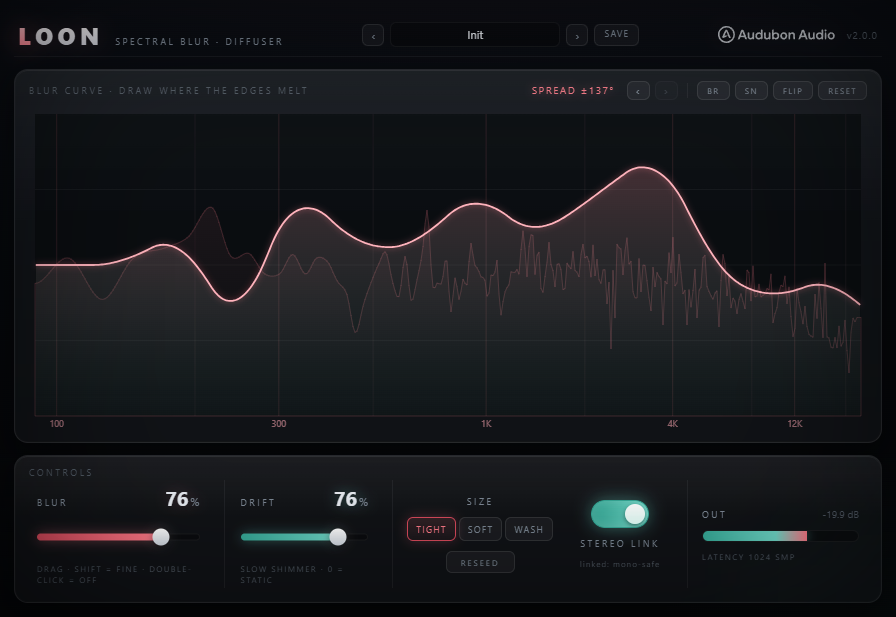
A static per-bin phase rotation applied to the STFT spectrum — widening and diffusing the stereo image, smoothing transient edges, turning room sounds into textures. Magnitudes are never touched. The tone is preserved exactly.
Loon applies a static per-bin phase rotation to the STFT spectrum — widening and diffusing the stereo image, smoothing transient edges, and turning room sounds into textures. Magnitudes are never touched, so the tone is preserved exactly. What you hear is diffusion, not EQ.
A phase diffuser that widens and smears the stereo image while leaving every magnitude exactly where it entered.
Loon rotates the complex phase of each frequency bin by a fixed, seed-drawn angle. The sound becomes incoherent with itself over time and space, but the absolute magnitude of every bin stays the same as the input — no harmonic change, no filter, no EQ curve. A hard-coded bass ramp keeps the sub clean, and a latency-matched dry path keeps any Mix blend phase-coherent.
Loon runs a windowed overlap-add STFT (Hann, 75% overlap) and rotates the complex phase of each frequency bin by a fixed, pseudo-random angle drawn from a seed. The sound becomes incoherent with itself over time and space, but the absolute magnitude of every bin stays the same as the input. No harmonic change, no filter, no EQ curve.
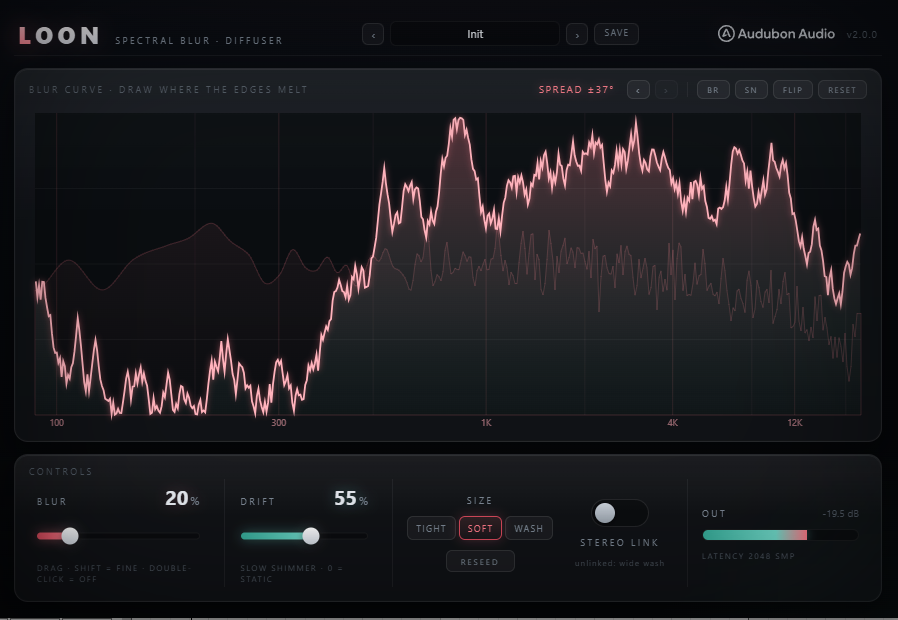
Each bin gets a fixed rotation angle θ drawn from the Reseed generator. At Amount 0, every θ = 0 and the plugin is bit-transparent. As Amount rises, θ is scaled by the blur curve's weight at that frequency — bins with higher curve values receive more rotation, bins at zero receive none. Rotation is a pure phase shift: |z| unchanged, arg(z) += θ.
Because magnitudes never change, Loon is guaranteed not to colour the signal. Spectral energy at 200 Hz enters at one level and leaves at exactly the same level. You won't hear any EQ-like brightening or darkening as you raise Blur. What you hear is diffusion — the stereo image widens, transients soften, the sense of space grows.
Sub-bass diffusion causes comb filtering in mono and can muddy low-end energy. Loon hard-codes a gain ramp on the rotation depth: 0× below 120 Hz, full 1× by 350 Hz. The low end passes completely clean regardless of Blur or the drawn curve. Not adjustable — it's the right call for bass music and it's always on.
Pipeline latency = one FFT window, PDC-reported. At Tight (1024 samples): ≈23 ms. Soft (2048): ≈46 ms. Wash (4096): ≈93 ms. A separate latency-matched dry ring buffers the input so a 50/50 Mix blend is phase-coherent — the dry arrives exactly when the wet does, no comb filtering.
The 512-point drawable curve acts as a per-frequency depth multiplier for the Blur macro. A flat line at 1.0 applies uniform diffusion everywhere above the sub ramp. Draw valleys to protect specific bands. Draw a rising shape to diffuse only the high end. Use shapes or randomizers, then fine-tune by hand.
Click and drag on the curve canvas to draw freehand. The Y axis is rotation depth (0 = no diffusion, 1 = full Blur). The X axis maps to frequency on a log scale (same calibration as the spectral display behind it). Full 5-step undo/redo history: changes are captured before each draw, randomize, or shape-apply action.
Flat / Rising / Falling / Mid Bell / High Hump / Rising Tiers. Flat (full depth everywhere), Rising (blur the top end only), Falling (blur the lows — the bass ramp still protects sub), Mid Bell (focus diffusion in the 1–4 kHz presence band), High Hump (air-only diffusion), Rising Tiers (5-step staircase for a banded effect).
Brown: bounded random walk (smooth spectral mountains). Smooth: interpolated curve with soft-clip shaping (organic, no jagged edges). Flip: mirror the curve vertically (invert highs/lows). Reset: restore flat 1.0 default. All tool actions are captured into undo history before applying.
Two controls unlock the spatial dimensions of the diffusion. Stereo Link controls whether L and R share one set of phase angles (safe, subtle) or use completely independent sets (maximum width). Drift adds a slow, continuous, bounded random walk to the fixed angles so the diffusion fingerprint evolves over time.
When Link is on (default), both channels rotate by the same set of angles — the result is diffuse but mono-compatible. When Link is off, L and R draw from independent random seeds: the two channels rotate by entirely different angles across all bins, creating a wide, decorrelated stereo image that sounds enormous on headphones but may collapse partially in mono. Sub-band protection still applies on both channels regardless.
At 0%, the phase rotation angles are perfectly static — the same fingerprint every block, no warble, no movement. As Drift rises, each bin's angle wanders as a bounded random walk (reflected at ±π), sized so it takes about 8 seconds to drift across its full range. On sustained pads this creates a natural shimmer without the metallic flutter of per-frame phase randomization. Drift = 0 is byte-identical to no-drift processing.
Hit Reseed to draw a new set of pseudo-random phase angles from new seeds. Every Reseed gives Loon a different diffusion fingerprint — the same Blur and curve, but a different spatial character. If the current fingerprint causes an unwanted artifact (a partial that happens to be near a phase-cancellation sweet spot), Reseed moves it. Saved with the preset.
Global depth macro. Scales the rotation weight at every frequency by the curve's value at that band. 0% = bit-transparent bypass (the angles exist but multiply by zero). 100% = full curve-weighted diffusion. This is the primary mix-in dial — automate it like a wet knob.
On: L and R share one angle table — diffuse but mono-safe. Off: independent tables per channel — maximum decorrelation and width. Default On. For stereo buses and reverb sends where mono compatibility matters, keep Link on. For headphone-optimised width effects, turn it off.
FFT window length (1024 / 2048 / 4096 samples). Larger sizes resolve low-frequency bins more distinctly and produce a longer, more sustained wash. Not automatable — switching re-prepares the engine off the audio thread and re-reports latency. Tight (default): 23 ms. Soft: 46 ms. Wash: 93 ms.
Per-bin phase walk speed. 0% = static (no movement). 100% = fast drift (~8 s to traverse ±π per bin, scaled by the walk step). Keep below 30% for a subtle shimmer. Above 60% starts to produce a gentle, evolving chorus-like movement. When linked, R replays L's walk; when unlinked, independent walks per channel.
Factory presets cover the full range from a near-invisible polish to an enveloping wash. Size is never changed by a preset — it stays where you set it, since it controls latency, not sound character.
All defaults. Blur at 0% — bit-transparent. A blank slate for building your own shape from scratch.
Light uniform diffusion. Smears transient edges very subtly without audible washing. A glue layer on a full mix bus to knock off the "assembled from separate tracks" quality.
Full uniform diffusion. Best on reverb returns, pads, or textural sources where complete blurring is the goal. Sends everything into space while keeping the tone intact.
Diffusion focused in the top two octaves (air band). Lows and mids stay focused; the air layer becomes a cloud of shifting phase. Great on cymbals, room mics, and synth pads.
The blur curve peaks around the 1–4 kHz presence band. Smooths harsh mids and takes the edge off overdriven sources or guitars with too much bite. Bass and air remain clear.
Curve falls from high at the low end to zero at the top — but the bass protection ramp still keeps the sub clean. A warm, rounded diffusion that blurs low-mids while leaving attack and air crisp.
Stereo Link off — L and R get completely independent rotation tables. The stereo image spreads very wide. Use on headphone-optimised content, room sends, or anywhere mono compatibility isn't a concern.
Moderate diffusion with active drift. The fixed phase angles slowly wander per bin — the washing effect evolves over time, creating a natural shimmer. Long pads and reverb tails sound like they're breathing.