Kea Multiband Mangler
Kea splits your signal into four bands — Sub, Low, Mid, High — with Linkwitz-Riley crossovers, then gives the upper three their own drive curve, TWO serial Color FX slots, a one-knob Squash compressor, and motion from a control-rate LFO plus a level-invariant envelope follower — while keeping the Sub locked clean. This guide covers every control, all nine Color FX architectures, and five practical workflows for reese and neurofunk bass.
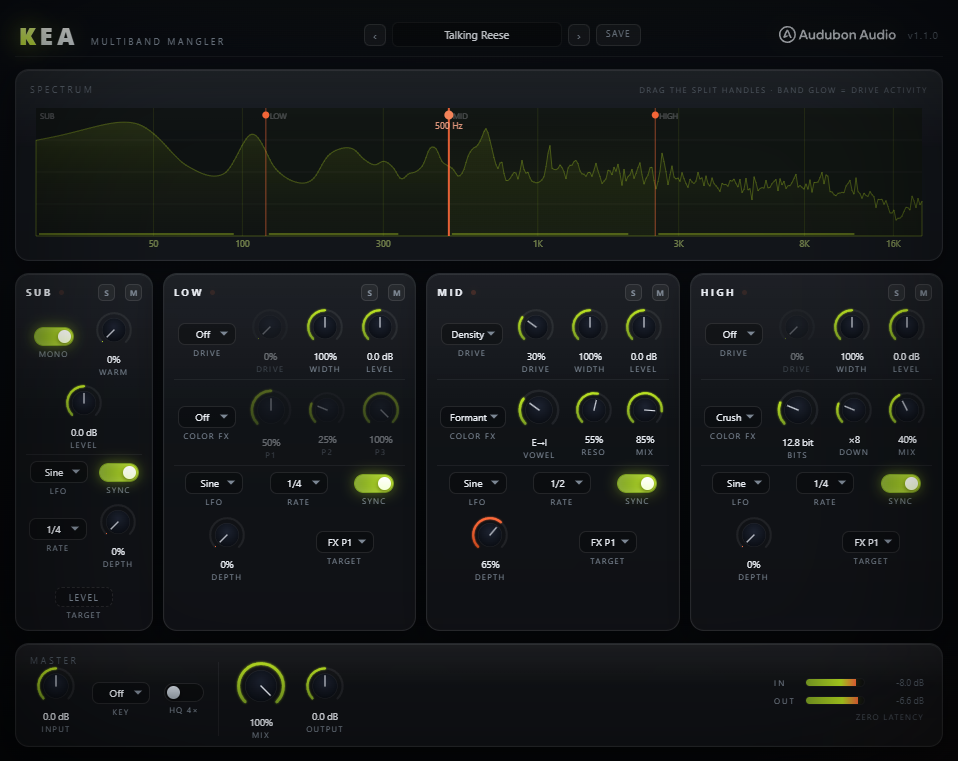
The four bands & crossovers
Kea carves the signal into four bands using three crossover handles you drag directly on the spectrum analyzer. The cascaded LR4 splits are allpass-compensated, so Sub + Low + Mid + High reconstruct the input exactly (bit-transparent at 100% Mix with no processing).
- Sub Split — 40–250 Hz, default 120 Hz. Boundary between the locked-clean Sub and the Low band.
- Low Split — 150–1500 Hz, default 500 Hz. Boundary between Low and Mid.
- High Split — 800–8000 Hz, default 2500 Hz. Boundary between Mid and High.
Adjacent splits are held at least a half-octave apart at runtime, so the handles can never cross or collapse. The green band glow on the analyzer shows drive activity per band.
The Sub band — locked clean
The Sub band deliberately has no drive types, no FX and no width. This is the plugin's core promise: your low end can't be ruined. It offers only:
- Sub Level — ±12 dB trim, default 0.
- Sub Warm — 0–100%, default 0. A gentle DC-blocked Tube (ADAA) saturation with measured makeup gain, so engaging it adds weight without ducking the level.
- Mono — default on. Sums the sub to mono for a centred, phase-solid foundation. Turn off to keep stereo sub content.
- Sub LFO — a tempo-syncable LFO routed to LEVEL only (fixed target chip). Rhythmic sub ducking — sidechain pump with no sidechain. Motion, never color.
- Mute / Solo — audition the sub in isolation, or drop it while you work on the top.
Drive — per-band saturation
Each of Low / Mid / High has a Drive Type selector and a Drive amount (0–100%, default 0). The seven curves are Jackdaw's validated ADAA shapers — clean at 1×, even cleaner with HQ 4× on.
- Soft — smooth symmetric rounding. Glue and body.
- Tube — even-harmonic asymmetry. Warm, valve-like.
- Diode — rectifier-style asymmetric clip. Buzz and grit.
- Fold — wavefolder. Dense upper harmonics that bloom with drive.
- Sine — sine-wrap shaper. Metallic, ring-mod-adjacent.
- Hard — firm clip. Square-edged aggression and loudness.
- Density — program-dependent thickening. The dense neuro-mid workhorse.
At 0% or type Off the drive stage is bypassed. Drive scales both pre-gain into the curve and the resulting harmonic density. Every type carries its own measured auto-gain, so pushing Drive changes timbre, not loudness. Fold and Sine automatically arm the 4× oversampling stage (they're the only two curves that stay dirty at 1×), and the envelope follower can be routed to Drive to open the stage with each note.
Color FX — nine architectures, two serial slots
After drive, each upper band has TWO Color FX slots run strictly in series — the signal goes A into B. Switch between them with the compact A/B tab pair on the strip; a flame dot on a tab means that slot is live. Each slot loads any of the nine architectures; the three macro knobs (P1 / P2 / P3) re-label to fit whichever is loaded, and the readouts show real units. Stacking is the feature: Shift into Phaser, Formant into Comb, Curlew into Crush.
- Shift — Hilbert frequency shifter. P1 Shift ±200 Hz (fine near 0 for the ±1–20 Hz growl zone), P2 Feedback 0–95% (barber-pole), P3 Mix.
- Comb — key-snapped comb resonator. P1 Tune 40–2000 Hz (snaps to Key), P2 Feedback ±95%, P3 Damp.
- Formant — vowel filter. P1 morphs A→E→I→O→U, P2 Resonance, P3 Mix. The talking-reese source.
- Filter — morphing SVF. P1 Cutoff 40 Hz–12 kHz, P2 Q 0.5–20 (resonance-normalised so screech Q stays usable), P3 Morph LP→BP→HP.
- Chorus — pan-distributed 3-tap. P1 Rate 0.05–8 Hz, P2 Depth 0–1.2 ms, P3 Mix. Bass-safe width.
- Crush — bit + rate reducer. P1 Bits 16→3, P2 Down ×1–32, P3 Mix. Digital grit and aliasing.
- Curlew — spectral frame delay. P1 Amount, P2 Preshift (slides the band's bins EARLY — automatable). Where P3 sits, the Walk buttons: BRN deals a smooth random delay curve, SMP a stepped one, RESET flattens. Walks recall deterministically. Engaging Curlew adds fixed, host-reported latency.
- Snipe — 64-stage allpass disperser. P1 Stages 0–64 (continuous), P2 Freq 20 Hz–20 kHz, P3 Pinch. Transients become laser zips.
- Phaser — six staggered allpasses with feedback. P1 Center 60 Hz–8 kHz, P2 Feedback 0–90%, P3 Mix. No internal LFO — sweep P1 with the band LFO or env follower.
Key, Squash, Width & Level
The global Key (Off / C…B) snaps the Comb FX's Tune to the root's octave-and-fifth grid, so metallic comb resonances always land in your track's key — no pitch tracker. When Key is on, the Comb Tune knob reads the resulting note name.
- Squash — per band, 0–100%, default 0. One-knob upward+downward compression toward the band's OWN running average — the OTT feel with no threshold to set. Level-invariant by construction, structurally gain-matched, bit-inert at 0%.
- Width — per band (Low/Mid/High), 0–200%, default 100. 0% = mono, 200% = maximum side. Widen the top while the sub stays mono.
- Level — per band, ±12 dB, default 0. Balance the mangled bands against the clean sub.
- Mute / Solo — every band has both, with click-free ramps. Multiple solos stack.
Motion — LFO & envelope follower
Each upper band has two modulation sources. The tempo-syncable LFO is the flame-coloured motion accent, evaluated at control rate (every 32 samples) so fast 1/16 and 1/32 wobbles keep their shape. The Env follower is the acid-coloured one — it tracks the note you play, not the gain staging. Both dots on the strip header light while their source is moving.
- LFO Shape — Sine, Tri, Saw Up, Saw Dn, Square, S&H (stepped random).
- LFO Sync — default on. Locks to host tempo across 12 divisions (4/1 … 1/8T, including dotted and triplet; default 1/4). Switch off for a free 0.02–20 Hz Rate knob.
- LFO Depth / Target — 0–100% onto FX P1, FX P2, Level, or Width (slot A's macros). Level and Width only dip (never boost past the set value), so modulation stays safe.
- Env — bipolar ±100%, default 0. Positive: quiet parts pull the target down (the patch opens WITH the note). Negative: loud parts pull it down (squash-shaped). Level-invariant — the same patch growls the same at −30 dB as at −6 dB.
- Env Tgt — FX P1, FX P2, Level, Width, Drive, FX B P1, or FX B P2. Drive lets the note open the saturation; the FX B targets sweep the second slot — an env-swept phaser in B over a static growl in A is the signature v1.3 move.
Master, Mix, HQ, Clip & presets
Global controls sit in the master row. Input and Output trim ±24 dB each with live meters. Mix (0–100%) blends the phase-matched dry path against the summed wet bands for parallel mangling. Clip (off by default) is an output soft clip after the Output trim — bit-transparent below 0.75, exact 0 dBFS ceiling, so you can drive INTO it for loudness.
HQ 4× (off by default) wraps each drive stage in 4× FIR oversampling to reduce aliasing under heavy drive; Fold and Sine drive types arm it automatically. HQ and the Curlew FX are the only latency sources — both integer, both host-reported, and the latency readout under the meters always shows the current total. Presets: 16 factory starting points, plus your own user presets saved to Documents as .keapreset files. Each factory preset resets all parameters to default, then applies its overrides — a clean, reproducible starting point.
Reese bass from a saw
Feed a detuned saw into Kea. Set Sub Split around 110–130 Hz and leave the Sub mono and clean. On the Mid band, choose Density drive at 40–60% and load a Shift FX with P1 near the ±1–20 Hz zone for slow beating movement. Widen the High band to 140–160%. Add a slow synced LFO (1/2 or 1/1) on the Mid targeting FX P1 for the rotating reese motion. Level-match the bands and set Output to match bypass.
Talking neuro
On the Mid band, pick Density drive and load Formant. Assign a synced LFO (1/8 or 1/16, Sine or Tri) to FX P1 so the vowel morphs A→U in rhythm. Push P2 Resonance for a stronger "talking" quality. Add a Crush FX on the High for digital edge. Keep the Sub clean and mono underneath so the low end stays anchored while the mids speak.
Clean-sub stereo widener
Use Kea with no drive or FX — just the band split. Leave the Sub mono, then set Low Width around 110%, Mid 140%, High 170%. You get a progressively wider stereo image toward the top while the sub stays centred and phase-solid. This is essentially the Clean Sub Wide Top preset; save your own variant once the widths sit right for your track.
Stacked growl (two slots)
On the Mid band, set Density drive around 45%, then load Shift in slot A with P1 in the slow-beat zone and Feedback around 50% — the growl. Hit the B tab and load Phaser with Feedback around 55%. Now set Env to +60% and Env Tgt to FX B P1: every note you play sweeps the phaser's center through the shifted growl. That's the Stacked Growl preset — two serial architectures moving as one instrument. Try Formant-into-Comb (set a Key) for talking metal.
Crushed metallic top
Set a Key (say F or G). On the Mid, load Comb — its Tune now snaps into key for a musical metallic resonance; push P2 Feedback and tune P1 to the note you want ringing. On the High, load Crush and pull Bits down to 6–8 with a little Down for aliasing sparkle, then widen it. Enable HQ 4× if the drive on the mids starts to alias. The result is the Metal Neck / Crushed Air territory over an untouched sub.