01
Init
All defaults. No drive, no FX, Sub mono on. A clean 4-band pass-through to build your own mangle from scratch.
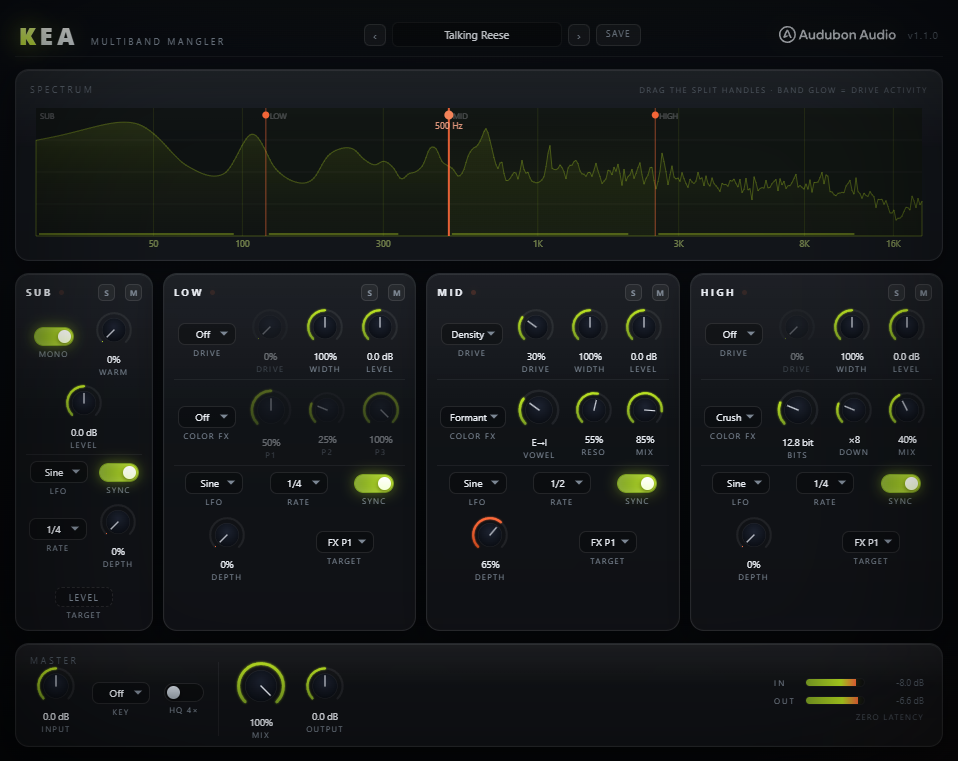
A 4-band neuro splitter for reese and neurofunk bass. Linkwitz-Riley crossovers carve the signal into Sub / Low / Mid / High, then each band gets its own drive curve and TWO serial Color FX slots — frequency shift, key-snapped comb, formants, filter, chorus, bitcrush, spectral smear, disperser, phaser — stacked in any pair, with an envelope follower and control-rate LFOs moving it all. The Sub band is locked clean by design, so the low end can't be ruined.
Kea splits the incoming signal into four bands with Linkwitz-Riley crossovers, then hands each band its own set of mangling tools — a Jackdaw-lineage drive stage plus two serial Color FX slots, a one-knob Squash compressor, and modulation from a tempo-locked LFO and a level-invariant envelope follower. The Sub band is deliberately locked to clean processing only: mono, level, a gentle warm, and a level-only LFO for rhythmic ducking. That's the differentiator versus a general-purpose multiband rack — your low end cannot be destroyed no matter how hard you drive the top three bands.
The neuro splitter — split the bass, mangle the mids, and keep the sub clean by construction.
Three draggable crossover handles set the Sub / Low / Mid / High boundaries. Each of the Low, Mid and High strips carries a drive curve (Soft through Density), two serial Color FX slots (A into B) with nine selectable architectures each, a one-knob Squash compressor, a mid/side Width control, a Level trim, a tempo-syncable control-rate LFO, and an envelope follower that makes patches react to the note. Global Input, Output, Mix, an output Clip pill, and a global Key that snaps the comb's tuning into your track round it out. The band sum is phase-accurate to ±0.0000 dB thanks to allpass sum compensation on the cascaded splits — and every drive stage carries measured auto-gain, so hot settings change timbre, not level.
Kea uses cascaded Linkwitz-Riley (LR4, 24 dB/oct) crossovers at three user-set frequencies to carve Sub / Low / Mid / High. Cascaded LR4 splits don't sum flat on their own — lower bands pass through allpass copies of every crossover above them — so Kea applies matching allpass compensation to the Sub band and to the dry path. The band sum reconstructs the input to ±0.0000 dB (−309 dB dry-null in the sim).
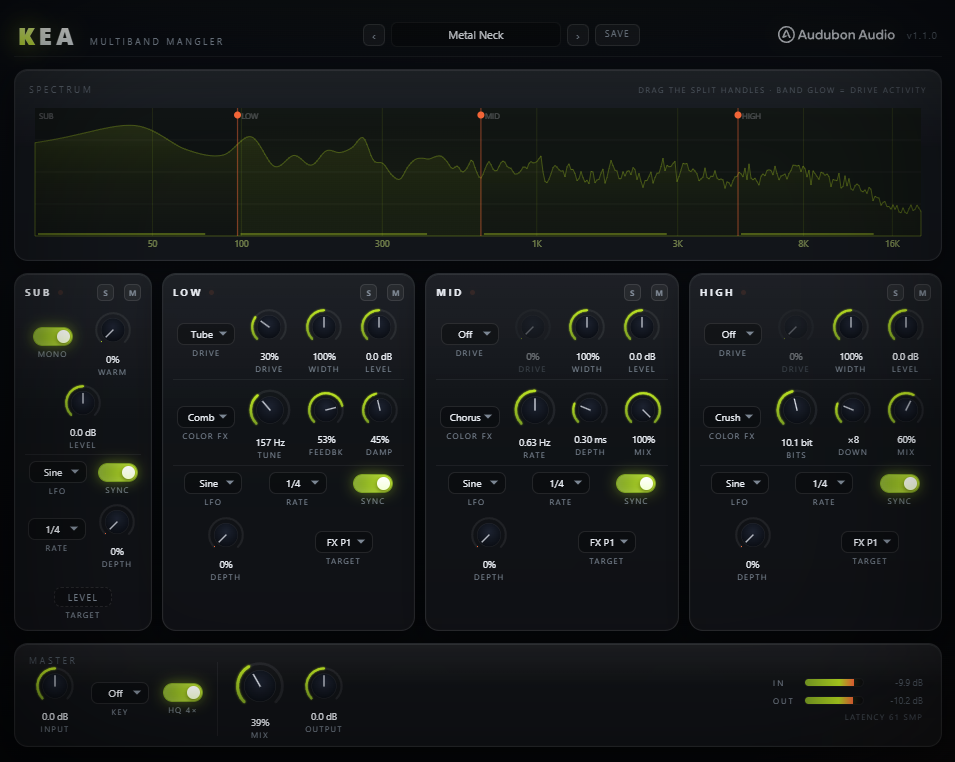
Sub Split (40–250 Hz, default 120), Low Split (150–1500 Hz, default 500), and High Split (800–8000 Hz, default 2500) set the four band edges. Drag the handles directly on the spectrum analyzer. The processor enforces at least a half-octave gap between adjacent splits at runtime, so the crossovers can never cross or collapse.
Each LR4 split introduces an allpass phase shift on the bands below it. Kea passes the Sub band through the same AP@Low and AP@High stages, and phase-matches the dry copy identically, so that Sub + Low + Mid + High reconstructs the source exactly. At 100% Mix with no processing, the output is bit-transparent within the numerical floor.
At default settings the whole plugin is zero-latency — every stage is IIR or antiderivative-antialiased (ADAA) drive. Toggle HQ 4× to wrap each strip's drive stage in 4× FIR oversampling (linear phase, integer latency); the Fold and Sine curves arm it automatically (they're the only two that stay dirty at 1×). The spectral Curlew FX carries its own fixed latency when engaged. Every path is delay-aligned and the total is host-reported via PDC.
The Sub band has no drive types, no FX and no width — only Level, Mono (default on), Mute/Solo, a gentle Warm (Tube ADAA, with measured makeup so engaging it never ducks the level), and a tempo-syncable LFO routed to LEVEL only for rhythmic sub ducking: motion, never color. It guarantees the foundation of a bass patch stays tight and centred while the upper bands get mangled into a reese.
Each of the Low, Mid and High strips has a Drive Type selector and a Drive amount (0–100%). The seven curves are ported verbatim from Jackdaw's validated ADAA shaper set — antiderivative-antialiased at 1× so they stay clean even before HQ oversampling, and each type carries its own measured auto-gain so cranking Drive changes timbre, not loudness. Fold and Sine automatically arm the 4× stage. Set the type, then push Drive to taste. At 0% or type Off the stage is bypassed — and the envelope follower can open a closed Drive knob on the loud notes.
Soft is a smooth symmetric saturator — gentle rounding for glue and thickness. Tube adds even-harmonic asymmetry for a warmer, valve-like character. Both are the mildest curves; good for the Low band where you want body without harsh edges.
Diode is a rectifier-style asymmetric clip with buzz and grit. Fold is a wavefolder that generates dense upper harmonics as drive rises. Sine wraps the signal through a sine shaper for metallic, ring-mod-adjacent tones. These are the mid-band mangling curves for reese growl.
Hard is a firm clip for square-edged aggression and loudness. Density is a program-dependent saturation that thickens transients and fills the sound — the go-to for a dense, wall-of-sound neuro mid. Pair with the High band's Color FX for the classic snarl.
After the drive stage, each of the Low / Mid / High strips has TWO Color FX slots run strictly in series — A into B, switched by a compact tab pair on the strip. Load any of nine architectures in either slot and stack them: Shift into Phaser for barber-pole notches, Formant into Comb for talking metal, Curlew into Crush for smeared grit. The same three macro knobs (P1 / P2 / P3) re-label and re-scale to fit whichever is loaded, and every level-active stage carries measured auto-gain. The UI display mirrors the DSP maths exactly, so the readouts never lie.
A Hilbert-based single-sideband frequency shifter (new, sim-gated DSP; 44–117 dB sideband rejection). P1 Shift is log-symmetric ±200 Hz — fine near zero for the ±1–20 Hz growl/beat zone. P2 Feedback (0–95%) creates a barber-pole cascade. P3 Mix.
A tuned comb resonator from Shrike. P1 Tune spans 40–2000 Hz and snaps to the global Key's octave+fifth grid when Key is set. P2 Feedback is bipolar ±95% (positive/negative comb). P3 Damp rolls off the resonant top.
Starling's tenor formant tables (F1–F3). P1 morphs the vowel continuously A → E → I → O → U. P2 Resonance sharpens the peaks for a stronger "talking" quality. P3 Mix. The classic talking-reese and vowel-wobble source.
A state-variable filter with a continuous response morph. P1 Cutoff spans 40 Hz–12 kHz (log). P2 Resonance is Q 0.5–20 — screech territory, kept usable by per-response resonance normalisation (measured, not guessed). P3 Morph sweeps the response LP → BP → HP. Stable under slammed LFO modulation.
A three-tap chorus whose voices are distributed across the stereo field (measured mono-extra ≤ 5 dB, so it stays bass-safe). P1 Rate 0.05–8 Hz (log). P2 Depth 0–1.2 ms. P3 Mix. Adds motion and width without collapsing in mono.
A bitcrusher plus sample-rate reducer. P1 Bits sweeps 16 → 3 bit. P2 Down is a 1× → 32× downsample. P3 Mix. Dial in digital grit and aliasing on the High band for a crushed-air topping over a clean sub.
Curlew's 1024-point spectral frame delay, per band. A seeded random walk (BRN = liquid smear, SMP = blocky chops, RESET = flat) delays each frequency bin by a different amount. P1 Amount, P2 Preshift slides the band's bins EARLY — automatable, because the latency is constant. Walks recall deterministically in presets and sessions.
A 64-stage allpass cascade from Snipe — the frequency-dependent delay that turns transients into laser zips. P1 Stages sweeps 0–64 continuously (fractional stages crossfade in click-free). P2 Freq centers the dispersion 20 Hz–20 kHz. P3 Pinch focuses it. Double-precision state, so low-end zips stay clean.
Six staggered allpasses with positive feedback — the classic neuro notch comb. P1 Center 60 Hz–8 kHz, P2 Feedback 0–90% for resonant screech between the notches, P3 Mix. No internal LFO on purpose: point the band LFO or envelope follower at P1 and the macro architecture does the sweeping.
Three systems keep Kea musical. The global Key snaps the comb resonator to your track's root without a pitch tracker. Each upper band carries its own tempo-syncable control-rate LFO — the flame-coloured motion accent. And each band has an envelope follower that tracks the note's shape, not the gain staging, so patches react to what you play at any level.
Set Key to Off or any root C…B. When active, the Comb FX's Tune snaps to the root's octave-and-fifth grid — the power-chord definition of "in key" — so metallic comb resonances always land in the track's key. No pitch tracker, no sidechain; it's a deterministic grid snap. The knob readout shows the resulting note name when Key is on.
Each of Low / Mid / High has one LFO with six shapes — Sine, Tri, Saw Up, Saw Dn, Square, S&H — evaluated at CONTROL RATE (every 32 samples), so a 1/32 chop at 174 BPM traces ~64 points per cycle and keeps its shape. Sync (default on) locks to host tempo across 12 divisions (4/1 down to 1/8T); Sync off gives a free 0.02–20 Hz Rate. Route it to FX P1, FX P2, Level, or Width — Level and Width only dip, never boost, so modulation stays safe. The Sub has its own level-only LFO for rhythmic ducking.
A per-band follower normalised against its own slow reference — LEVEL-INVARIANT, so the same patch growls the same at −30 dB as at −6 dB. Bipolar Depth (±100%): positive opens the target with the note, negative squashes it. Seven targets: FX P1/P2 (slot A), Level, Width, Drive — env-to-Drive rides the saturation with your playing — plus FX B P1/P2 to sweep the second slot. The acid env dot on the strip header lights as it tracks.
Master and global controls, the locked-clean Sub band, and the identical Low / Mid / High strips. Ranges and defaults below trace directly to the plugin's parameter layout.
Input trim applied before the split, with a live In meter. Use it to drive the saturation stages harder or to match gain into the plugin.
Final output trim after the dry/wet blend, with a live Out meter. Compensate for level changes from driving and Color FX.
Global dry/wet between the phase-matched dry path and the summed wet bands. The dry copy is allpass-matched, so any blend stays phase-coherent.
Global root. Snaps the Comb FX's tune to the root's octave+fifth grid. Off = free-running comb tuning.
Crossover between the Sub and Low bands. Drag the leftmost handle on the analyzer. Everything below stays locked clean.
Crossover between the Low and Mid bands. Kept at least a half-octave above Sub Split at runtime.
Crossover between the Mid and High bands. Kept at least a half-octave above Low Split at runtime.
Wraps each drive stage in 4× FIR oversampling for lower aliasing on heavy drive. Adds host-reported latency. Off = zero latency.
Level trim for the Sub band. The only tonal shaping the sub gets besides Warm — no drive, no FX.
A gentle Tube (ADAA) saturation on the sub only, DC-blocked. Adds subtle harmonic weight without breaking the low end.
Sums the Sub band to mono. On by default for a centred, phase-solid foundation. Turn off to preserve stereo sub content.
Every band (Sub included) has click-free Mute and Solo. Solo on any band auditions it in isolation; multiple solos stack.
Per-band saturation curve (Low / Mid / High). Eight choices including Off. See section 03 for character.
Drive amount into the selected curve. 0% or type Off = bypassed. Drive scales both pre-gain and harmonic density.
Two serial effect slots per band, switched by the A/B tabs — the signal runs A into B. Each slot loads any of the nine architectures; an engaged dot on the tab shows a slot is live. See section 04.
The three macros of each Color FX slot. Their meaning (e.g. Shift/Feedback/Mix, or Cutoff/Reso/Morph) depends on the loaded type. With Curlew loaded, P3's spot becomes the Walk buttons: BRN and SMP deal fresh random delay curves, RESET flattens.
One-knob upward+downward compression toward the band's OWN running average — the OTT feel, level-invariant by construction. No threshold to set; makeup is structural. 0% is bit-inert.
Bipolar envelope-follower amount. Positive: quiet parts pull the target down (gate-shaped). Negative: loud parts pull it down (squash-shaped). The follower is level-invariant — same response at any gain staging.
Destination for the envelope follower. Drive lets the note open the saturation stage; the FX B targets sweep the second slot's macros — a phaser in B swept by your playing.
Global output soft clip after the Output trim: parabolic knee, bit-transparent below 0.75, exact 0 dBFS ceiling. No true-peak lookahead — loudness-first by design.
Mid/side width for the band. 0% = mono, 100% = unchanged, 200% = maximum side. Per band on Low / Mid / High only.
Per-band output trim after drive, FX and width. Balance the mangled bands against the clean sub.
The band's modulation waveform. Six shapes. S&H gives stepped random movement for glitchy wobbles.
Sync on locks to tempo across 12 divisions (4/1 … 1/8T, default 1/4). Sync off exposes a free-running Hz Rate knob.
Modulation amount for the band's LFO. 0% = no movement (the LFO dot stays dark). Raise to introduce wobble.
Destination for the LFO. FX P1/P2 wobble the current Color FX macros; Level and Width only dip (never boost).
Tempo division used when Sync is on. Twelve options including dotted (1/4., 1/8.) and triplet (1/4T, 1/8T).
Chooses between the tempo-locked Sync Rate and the free-running Hz Rate. Toggling swaps which control is shown on the strip.
Factory presets reset every parameter to default and then apply their overrides, so each is a clean, reproducible starting point. Crossover frequencies stay where you set them unless a preset explicitly moves them.
All defaults. No drive, no FX, Sub mono on. A clean 4-band pass-through to build your own mangle from scratch.
Tube Low, a mid frequency-shift whose feedback swells on the hits via the env follower, chorused wide High. The core rotating reese.
Density Mid through a formant morph on a 1/2 LFO sweep, drive opened by the note (env → Drive), crushed air on top.
The follower showcase: the vowel morph rides the note's envelope, so the growl follows your playing. Warm sub, wide chorus top.
Tube-driven Low into a key-snapped comb, plus a crushed High. Metallic, resonant, aggressive.
Density Mid through a 1/8 motion filter, squashed for glue on both low bands. The rolling neurofunk workhorse.
Tight dual-band 1/16 filter wub — the control-rate LFO flex. Low and Mid wobble in lockstep, squashed, crushed top.
The phaser at work: 1/4-swept resonant notches over squashed tube lows. Swirling, vocal, rolling.
The two-slot showcase: a frequency-shift growl runs INTO a phaser, the env follower sweeping the phaser's center with the note.
Soft-driven Mid through a morphing filter at screech Q with a saw-down LFO synced to 1/1. Classic hoover sweep motion.
No drive or FX — just progressively wider Low, Mid and High bands over a mono sub. A pure stereo-shaping tool.
Tube Low, a mid downshift whose feedback breathes with the input, chorused wide High. Stacked growl with movement up top.
Heavy bitcrush and width on the High with the env ducking the blasts, a subtle chorus on the Mid. Digital sparkle over a clean foundation.
The sub LFO ducking level on 1/4 saw — sidechain pump with no sidechain — over lightly driven, env-tamed lows.
A square 1/8 LFO gating the vowel morph — chopped talking bass, click-free thanks to the smoothed control path.
Everything on: warm sub, diode Low + comb, density Mid + shift stacked into a B-slot phaser with env-driven drive and squash, disperser High. Maximum destruction.