Audubon · Plugins
KKP-001  ·  v1.0.0
Kakapo Sub Tracking Generator plugin UI
NEW · VST3 PLUGIN EST. 2026 · AUDUBON AUDIO
Sub Tracking Generator

Kakapo.
The bird that booms.

The kākāpō digs a bowl in the earth and booms all night — a sub-100 Hz call that carries for kilometres, the loudest low end in the bird world. This one listens to your bass, finds the note, and booms underneath it: a pure, phase-locked sub oscillator that follows your track's own audio. No MIDI, no second synth, no re-writing the bassline. Your growl keeps its mids; Kakapo supplies the floor.

Under development · v1.1.0
$29
Format
VST3 Fx · Win 64 · macOS Universal
Tracks
25 – 500 Hz any mono bass
Latency
Zero no PDC, ever
The Sub
Mono by construction
License
Royalty-free commercial OK
01 — Overview

Huge mids, weak sub. The oldest bass problem.

Every processed bass trades low end for character — the growl gets the mids, the reese gets the movement, and the fundamental gets eaten alive. The usual fix is layering a sine synth under it, which means writing the MIDI twice, tuning the layer forever, and praying the two stay in phase. Kakapo skips all of it: insert it on the bass, and it generates the clean sub from the audio itself.

VST3 Sub Generator Pitch Tracked Phase Locked Chromatic Snap Zero Latency

Kakapo tracks the fundamental of whatever is playing, snaps it to the nearest note, and runs a phase-continuous sine underneath — riding your input's own envelope, gated by your input's own level, and phase-locked to your input's own cycle so the layered low end sums instead of beating. Turn one knob and the floor is back.

Nothing else in our catalog creates low end — Grosbeak fattens what is there, Kea and Cassowary protect the sub while they work the mids, Crossbill folds. Kakapo is the missing foundation tool: the plugin you insert before any of them, so there is a foundation to protect. It generates its sub from tracked pitch — not by octave-dividing the input — so the sub is always a clean oscillator at a real note, never a colored copy of your source's wobble.

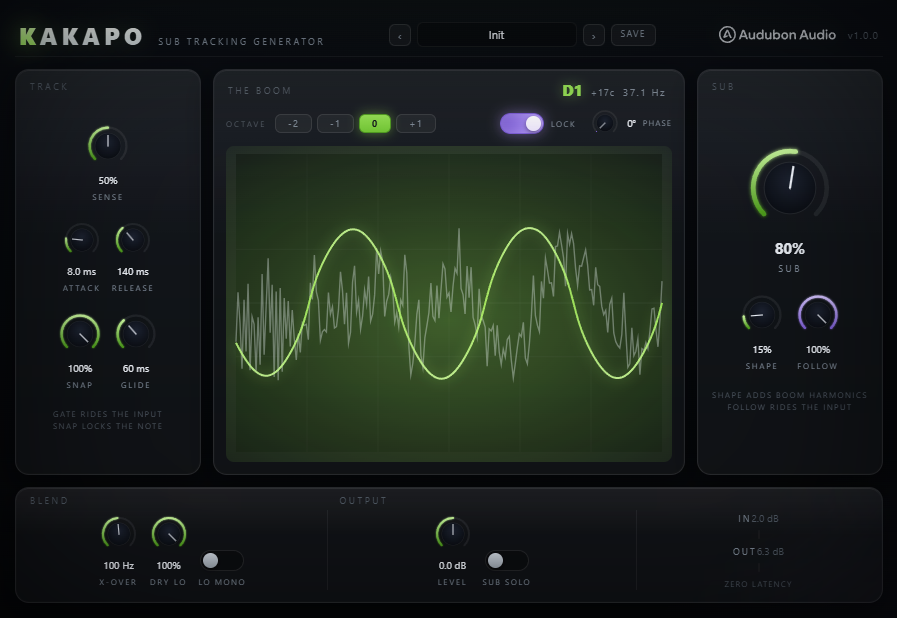
Kakapo Sub Tracking Generator full plugin interface
Plugin · full interface
02 — The Tracker

Built to not be fooled. Measured, not asserted.

A sub generator lives or dies on its tracker: one octave error and the drop falls apart. Kakapo's detector is a ground-up autocorrelation engine — it correlates the signal against itself across every candidate period and reads the pitch from where the waveform genuinely repeats, with a built-in measure of how confident that answer is. The verification suite drives it with sines, sawtooths, noise bursts, and 808 slides — eighteen gates, all green, numbers below.

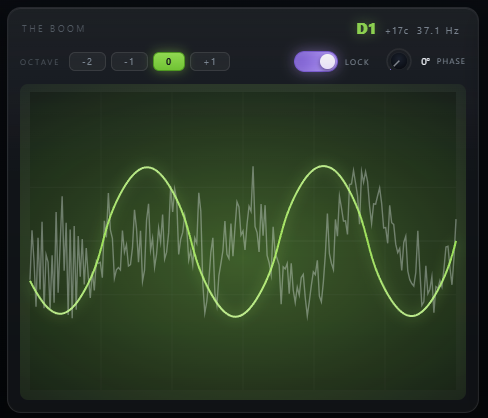
Kakapo THE BOOM scope with the tracked note readout
Autocorrelation Core

A normalized square-difference engine in the McLeod family — the method proper tuners use — with parabolic refinement of the winning period. Accuracy on reference bass tones measures within a tenth of a cent, and the first-major-peak rule resists octave flips structurally; a flip that still tries needs five agreeing readings before it is even considered.

Noise Cannot Vote

Every reading carries a clarity score — how periodic the window actually was. Noise scores low and simply produces no reading at all, so there is nothing to chase: through a full-level broadband noise burst the held note drifts by six cents, measured. No thresholds to tune, no heuristics bolted on — it falls out of the math.

Slides Keep Sliding

Note changes confirm by consecutive agreeing readings — each within earshot of the last, so an 808 slide keeps confirming as it moves instead of stalling on a frozen reference. A 300 ms octave slide tracks continuously through its whole length and settles dead on target.

Holds, Never Glisses

When the input drops away — silence, a gap, a drum fill — the pitch holds exactly where it was and only the level gates out. No decaying pitch slides, no reset to a default note. The next note picks up from a sane place, and a kick-only passage can keep booming the last note on purpose.

03 — The Pitch Path

From tracked pitch to the note you meant.

Raw tracked pitch is honest but wobbly — a detuned reese is genuinely fifteen cents flat. Between the tracker and the oscillator sit four controls that turn what the bass is into what the sub should be.

1
Snap

Chromatic quantize with hysteresis: at 100 the sub lands exactly on the nearest semitone and vibrato cannot make it flutter across a note boundary. At 0 it follows every bend verbatim — the 808-slide setting. Defaults to 100, because basslines live on notes.

0 – 100 %def 100
2
Glide

Portamento between targets, measured in the musical domain so an octave takes as long as a semitone is smooth. Short keeps riffs tight; long turns note changes into a synth-bass slide under the whole pattern.

0 – 500 msdef 60
3
Octave

Shifts the generated sub against the tracked note: −2, −1, 0 or +1 octaves. A midrange stab at G2 becomes a G1 foundation at −1; a bass already living at 40 Hz gets reinforced in place at 0.

−2 → +1def 0
4
Lock & Phase

The differentiator. LOCK phase-locks the oscillator to your input's actual cycle, and PHASE dials in the alignment — so when you layer the sub under your kept low end, the two sum instead of slowly beating against each other. Verified to a tenth of a degree.

PLL · 0–360°def on
04 — The Sub Voice

One oscillator, doing exactly one job.

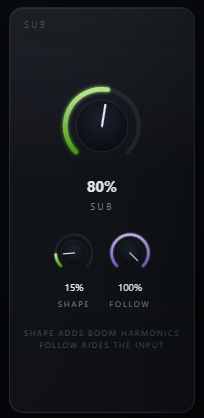
Kakapo SUB section with Sub, Shape and Follow controls
A — Shape
Boom Harmonics, Odd Only

SHAPE morphs the pure sine toward a rounded square, adding only odd harmonics — the third and fifth that let a sub read on laptop speakers and earbuds. Even harmonics would smear the pitch an octave up, so the morph is built symmetric: measured even-harmonic content is 146 dB below the fundamental, which is to say none.

B — Follow
Rides Your Envelope, Or Not

At 100, the sub tracks your input's dynamics one to one — 6 dB louder in, 6 dB louder sub, measured to within a twentieth of a dB. At 0, the sub holds a flat level for as long as the gate is open: compressed-bass behaviour without a compressor in sight.

C — Sense
A Gate That Does Not Chatter

SENSE sets how much input it takes to open the sub, with 6 dB of hysteresis and a minimum-open hold so a level parked on the threshold cannot stutter the low end. Attack and release shape how the sub arrives and leaves — from drum-tight gating to long half-time tails.

D — Mono
Mono By Construction

The generated sub is one oscillator sent identically to both channels — not a stereo signal folded down, but mono at the source, the way club systems and vinyl want the bottom octave. Verified in the suite: soloed sub side energy is zero to numerical precision.

05 — Blend

Layer it under, or hand it the keys.

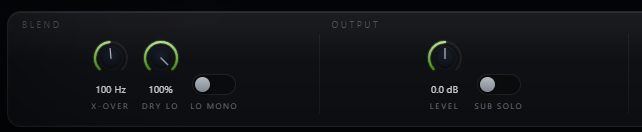
Kakapo BLEND and OUTPUT rail with X-Over, Dry Lo, Lo Mono, Level and Sub Solo
A — X-Over
A Crossover That Never Combs

The dry signal is split at X-OVER with a Linkwitz-Riley pair whose two halves are phase-matched by design — at full DRY LO with the sub off, Kakapo measures flat to a thousandth of a dB from 20 Hz to 18 kHz. Insert it, and until you ask for something, nothing happens.

B — Dry Lo
Layer Mode, Replace Mode

DRY LO is your original low end's fader. At 100 the sub layers underneath everything you had — the default, because a generator should do no harm on insert. At 0 the crossover removes your dry lows entirely and Kakapo's oscillator becomes the foundation: a clean, tuned, phase-stable replacement for a wobbling original.

C — Lo Mono
Collapse The Dry Lows Too

LO MONO folds the kept dry lows below the crossover to mono, so a wide reese can keep its stereo mids while its bottom octave locks to the center with the generated sub. Off by default — it only touches your signal when you ask.

D — Sub Solo
Hear Exactly What It Adds

SUB SOLO auditions the generated lane alone — tuning SHAPE, checking the octave, or bouncing the sub as its own stem. The crossfade is click-free, and what you hear soloed is bit-for-bit what gets summed.

06 — Controls

Sixteen parameters, one job each.

TRACK decides when and what the tracker believes; the pitch bar decides what note the sub plays; SUB decides how it sounds; BLEND decides how it meets your signal. The defaults are the calling card: insert it on a bass and the floor appears.

Kakapo full control layout
Sense
0 → 100 % · def 50

How much input opens the gate — mapped from −25 to −65 dBFS with 6 dB of hysteresis and a 60 ms minimum-open hold.

Attack
1 → 200 ms · def 8

How fast the sub's level follows the input upward. Short for drum-tight arrival, long for swells.

Release
20 → 1000 ms · def 140

How the sub lets go when the input stops. Long settings turn staccato stabs into a sustained floor.

Snap
0 → 100 % · def 100

Chromatic quantize with anti-flutter hysteresis. 100 = always in tune; 0 = follow every bend and slide verbatim.

Glide
0 → 500 ms · def 60

Portamento between pitch targets, constant in musical terms across the range. The note-change smoother.

Octave
−2 / −1 / 0 / +1 · def 0

Shifts the generated sub against the tracked note. −1 turns a midrange riff into a proper sub line.

Lock
On / Off · def On

Phase-locks the oscillator to the input's cycle so layered lows sum instead of beating. Releases automatically when Snap pulls the pitch away.

Phase
0 → 360° · def 0

The lock's alignment target. Tune it while watching the scope — or by ear — for the fattest sum with your kept lows.

Sub
0 → 150 % · def 80

The generated lane's level, with headroom above unity for when the sub is the whole point.

Shape
0 → 100 % · def 15

Sine to rounded square. Adds odd harmonics only — small-speaker presence without shifting the perceived octave.

Follow
0 → 100 % · def 100

How much the sub rides your input's dynamics. 0 holds a flat −12 dBFS while the gate is open.

X-Over
40 → 300 Hz · def 100

Where your dry signal splits. Everything above passes untouched; everything below is DRY LO's territory.

Dry Lo
0 → 100 % · def 100

Your original lows' fader. 100 layers the sub under them; 0 hands the low end to Kakapo entirely.

Lo Mono
On / Off · def Off

Folds the kept dry lows to mono below the crossover. The generated sub is already mono by construction.

Level
−24 → +24 dB · def 0

Output trim after the sum, for level-matched comparisons against bypass.

Sub Solo
On / Off · def Off

Auditions the generated sub alone, click-free. What you hear is exactly what gets added.

07 — Workflow

From thin to booming, in six moves.

Kakapo full plugin interface Kakapo THE BOOM scope and note readout
01
Insert Kakapo on the bass — the growl, the reese, the 808, the midrange stab. With SUB at zero it is transparent, so you can set it up mid-session.
02
Play the part and watch THE BOOM: the note readout locks on, and the moss trace is the sub Kakapo wants to add under your ghosted dry signal.
03
Pick the register. If the bass already lives in the sub octave, leave OCTAVE at 0 for reinforcement; if it is a midrange riff, drop to −1.
04
Bring SUB up until the floor sits right, then add SHAPE until you can hear the note on small speakers — a little goes a long way.
05
Decide who owns the low end. Keep DRY LO at 100 to layer under your original lows — with LOCK aligning the two — or pull it to 0 and let the oscillator be the foundation.
06
Shape the motion: SENSE and ATTACK/RELEASE for how the sub arrives and leaves, SNAP and GLIDE for how it moves between notes. SUB SOLO to check your work, LEVEL to match, done.
08 — Stated Limits

What Kakapo 1.0 does not do.

A pitch tracker has real physics, and burying them would only cost you time later. These are the four worth knowing before you buy.

Monophonic Material

Kakapo tracks one fundamental. Basslines, stabs, leads, 808s — yes. Chords, full mixes, or two basses at once give it two answers to a one-answer question; it will pick the strongest and stick to it, which may not be the one you meant. Put it on the bass channel, not the master.

Tracking Takes Cycles

The detector needs a few cycles of a note to trust it — at 50 Hz, a cycle is 20 ms, so a new note settles in tens of milliseconds. The dry path is untouched zero-latency; only the generated sub's arrival is shaped by that settle plus your ATTACK and GLIDE. Sustained bass: perfect. Chromatic 32nd-note runs at 30 Hz: physics says no.

Fundamentals 25 – 500 Hz

The tracker listens below 500 Hz by design — it is a bass tool, and ignoring the upper spectrum is what makes it hard to fool. A part whose fundamental lives above 500 Hz (pads, plucked melodies up high) is outside the contract.

No MIDI Override Yet

1.0 tracks audio only. A MIDI side-input — play the notes in and skip the tracker entirely — is the planned 1.x headline, and the engine was built with the seam in place. Until then, SNAP at 100 gets you the always-in-tune result MIDI would.

09 — Specifications

Everything, on one page.

Format
VST3
Category
Fx · Generator / Bass
Platform
Windows 10 / 11 · macOS 10.13+ (Universal — Apple Silicon & Intel) · 64-bit
Version
1.1.0
Latency
Zero · causal dry path, no oversampling, no PDC at any setting
Tracker
NSDF autocorrelation (McLeod family), built from scratch for Kakapo · ~4 kHz analysis lane, ~12 ms readings · fundamentals 25 – 500 Hz · first-major-peak octave resistance, flips need 5 agreeing readings
Tracker guards
Clarity gating (noise produces no reading — 6 cents drift through a full-level noise burst, measured) · successive-agreement confirmation (an 808 slide keeps advancing — settles 0 cents off target after a 300 ms octave slide)
Accuracy
Within ±0.1 cents on reference sines across 30 – 400 Hz (parabolic peak interpolation — no integer-period quantization)
Hold behaviour
Pitch holds through silence and gaps — never glisses, never resets · level gates independently
Pitch path
SNAP chromatic quantize 0 – 100 % with anti-flutter hysteresis · GLIDE 0 – 500 ms, log-frequency domain · OCTAVE −2 / −1 / 0 / +1
Phase lock
PLL on the input's cycle · PHASE target 0 – 360° · converges to 0.1° spread, measured · releases as SNAP pulls beyond 50 cents
Envelope
Peak follower · ATTACK 1 – 200 ms · RELEASE 20 – 1000 ms · FOLLOW 0 – 100 % (0 = flat −12 dBFS while open)
Gate
SENSE mapped −25 to −65 dBFS · 6 dB hysteresis · 60 ms minimum-open hold · no chatter at parked levels, verified
Sub voice
Phase-continuous sine, 16 – 1000 Hz clamp · SHAPE sine → rounded square, odd harmonics only (even content −146 dBc, measured) · always mono, both channels identical
Blend
Linkwitz-Riley split 40 – 300 Hz, phase-matched halves (flat within 0.001 dB, 20 Hz – 18 kHz, sub off) · DRY LO 0 – 100 % · LO MONO fold on the dry low lane
Output
SUB 0 – 150 % · LEVEL −24 to +24 dB · SUB SOLO click-free audition
Display
THE BOOM — triggered live scope (generated sub over the ghosted dry signal) · note readout with name, cents and Hz
Verification
18-gate float64 simulation suite — transparency, accuracy, octave immunity, snap, glide, gate, follow, shape, crossover, mono, lock, latency, noise hold, solo, torture, slides — all green before any build ships
Parameters
16 automatable — sense, attack, release, snap, glide, octave, lock, phase, sub, shape, follow, x-over, dry lo, lo mono, level, sub solo
Presets
14 factory · user presets saved to disk
Window
900 × 620
10 — Fine Print

Documentation.

DAW
Any VST3-compatible host — Ableton Live 11+, FL Studio 20+, Reaper, Cubase, Studio One, Bitwig, and others. VST3 only — Logic Pro and GarageBand load Audio Units, not VST3, so they are not supported.
Operating System
Windows 10 or 11 (64-bit) — the editor uses WebView2, which is built into Windows 11 and most current Windows 10 installs. macOS 10.13 High Sierra or later — one Universal build runs natively on both Apple Silicon and Intel Macs.
Format
VST3 effect, stereo in and stereo out. Insert on the bass channel — it generates its sub from that channel's audio.
Best On
Monophonic bass material with a fundamental between 25 and 500 Hz — growls, reeses, 808s, midrange stabs, DI bass, synth leads in the bass register.
Not A Mix-Bus Tool
Kakapo tracks one fundamental at a time. Chords and full mixes give it conflicting answers — keep it on individual bass sources.
Recommended Setup
Start from the defaults: SNAP 100, LOCK on, DRY LO 100, SUB 80 %. Play the part, watch the note readout lock, then choose the octave and balance SUB against your original lows.
Updates
First release 1.0.0. Free updates for all future 1.x releases.
v1.1.0 — Update check, from the logo
The Audubon Audio wordmark in Kakapo’s header is now a button. Click it and Kakapo asks audubonaudio.com one question — which build is current — then shows that number beside the one you are running, with a link straight to the members area if there is something newer and a plain “you have the current version” if there is not. If it cannot reach us it says so rather than claiming you are up to date. This is the only moment Kakapo touches the internet, it happens only on that click, and nothing about you goes with it — no serial, no licence, no machine id, not even your version or operating system. The comparison happens on your own machine.
v1.0.0 — Initial Release
First release. Pitch-tracked sub generator: from-scratch NSDF autocorrelation tracker (25 – 500 Hz) with clarity gating, parabolic sub-cent readings, octave-flip confirmation, slide-surviving successive agreement, and hold-on-silence; chromatic SNAP with anti-flutter hysteresis; log-domain GLIDE; OCTAVE −2 to +1; PLL phase LOCK with 0 – 360° PHASE target; SENSE gate with hysteresis and hold; ATTACK / RELEASE / FOLLOW envelope; SHAPE odd-harmonic morph; Linkwitz-Riley X-OVER with DRY LO layer/replace and LO MONO fold; SUB SOLO; THE BOOM triggered scope with note readout; 14 factory presets; zero latency; 18-gate verification suite green.
Full User Guide
A step-by-step walkthrough of tracking, the pitch path, phase lock, layer-vs-replace blending and every control — read the Kakapo user guide.
Personal & Commercial Use
Use Kakapo in any project — music production, mixing, sound design, post-production, broadcast, and live performance. No royalties, no project restrictions.
Single User
One license per user. Install on the computers you personally own or operate.
Serial Activation
Your license includes a unique serial number tied to your email. Your serial and download are permanently accessible in your Members Area.
Free Updates
All 1.x updates are free. Your serial activates the current version and all future updates in the 1.x line.
No Redistribution
The plugin binaries may not be shared, resold, or redistributed. Each user must obtain their own license.
K
Kakapo Sub Tracking Generator · VST3
$29