Audubon · Plugins
JKD-001  ·  Released v1.3
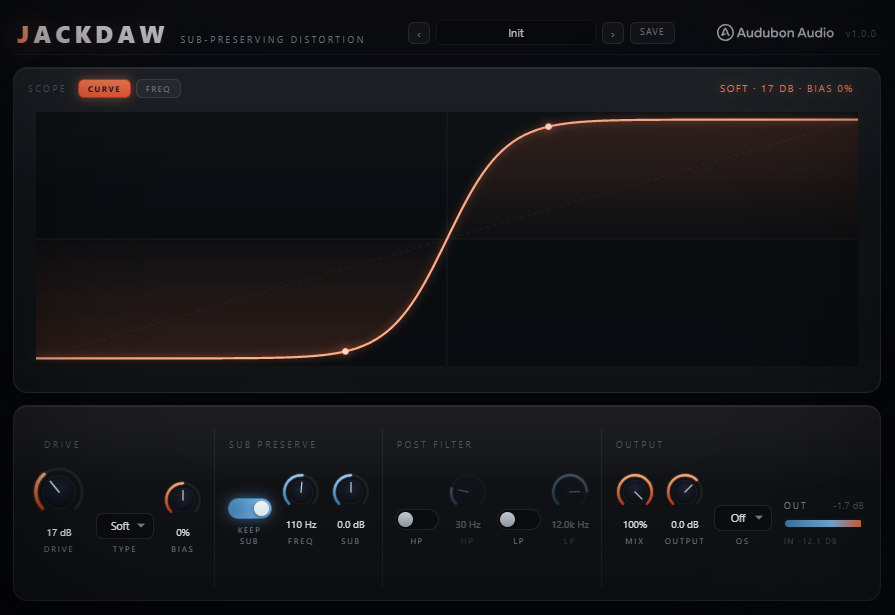
Jackdaw full plugin UI
NEW · VST3 PLUGIN EST. 2026 · AUDUBON AUDIO
Sub-Preserving Distortion

Jackdaw.
Distortion that leaves the sub alone.

Eight waveshaper curves with zero-latency antialiasing, a reactive drive stage that follows your playing, and two independent, mix-safe ways to protect the low end — every feature a true no-op when you don't need it. Drive it hard up top without losing the weight underneath.

One-time · v1.3.0
$29
Free, full plugin. The output dips to silence every 30 seconds until you enter a serial — buying removes it, no reinstall needed.
Format
VST3 Fx · Win 64 · macOS Universal
Curves
8 Soft to Stair
Anti-alias
ADAA zero latency
Sub Protect
2 ways both bypassable
License
Royalty-free commercial OK
01 — Overview

Grit on top. Weight underneath.

Distortion redistributes energy, and that usually eats the sub weight a bass patch lives on. Jackdaw gives you two independent, mix-safe ways to keep the low end intact — Sub Preserve splits it around the distortion entirely, and Post HP/LP clean up what the distortion generates before it's added back. Both are a true no-op when disabled.

VST3 Waveshaper ADAA Sub-Safe 8 Curves Reactive

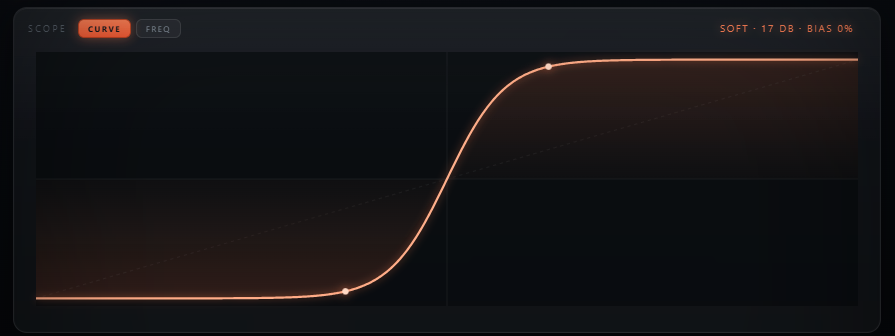
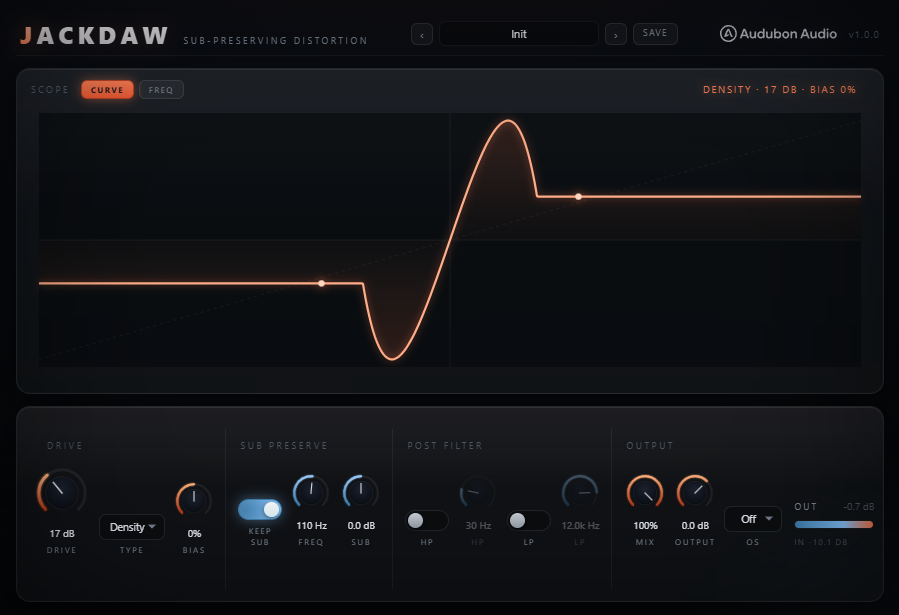
Three scope views tell you exactly what's happening: WAVE shows the live dry-versus-shaped waveform, CURVE shows the live transfer function of whatever shape and bias you've dialed in, and FREQ shows the output spectrum with the protected sub region shaded and the post-filter responses overlaid. And the DELTA chip lets you listen to only what Jackdaw is adding — and hear for yourself that it contains no sub.

With Sub Preserve, Post HP/LP, Dyn, Sag and Tilt all at rest and Bias at zero, Jackdaw skips every one of those stages entirely — the signal path is just Drive into the shaper and out through Mix and Output. Turn on only what the track needs.

Jackdaw plugin interface
Plugin · full interface
02 — The Engine

Antialiased at the source, not papered over after.

Every curve runs through 1st-order antiderivative antialiasing (ADAA) at base sample rate — no oversampling required to keep the top end clean, which is why Oversampling defaults to Off.

Jackdaw waveshaper curve view showing the live transfer function
ADAA, Zero Latency

Each curve has a closed-form antiderivative, so aliasing is suppressed mathematically at base rate — no added latency, no need to oversample by default.

Sub Stays Untouched

Between samples, sub-bass changes so little that ADAA collapses to the exact curve — it only cleans up the high harmonics that actually alias.

Optional Oversampling

Off, 2×, 4×, or 8× on top of ADAA for extreme drive on the hardest curves — a linear-phase FIR with latency honestly reported when engaged.

👁
The Picture Never Lies

The CURVE view's JavaScript mirrors the actual DSP shaper code exactly — what you see on screen is what's happening to the audio.

03 — Eight Curves

Eight shapes. Eight harmonic signatures.

Each Type is a distinct, curated waveshaping curve — pick the character first, then dial Drive and Bias to taste.

1
Soft

The gentlest curve — rounds peaks without hard edges, a subtle warming saturation.
TypeGentle
2
Tube

Even-harmonic character reminiscent of driven valve gain stages — warm and musical.

TypeEven harmonics
3
Diode

A diode-clipper-style curve with its own distinct onset and knee character.

TypeClipper
4
Fold

Wave-folds peaks back on themselves for a denser, more complex harmonic spectrum.

TypeComplex
5
Sine

A smooth sinusoidal shaping curve — rounded, musical harmonic generation.

TypeRounded
6
Hard

Brickwall clipping — the hardest edge in the set, aggressive odd-harmonic bite.

TypeAggressive
7
Density

A denser, thicker curve tuned for adding perceived loudness and body without harshness.

TypeThickening
8
Stair

New in v1.1 — a hard six-step staircase with a dense, metallic high-harmonic spray. The digital tearout texture the smooth curves can't make, still alias-suppressed at zero latency.
TypeStepped
04 — Sub Preserve

Split it out. Add it back untouched.

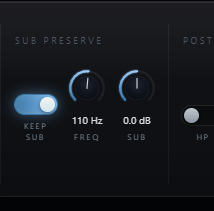
Jackdaw Sub Preserve, Sub Freq and Sub Gain controls
A — LR4 Crossover
Only the Band Above Gets Distorted

A Linkwitz-Riley crossover splits the input; only the high band is driven and shaped. The untouched sub is added back afterward, pristine.

B — Phase-Coherent Dry
No Comb Filtering, Ever

The dry-for-mix signal is the allpass-reconstructed input, so the sub stays phase-coherent across the entire Mix range — no notching as you blend.

C — Sub Freq & Gain
40 – 300 Hz, ±12 dB

Set the crossover to sit right above your fundamental, and optionally boost the preserved sub back in with Sub Gain.

D — Sub Mono
Mono Below the Crossover

New in v1.1: one switch folds only the protected sub lane to mono. Club rigs and vinyl are mono down low — a wide sub can cancel on the big system. The top stays as wide as you made it.
05 — Post Filters, Bias & Tilt

Clean the grit. Shape the asymmetry.

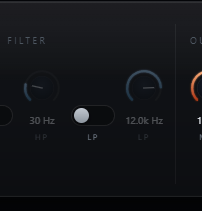
Jackdaw Post HP and Post LP filters
A — Post HP / LP
12 dB/oct, on the Distorted Band Only

Gentle filters that sit before the sub is re-added — high-pass the distortion's low mud out, or tame fizz up top, without ever touching the preserved sub.

B — Composes Cleanly
Sub Preserve + Post HP, Together

Because Post HP filters the distorted band before the sub returns, you can HP the grit's low mud while the real, untouched sub still comes back underneath.

C — Bias
Asymmetry Toward Even Harmonics

Bias pushes the curve asymmetric, adding even-harmonic content. A DC blocker (blended by |Bias|) keeps things clean — transparent at Bias 0.

D — Tilt
The Boost-In / Cut-After Move, One Knob

New in v1.1: Tilt tips the spectrum around 700 Hz going INTO the shaper, then applies the exact inverse after it. The tonal balance comes back — what changes is which part of the sound drives the distortion. The classic neuro two-EQ trick, built in and latency-free.

06 — Global Controls

Eight controls drive the shape.

Drive and Bias feed the shaper; Dyn, Sag and Tilt make it react to your playing; Mix and Output finish the blend; Oversampling is there when you need it.

Jackdaw full control layout
Drive
0 → 48 dB

Pre-gain into the shaper — the primary control over how hard the curve is pushed.

Bias
−100 → 100 %

Asymmetry into even harmonics. Zero is fully transparent, with the DC blocker skipped entirely.

Dyn
−100 → 100 %

Envelope-tracked drive. Positive keeps note fronts clean while tails bloom into growl; negative puts the spit on the attacks. Zero is an exact no-op.

Sag
0 → 100 %

Slow bias drift charged by loud sustains, like a pedal's supply sagging — long notes bloom even-harmonic warmth. Short hits never charge it.

Tilt
−100 → 100 %

±6 dB emphasis around 700 Hz into the shaper, exactly inverted after it — aim the drive at the mids or the lows without changing the balance.

Mix
0 → 100 %

Dry/wet blend. At 0%, the output is bit-transparent bypass.

Output
−24 → 12 dB

Final trim for level-matched comparisons against bypass.

Oversampling
Off / 2× / 4× / 8×

Stacks on top of ADAA for extreme drive. Off by default; latency reported honestly when engaged.
07 — Workflow

From insert to grit, in six moves.

Jackdaw full plugin interface Jackdaw waveshaper curve display
01
Insert Jackdaw on a bass, drum bus, or full mix, and flip Keep Sub on — the low end is protected from the first knob turn.
02
Pick a Type — Soft or Tube for warmth, Fold or Hard for aggression, Density for thickness, Stair for stepped metallic tearout — and raise Drive.
03
Set Sub Freq right above your fundamental so only the harmonics get distorted, and use Sub Gain (and Sub Mono, for club systems) to taste.
04
Make it react: push Dyn positive so reese tails bloom while attacks punch clean, add Sag so long notes drift warm, and use Tilt to aim the drive at the mids.
05
Add Bias for even-harmonic warmth, turn on Post HP/LP if the distorted band needs cleanup, and hit DELTA to hear exactly what you're adding.
06
Balance with Mix, trim Output, and reach for Oversampling only if you're pushing the hardest curves at extreme Drive.
08 — Specifications

Everything, on one page.

Format
VST3
Category
Fx · Distortion
Platform
Windows 10 / 11 · macOS 10.13+ (Universal — Apple Silicon & Intel) · 64-bit
Version
1.3.0
Drive
0 – 48 dB pre-gain into the shaper
Type
Soft · Tube · Diode · Fold · Sine · Hard · Density · Stair
Bias
−100 to 100%, DC-blocked, transparent at 0
Dyn
−100 to 100% envelope-tracked drive, ±12 dB swing, exact no-op at 0
Sag
0 – 100% sustain-charged bias drift (~300 ms charge), exact no-op at 0
Tilt
±6 dB @ 700 Hz into the shaper, exact inverse after, exact no-op at 0
Anti-aliasing
1st-order ADAA on every curve, zero latency
Oversampling
Off (default) · 2× · 4× · 8×, linear-phase FIR
Sub Preserve
On/off, LR4 crossover, phase-coherent dry, a true no-op when off
Sub Freq / Gain
40 – 300 Hz crossover · ±12 dB
Sub Mono
On/off, folds only the protected sub lane to (L+R)/2, off by default
Post HP / LP
On/off · 20–500 Hz · 1–20 kHz, 12 dB/oct, off by default
Delta Monitor
Listen to wet-minus-dry — exactly what Jackdaw adds, click-free toggle
Mix / Output
0 – 100% bit-transparent at 0 · −24 to +12 dB trim
Latency
0 samples with Oversampling Off; reported honestly when engaged
State save
Full settings saved with DAW project
09 — Fine Print

Documentation.

DAW
Any VST3-compatible host — Ableton Live 11+, FL Studio 20+, Reaper, Cubase, Studio One, Bitwig, and others. VST3 only — Logic Pro and GarageBand load Audio Units, not VST3, so they are not supported.
Operating System
Windows 10 or 11 (64-bit) — the editor uses WebView2, which is built into Windows 11 and most current Windows 10 installs. macOS 10.13 High Sierra or later — one Universal build runs natively on both Apple Silicon and Intel Macs.
Format
VST3 effect. Insert on any mono or stereo channel where distortion needs to leave the low end alone.
Latency
Zero with Oversampling Off (the default). 2×/4×/8× add a reported linear-phase FIR latency your host compensates for automatically.
Recommended Setup
Start with Sub Preserve on, Type Tube, Drive around 12 dB, Sub Freq around 110 Hz. Then explore the other seven curves, Bias, and the reactive Dyn / Sag / Tilt stage.
Updates
Current release 1.3.0. Free updates for all future 1.x releases.
v1.3.0 — Bias holds its character at any Drive
Bias shifts the distortion curve’s operating point, which is what manufactures even harmonics. It was a fixed offset applied after the Drive gain, so Drive quietly rescaled it: the effect peaked around Drive 18–24 dB and was 24 dB weaker by Drive 48, and across its sweep it dropped up to 12 dB of level — so it read more like a volume knob than a character one. Bias is now measured against the signal actually reaching the curve and carries a level compensation, so it keeps its character wherever Drive is set and changes tone rather than loudness. Fold and Sine keep an absolute offset, since a scaled one wraps their fold period.

Three related fixes shipped with it. The DC blocker was being run at partial strength and left up to −17 dBFS of DC on the output through the middle of the Bias travel; it now always runs fully. Sag responded over a 2.3 dB window sitting after the Drive gain, which made Drive throw it like a switch — it now tracks how hard the part is played over about 20 dB. And Dyn reached its full range at half travel, so the outer half of the knob did nothing.
v1.2.0 — Update check, from the logo
The Audubon Audio wordmark in Jackdaw’s header is now a button. Click it and Jackdaw asks audubonaudio.com one question — which build is current — then shows that number beside the one you are running, with a link straight to the members area if there is something newer and a plain “you have the current version” if there is not. If it cannot reach us it says so rather than claiming you are up to date. This is the only moment Jackdaw touches the internet, it happens only on that click, and nothing about you goes with it — no serial, no licence, no machine id, not even your version or operating system. The comparison happens on your own machine.
v1.1.0 — The Reactive Update
Eighth curve: Stair, a hard six-step staircase quantizer with closed-form ADAA (alias-suppressed at zero latency). New reactive character stage: Dyn (envelope-tracked drive — tails bloom or transients spit), Sag (sustain-charged bias drift for blooming even-harmonic warmth), and Tilt (±6 dB emphasis into the shaper with an exact inverse after — the boost-in/cut-after move as one knob). Sub Mono switch folds the protected sub lane to mono for club systems. DELTA monitor lets you hear exactly what Jackdaw adds. Two new factory presets: Stair Tearout and Density Bloom. Every new control is an exact no-op at rest.
v1.0.0 — Initial Release
First public release. Seven ADAA-antialiased waveshaper curves (Soft, Tube, Diode, Fold, Sine, Hard, Density), zero-latency antialiasing with optional 2×/4×/8× oversampling, Bias with DC blocking, LR4 Sub Preserve crossover with phase-coherent dry reconstruction, Post HP/LP on the distorted band, Mix, and Output.
Full User Guide
Step-by-step walkthrough of the eight curves, Sub Preserve, the reactive Dyn / Sag / Tilt stage, Post filters, Bias, and workflow recipes for driving bass without losing weight.
Open User Guide →
Personal & Commercial Use
Use Jackdaw in any project — music production, mixing, sound design, post-production, broadcast, and live performance. No royalties, no project restrictions.
Single User
One license per user. Install on the computers you personally own or operate.
Serial Activation
Your license includes a unique serial number tied to your email. Your serial and download are permanently accessible in your Members Area.
Free Updates
All 1.x updates are free. Your serial activates the current version and all future updates in the 1.x line.
No Redistribution
The plugin binaries may not be shared, resold, or redistributed. Each user must obtain their own license.
J
Jackdaw Distortion · VST3
$29