Audubon ยท Plugins
HMB-001  ยท  Released v1.1
Hummingbird full plugin UI
NEW ยท VST3 PLUGIN EST. 2026 ยท AUDUBON AUDIO
Tremolo ยท Chop ยท Stutter

Hummingbird.
Make it flutter.

A tempo-synced volume LFO with five shapes, triplet and dotted feel, per-cycle smoothing, and stereo phase offset. From a gentle sine tremolo to a hard square-wave chop โ€” locked to your grid or free-running.

Free ยท v1.1.0
Free
Format
VST3 Fx ยท Win 64 ยท macOS Universal
Shapes
5 incl. S&H
Rate
0.1โ€“20 Hz ยท free
Sync
1/32โ€“1/1 + triplet ยท dotted
License
Royalty-free commercial OK
01 โ€” Overview

One LFO on your volume.
Endless rhythmic motion.

Hummingbird modulates the level of anything you put it on with a tempo-synced or free-running LFO. Five waveforms, a BPM-locked rate with triplet and dotted feel, smoothing to soften the edges, and a stereo phase offset for width โ€” the building blocks of tremolo, gating, chopping, and stutter, in one small glass panel.

VST3 Tremolo BPM Sync 5 LFO Shapes Stereo Width

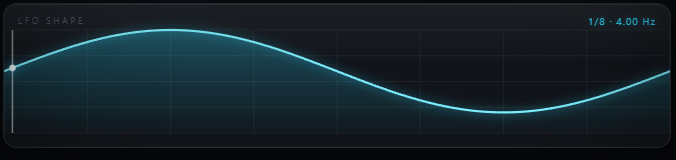
A live LFO visualizer shows the current waveform and a moving playhead, so you always see exactly where the modulation is in its cycle โ€” with a second blue trace when stereo offset is engaged.

Switch to BPM Sync and the rate locks to your host tempo at any division from 1/32 to 1/1, with Straight, Triplet, or Dotted feel. Add a few milliseconds of Attack to round off square-wave clicks, or push Depth to 100% for a hard rhythmic gate. Everything sits on one screen โ€” no menus, no pages.

Hummingbird full plugin UI
Plugin ยท full interface
02 โ€” The Engine

A volume LFO you can see.

The animated visualizer draws the active waveform with a live playhead riding the cycle. Set depth, shape, and rate by ear while watching the modulation move in real time.

Hummingbird full plugin UI showing LFO visualizer and controls
โˆฟ
Five LFO Shapes

Sine for smooth classic tremolo, Square for hard gating, Saw for rhythmic swells, Triangle for an even linear sweep, and Random (sample & hold) for glitchy, unpredictable volume jumps. One click switches between them.

โ–ถ
Live Visualizer

The waveform display animates with a playhead that tracks the LFO's current position. Depth scales the trace's height; a second blue trace appears when stereo offset is active, showing the right channel's phase.

โฑ
Free or Synced

Run free from 0.1 to 20 Hz for tape-style wobble, or flip on BPM Sync to lock the rate to the host grid. In free mode, type a division like 1/8 or 1/16t and Hummingbird converts it to Hz at the current tempo.

โ—ฃ
Edge Smoothing

An Attack control adds 0โ€“50 ms of smoothing per LFO cycle, rounding the hard transitions of square and saw shapes into clickless swells. Dial it to taste between a sharp chop and a gentle pulse.

03 โ€” LFO Shapes

Five waveforms. Five rhythmic feels.

Each shape gives the volume a different character โ€” from the gentlest tremolo to the hardest stutter. Pair them with Depth and Attack to dial in exactly how the motion lands.

โˆฟ
Sine

The classic. A smooth, rounded rise and fall โ€” medium depth gives you vintage amp-style tremolo with no hard edges.
ShapeTremolo
โŠ“
Square

Full on, full off. At high depth this is a hard gate or chop โ€” the foundation of trance gates and stutter edits.

ShapeGate / Chop
โ—บ
Saw

A sharp drop then a ramp back up. With a little Attack it becomes a rhythmic swell that pumps once per beat.

ShapeSwell
โ–ณ
Triangle

A linear up-and-down. Like sine but with a more even, mechanical motion โ€” steady pulsing without the rounded peaks.

ShapePulse
โ˜
Random

Sample & hold. The level jumps to a new random value each cycle โ€” glitchy, unpredictable, perfect for IDM and broken textures.

ShapeS&H ยท Glitch
%
Depth & Mix

Depth sets how far the level swings; Mix blends the modulated signal back against the dry. Together they take any shape from subtle to extreme.
Global0โ€“100%
04 โ€” Tempo Sync

Locked to the grid.
Straight, triplet, or dotted.

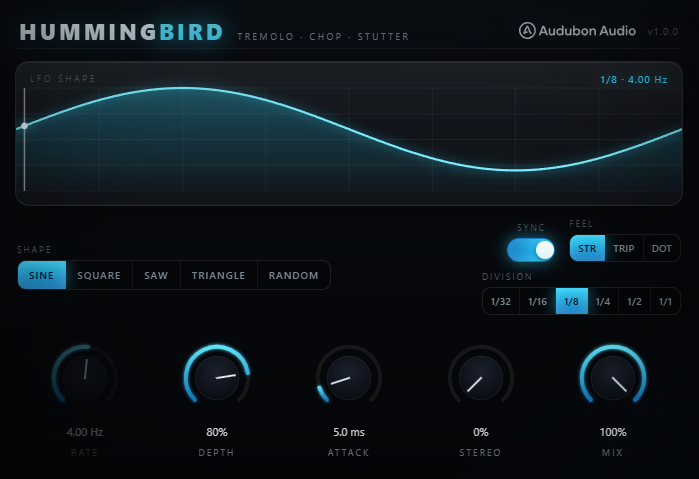
Hummingbird BPM sync, division, and feel controls
A โ€” BPM Sync
Lock to Host Tempo

Flip BPM Sync on and the LFO rate snaps to your host's tempo and transport. The flutter stays perfectly in time as the project plays, and stretches with any tempo change automatically.

B โ€” Division
1/32 โ†’ 1/1

Choose the note value the LFO cycles on โ€” from a frantic 1/32 stutter up to a slow 1/1 whole-note swell. Six musical divisions cover everything from texture to groove.

C โ€” Feel
Straight ยท Triplet ยท Dotted

Apply a triplet or dotted feel to any division for swung, shuffled, or off-grid rhythms. The same 1/8 division can pulse straight, bounce as a triplet, or lope as a dotted note.
05 โ€” Width & Edges

Offset the channels. Round the edges.

Hummingbird Stereo and Mix knobs
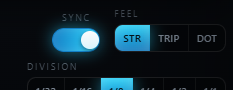
A โ€” Stereo
0โ€“100% Phase Offset

Push the right channel's LFO out of phase with the left. At higher values the modulation pans and rotates between the speakers, turning a mono tremolo into a wide, swirling auto-pan effect.

B โ€” Attack
0โ€“50 ms Per-Cycle Smoothing

Soften the leading edge of each cycle. Zero gives you the raw shape โ€” a hard square click or a sharp saw drop. A few milliseconds rounds it into a clickless swell without losing the rhythm.

C โ€” Mix
Dry / Wet Blend

Blend the modulated signal back against the dry. Pull Mix down for a subtler tremolo that keeps some steady level underneath, or leave it at 100% for full-depth chopping.

06 โ€” Global Controls

Five knobs that shape the motion.

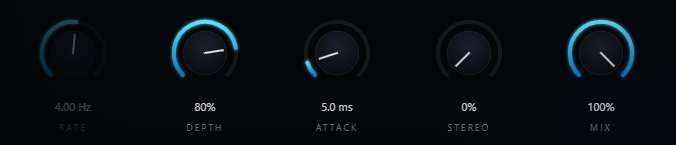
Rate and Depth set the speed and intensity; Attack and Stereo shape the edges and the width; Mix balances it against the dry.

Hummingbird global knob row
Rate
0.1 โ†’ 20 Hz

LFO speed in free mode. Double-click to type a Hz value or a note division like 1/8 or 1/16t. When BPM Sync is on, the division selector takes over.

Depth
0 โ†’ 100 %

How far the level swings each cycle. Low for a gentle shimmer, 100% for a full on/off gate. The single biggest control over how aggressive the effect feels.

Attack
0 โ†’ 50 ms

Per-cycle smoothing. Zero keeps the shape's hard edges; raise it to round square and saw clicks into swells without softening the timing.

Stereo
0 โ†’ 100 %

Phase offset between left and right LFOs. Zero is mono tremolo; higher values widen into a panning, rotating motion across the stereo field.

Mix
0 โ†’ 100 %

Dry/wet balance. At 100% only the modulated signal is heard; pull back to blend the effect under the original level for parallel-style tremolo.
07 โ€” Workflow

From insert to groove, in seven moves.

Hummingbird full plugin UI Hummingbird LFO visualizer
01
Insert Hummingbird on any channel โ€” a pad, a vocal, a drum bus, a synth โ€” anywhere you want rhythmic volume motion.
02
Turn on BPM Sync so the flutter locks to your project tempo, then pick a Division โ€” 1/8 or 1/16 is a good starting groove.
03
Choose a Shape. Sine for smooth tremolo, Square for a hard gate, Random for glitch. Watch the visualizer to see the motion.
04
Set Depth for intensity โ€” subtle shimmer at low values, full chop near 100%.
05
Add a touch of Attack to round off any clicks on square or saw shapes, keeping the rhythm tight but clickless.
06
Dial in a Feel โ€” Triplet or Dotted โ€” if you want the motion to swing or sit off the straight grid.
07
Raise Stereo for a wide, panning flutter, then balance the whole effect with Mix. Automate Rate for accelerando builds.
08 โ€” Specifications

Everything, on one page.

Format
VST3
Category
Fx ยท Modulation
Platform
Windows 10 / 11 ยท macOS 10.13+ (Universal โ€” Apple Silicon & Intel) ยท 64-bit
Version
1.1.0
LFO shapes
Sine, Square, Saw, Triangle, Random (S&H)
Rate (free)
0.1 โ€“ 20 Hz ยท typed note divisions accepted
BPM sync
Locks LFO rate to host tempo
Divisions
1/32 ยท 1/16 ยท 1/8 ยท 1/4 ยท 1/2 ยท 1/1
Feel
Straight ยท Triplet ยท Dotted
Depth
0 โ€“ 100% modulation amount
Attack
0 โ€“ 50 ms per-cycle smoothing
Stereo
0 โ€“ 100% L/R phase offset
Mix
0 โ€“ 100% dry/wet blend
Visualizer
Animated waveform + live playhead ยท stereo trace
Value entry
Double-click any knob to type an exact value
State save
Full settings saved with DAW project
09 โ€” Fine Print

Documentation.

DAW
Any VST3-compatible host โ€” Ableton Live 11+, FL Studio 20+, Reaper, Cubase, Studio One, Bitwig, and others. BPM Sync follows the host tempo and transport. VST3 only โ€” Logic Pro and GarageBand load Audio Units, not VST3, so they are not supported.
Operating System
Windows 10 or 11 (64-bit) โ€” the editor uses WebView2, which is built into Windows 11 and most current Windows 10 installs. macOS 10.13 High Sierra or later โ€” one Universal build runs natively on both Apple Silicon and Intel Macs.
Format
VST3 effect. Insert on any mono or stereo channel where you want rhythmic volume modulation.
CPU
A single LFO on the channel's gain โ€” extremely light. Run many instances across a session with negligible load.
Recommended Setup
Start with BPM Sync on, Division 1/8, Sine shape, Depth 80%, Attack 5 ms. Then explore shapes, feel, and stereo from there.
Updates
Current release 1.1.0. Free updates for all future 1.x releases.
v1.1.0 โ€” Update check, from the logo
The Audubon Audio wordmark in Hummingbird’s header is now a button. Click it and Hummingbird asks audubonaudio.com one question — which build is current — then shows that number beside the one you are running, with a link straight to the members area if there is something newer and a plain “you have the current version” if there is not. If it cannot reach us it says so rather than claiming you are up to date. This is the only moment Hummingbird touches the internet, it happens only on that click, and nothing about you goes with it — no serial, no licence, no machine id, not even your version or operating system. The comparison happens on your own machine.
v1.0.0 โ€” Initial Release
First public release. Five LFO shapes, free 0.1โ€“20 Hz rate and BPM sync with Straight/Triplet/Dotted feel, per-cycle Attack smoothing, stereo phase offset, dry/wet Mix, and an animated glass visualizer with live playhead.
Full User Guide
Step-by-step walkthrough of the LFO shapes, BPM sync and feel, the visualizer, stereo width, and workflow recipes for tremolo, gating, chopping, and stutter effects.
Open User Guide โ†’
Personal & Commercial Use
Use Hummingbird in any project โ€” music production, mixing, sound design, post-production, broadcast, and live performance. No royalties, no project restrictions.
Single User
One license per user. Install on the computers you personally own or operate.
Serial Activation
Your license includes a unique serial number tied to your email. Your serial and download are permanently accessible in your Members Area.
Free Updates
All 1.x updates are free. Your serial activates the current version and all future updates in the 1.x line.
No Redistribution
The plugin binaries may not be shared, resold, or redistributed. Each user must obtain their own license.
H
Hummingbird Tremolo / Stutter ยท VST3
Free