01
Init
All defaults. FAT and COLOR at 0%, Mix 100%, Clip on at 0 dB / SOFT 1. A transparent, zero-latency starting slate.
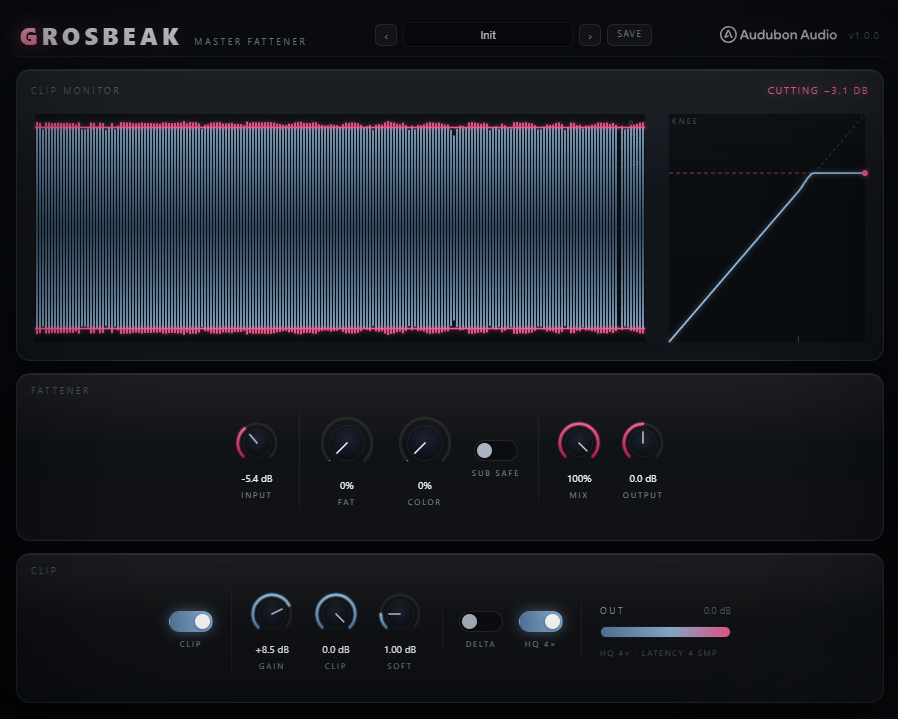
One window makes a mix bus fat, adds top-end colour, and finishes through a GClip-style ceiling you can see. Zero latency end to end — safe as the last plugin on the master or drop bus of a live session.
Grosbeak takes the mastering chain from the Condor Multiband — fatten, colour, clip — rebuilds every weak part of it, and puts the whole thing behind one clip monitor you actually watch. FAT morphs clean into loudness-matched warmth. COLOR lifts the air without pushing the upper mids. A variable-knee GClip ceiling finishes it. Nothing here adds latency until you ask it to.
A master-bus glue clipper that makes things thick and loud without turning the fat knob into a hidden volume lever.
The Pine Grosbeak — "gros" for fat — is the plump raspberry-red finch. The plugin is named for what it does: it makes a bus heavy. FAT is a biased-tanh saturator whose makeup gain is loudness-matched (AC-RMS of a −12 dBFS sine, within ±1.3 dB across the whole sweep), so the knob adds harmonic weight, not level. An optional SUB SAFE crossover keeps the low end out of the saturator. And because both nonlinearities are first-order ADAA, the default signal path is bit-transparent and zero-latency — the honest last-in-chain finisher.
Input trim splits into a phase-matched dry tap and the wet chain. FAT saturates, COLOR shelves and excites, MIX blends against the dry, OUTPUT sets level, and the CLIP section finishes into a variable ceiling. Both nonlinear stages are anti-derivative anti-aliased (ADAA-1) — so at rest, the whole thing is a straight wire.
One knob morphs clean into loudness-matched 2nd/3rd-order harmonic warmth (H2 down to −19.7 dB at max). The dry/wet morph is folded into a single biased-tanh ADAA curve, so the blend can never comb. Makeup is derived from the AC-RMS of the static curve over a −12 dBFS sine (±1.3 dB across the sweep), and a DC blocker cleans up the bias term the even harmonics leave behind.
Optional, off by default. When on, a Linkwitz-Riley 4th-order crossover at 110 Hz routes everything below the split around the saturator — the low end stays clean no matter how hard you push FAT. The dry stays phase-matched via the LR4 allpass reconstruction. The 2nd harmonic of a 43 Hz sub drops from −34 dB to −112 dB at full FAT. Off = the original full-band Condor-master sound.
An RBJ 2nd-order high shelf (fc 4.8 kHz, S 1, gain 20·log10(1+0.58·color) ≈ +4.6 dB at 15 kHz maxed) adds air without the upper-mid forwardness of a naive one-pole. Above it, an envelope-normalised ADAA exciter on the 8 kHz band adds sheen that stays constant with input level — the same sparkle at −24 dBFS as at −6 dBFS (0 dB swing).
The finisher. GAIN drives into a ceiling; CLIP sets the ceiling (−18…0 dB); SOFT sets the knee (0…6 dB — 0 is a pure hard clip, 1 dB reproduces the Condor GClip exactly). A C1 cubic Hermite knee keeps slope continuous at both edges. The clip section toggles off for honest A/B null tests. All of it drawn live in the Clip Monitor.
The original Condor fattener used an asymmetric tanh with a slope kink at zero — a crossover-style fizz on quiet material — and a 1/√ makeup guess that turned the knob into a +7 dB loudness lever. Grosbeak's FAT is a smooth biased curve, ADAA-anti-aliased, with makeup matched to the AC energy of the signal, so you hear thickness appear while the level barely moves.
FAT builds the shaping curve as tanh(u+b)−tanh(b): a bias term b (0.30 × fat) tilts the transfer function to favour even harmonics, and the whole curve is offset so it still passes through zero. No kink at the origin means no crossover fizz on low-level passages. At maximum, the 2nd harmonic sits at −19.7 dB — audible warmth, not obvious distortion.
Peak-matching isn't enough — saturation changes the crest factor. Grosbeak measures the AC-RMS of the static curve across one cycle of a −12 dBFS sine and sets makeup from that, holding output loudness within ±1.3 dB across the entire 0–100% sweep. Turning FAT up gives you harmonic density, not a level jump that fools you into thinking it sounds "better."
FAT is a first-order antiderivative anti-aliased (ADAA-1) nonlinearity — it suppresses the worst aliasing without any oversampling, so the default path stays zero-latency. A post-FAT DC blocker removes the DC component the even-harmonic bias produces. Want more headroom against aliasing on extreme slams? The HQ 4× pill oversamples the whole chain.
COLOR is two moves in one knob: a proper 2nd-order presence shelf and an air-band exciter that's normalised to the signal envelope. The old Condor colour aliased and its sheen swung 33 dB from −24 to −6 dBFS input. Grosbeak's holds a 0 dB swing — the same air at any level — and MIX blends the whole wet chain against a latency-free, phase-matched dry.
A true RBJ cookbook 2nd-order high shelf at 4.8 kHz (S 1), gain 20·log10(1+0.58·color) — about +4.6 dB at 15 kHz fully up. Calibrated to the same high-air lift as the old shelf but with 1.6 dB less lift at 2.5 kHz, so you get top-end sheen without the upper-mid forwardness a 6 dB/oct one-pole skirt drags along with it.
On the band above 8 kHz, an ADAA tanh exciter is fed a signal normalised by a 5 ms / 200 ms envelope follower, then scaled back by that envelope. The result is the same amount of excitement at −24 dBFS as at −6 dBFS — a 0 dB level-dependence swing, and at least 12 dB less aliasing than the original naive tanh.
MIX blends the processed wet against a dry tap taken right after the Input trim — so a parallel blend stays level-balanced, not louder. Because there's no oversampling in the default path, the dry and wet are sample-aligned and phase-coherent: a 45% Mix thickens without any comb filtering. Great for parallel saturation on a drum or synth bus.
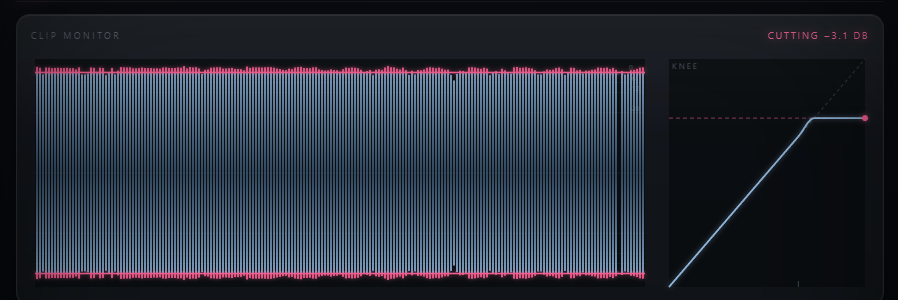
The GClip-style finisher is generalised into three controls and drawn in real time. The Clip Monitor hero shows the actual measured DSP peaks — clipper output as a frost wave, the slice that got cut as glowing raspberry, the ceiling as a raspberry line, and a dashed line where the SOFT knee starts to bend. No re-simulation in JavaScript: those are the numbers the audio thread measured.
GAIN drives the signal into the ceiling (the loudness lever). CLIP sets the ceiling itself, −18 to 0 dB. SOFT sets the knee width, 0 to 6 dB: 0 is a pure hard clip, 1 dB reproduces the Condor master's GClip bit-for-bit. The knee is a C1 cubic Hermite — slope 1 entering, slope 0 at the ceiling — continuous at both edges at every setting.
The scrolling monitor shows real pre-clip and post-clip peaks at 30 Hz with a live readout ("CUTTING −1.2 dB" / "CLEAN" / "CLIP OFF"). The KNEE inset draws the live transfer curve, auto-scaled to the ceiling, with a knee-start tick and the eased operating point of the programme material. A Type-1 activation glow, driven by the measured FAT activity, breathes when the saturator is working.
HQ 4× (default off) oversamples the entire nonlinear chain — the worst-case alias floor drops from −34 dB to −71 dB with 0.00 dB of H2/H3 character change; off stays the bit-identical zero-latency path, on reports the oversampler's few samples to the host. DELTA listen plays output minus the gain-matched dry — exactly what FAT and COLOR add and what the clipper removes — and nulls bit-exactly when the chain is linear.
Trim into the whole chain. Drives FAT and COLOR harder. The dry tap for Mix is taken after this trim, so parallel blends stay level-balanced.
The fattener. Morphs clean into loudness-matched 2nd/3rd-order harmonic warmth (H2 −19.7 dB at max). Loudness holds within ±1.3 dB across the sweep.
LR4 @ 110 Hz keeps subs out of the saturator, phase-matched dry. Off = the original Condor-master full-band sound.
Presence shelf (RBJ, 4.8 kHz, ≈+4.6 dB @ 15 kHz maxed) plus an envelope-normalised air exciter — the same sheen at any input level.
Parallel blend of the wet chain against the phase-matched, latency-free dry. Lower it for parallel thickening that never combs.
Level into the clip section — set how hard the fattened, coloured signal arrives at the ceiling before GAIN.
The clip section on/off. On, Grosbeak is a finisher; at CLIP 0 dB / GAIN 0 it only touches actual overs. Off = an honest bypass for null tests.
Drive into the ceiling — the GClip loudness lever. Push it to push more of the programme into the knee and past the ceiling.
The ceiling itself. Everything above it is clipped; the SOFT knee eases the approach. Shown live as the raspberry line in the monitor.
Knee width below the ceiling. 0 = pure hard clip; 1 dB reproduces the Condor GClip exactly; higher = a rounder, softer approach.
Oversample the whole nonlinear chain at 4×. Off = zero-latency identity path; On drops the worst-case alias floor ~37 dB and reports latency. Toggle while stopped.
Listen to output minus the gain-matched dry — exactly the adds and cuts. Accent-lit so it can't be left on unnoticed; nulls bit-exactly when linear.
Applying a preset resets every parameter to default first, then dials in only the values listed — so each is a clean, predictable starting point. HQ and Delta stay at their defaults in every factory preset: HQ is a session choice, Delta is a listen mode.
All defaults. FAT and COLOR at 0%, Mix 100%, Clip on at 0 dB / SOFT 1. A transparent, zero-latency starting slate.
A touch of FAT and a hint of COLOR. Light harmonic weight and air to glue a stereo bus together without any obvious effect.
More saturation, more colour, and a few dB of clip GAIN. A confident, forward master-bus thickness that pushes into the ceiling.
Heavy FAT and COLOR into +6 dB of GAIN with a near-hard knee (SOFT 0.5). For the drop — maximum weight and loudness.
Gentle FAT with a wide, soft knee (SOFT 3) and Mix pulled to 85% — a warm, rounded master finish that keeps some dry intact.
SUB SAFE engaged, heavy FAT (55%) and +5 dB GAIN. Slam the mids and highs hard while the sub-bass stays clean under 110 Hz.
A little FAT and a lot of COLOR (42%). Mostly presence shelf and air exciter — brighten and open a dull mix without adding weight.
No FAT or COLOR — +4 dB GAIN into a tight knee (SOFT 0.2). Pure ceiling control for a transparent, loud clip-only finish.
Big FAT (62%) blended at 45% Mix. Parallel saturation — dense harmonics under the dry signal without losing the transient snap.