Audubon · Plugins
GRK-001  ·  Released v1.2
Grackle full plugin UI
NEW · VST3 PLUGIN EST. 2026 · AUDUBON AUDIO
Color Bass Resonator

Grackle.
Color that rings in tune.

Light up notes on the built-in keyboard and a bank of tuned resonators rings color at those pitches — morphable from glassy and pretty to metallic and bell-like. A Focus crossover keeps everything below it dry, so the sub stays clean and punchy at every setting.

Under development · v1.2.0
$29
Format
VST3 Fx · Win 64 · macOS Universal
Engine
Tuned Resonators + Focus crossover
Latency
Zero at every setting
Notes
12 chroma keyboard
License
Royalty-free commercial OK
01 — Overview

Light a chord. Hear it ring.

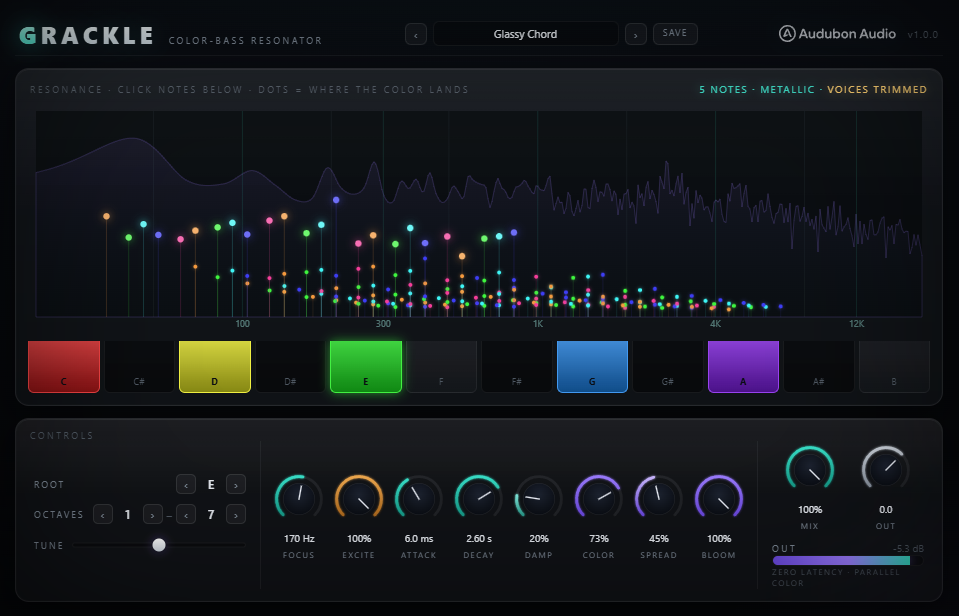
Grackle is a tuned resonator bank locked to whatever notes you light on its built-in 12-key chroma keyboard — a chord, a scale, a single pitch. Whatever hits the plugin with energy near a lit note rings at that pitch, like a resonant EQ that sings instead of just cutting and boosting.

VST3 Tuned Resonator Zero Latency Bass-Safe Parallel Dry

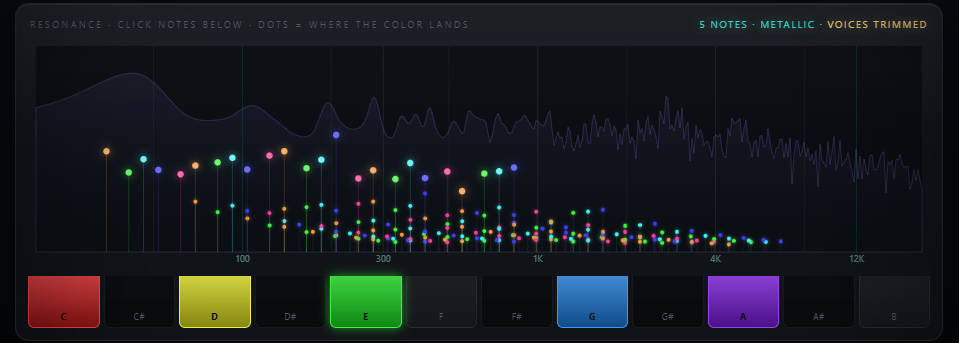
The spectrum display shows resonance landing as colored dots that spread apart as Color rises — you watch the chord's color take shape in real time, not just hear it.

A Focus crossover keeps the resonator bank from touching anything below it — dry stays full-band and untouched in parallel, so the sub never gets tuned, colored, or smeared. At Mix 0% or with no notes lit, the output is bit-identical dry.

Grackle full plugin interface
Plugin · full interface
02 — The Engine

Tuned to ring, built to stay clean.

One resonator voice per lit note, each tracking its own pitch. Focus is the bass control — it high-passes what excites the resonators and what returns as wet, so nothing tuned ever lands on your fundamental.

Grackle chroma keyboard with spectrum display above it
One Voice Per Note

Each lit pitch class gets its own tuned resonator voice, ringing only when the source has energy near it — played-through, not synthesized.

Focus Crossover

Sets the frequency above which resonance is applied. Everything below stays fully dry — the sub is never resonated, colored, or delayed.

Zero Latency

The dry path runs fully in parallel with no added delay, at every Focus, Decay, Color, or Mix setting — safe to use on a live bass bus.

Unconditionally Stable

Ring feedback is hard-clamped below unity, so long Decay times never risk runaway self-oscillation, even on dense chords.

03 — Playing It

A chord, lit by hand.

Notes are chosen manually on the 12-key chroma keyboard — pitch classes across an octave range, transposed and voiced with a handful of controls.

Keyboard

Click any of the 12 pitch classes to light it. Light a single note, a power chord, a full scale — whatever the track needs.
NotesManual, up to 12
R
Root

Transposes the whole lit set to a new key without re-clicking a single note.

Range12 keys
8ve
Octave Lo / Hi

Sets how many octaves the lit pitch classes span — a tight cluster or a wide spread across the register.

Range0 – 8 each
±
Tune

Fine-tunes the whole set in cents — nudge everything sharp or flat to match a detuned source.

Range±50 cents
Spread

Widens the resonance across the stereo field, tapered off under 120 Hz so low notes stay mono-safe.

Range0 – 100%
32-Voice Pool

Dense chromatic masks trim gracefully, dropping the lowest notes first so the pool never chokes.
Voices32 max
04 — Color

The money knob. Pretty to metallic.

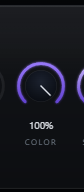
Grackle Color knob turned toward metallic
A — Pretty
Glassy, Harmonic

At low Color, each voice's overtones stay integer and clean — a smooth, glassy ring that sits naturally under the source.

B — Metallic
Inharmonic, Bell-Like

Push Color up and the partials stretch off the harmonic series into bell and metallic territory — the same axis that defines "color bass" resonators.

C — Watch It Happen
Dots Spread on the Spectrum

The live spectrum display shows resonance as colored dots that visibly spread apart as Color rises — the harmonic-to-metallic morph, made visible.
05 — Damp & Bloom

Brightness, and an optional shimmer.

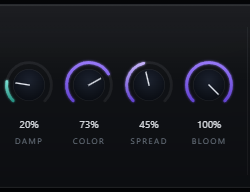
Grackle Damp and Bloom controls
A — Damp
Ring Brightness

Controls how bright or dark the ring decays — low Damp keeps it shimmering longer at the top, high Damp mellows it into a darker tail.

B — Bloom
Wet-Only Diffusion, Off by Default

Adds a lush, spectral shimmer to the wet signal only. Defaults to 0%, which is bit-exact bypassed — no smear and no latency added to the dry until you opt in.

C — Together
From Tight Ring to Wash

Low Damp and no Bloom gives a tight, bright ring; darken with Damp and add Bloom for a slow, blooming color wash instead.

06 — Global Controls

Five knobs shape the ring.

Focus keeps it bass-safe; Attack and Decay set the envelope; Mix and Output finish the blend.
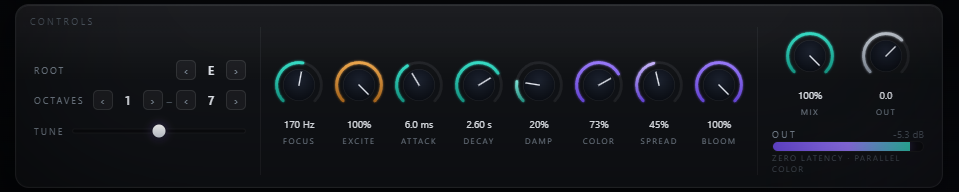
Grackle full control layout
Focus
20 → 1000 Hz

The crossover — resonance only applies above this frequency, keeping the sub dry and clean.

Attack
0 → 500 ms

Onset time per voice. Zero for a plucky stab that tracks transients, longer for a slow swell.

Decay
0.05 → 8 s

Ring length. Short for a percussive color hit, long for a sustained, blooming resonance.

Mix
0 → 100 %

Equal-power dry/wet blend. At 0%, output is bit-identical to the dry input.

Output
−24 → 12 dB

Post-mix trim for level-matched comparisons against bypass.

07 — Workflow

From insert to color, in six moves.

Grackle full plugin view Grackle chroma keyboard and spectrum
01
Insert Grackle on a bass, synth, drum bus, or vocal — anywhere tuned color could add character.
02
Light a chord or scale on the chroma keyboard, matching the key of your track with Root.
03
Set Focus above your sub's fundamental so the low end stays untouched and clean.
04
Dial Decay and Attack for the shape of the ring — short and plucky, or long and blooming.
05
Push Color toward metallic for bell-like color bass, or keep it low for a glassy, harmonic shimmer.
06
Balance with Mix, try a touch of Bloom for extra wash, and trim Output to match bypass level.
08 — Specifications

Everything, on one page.

Format
VST3
Category
Fx · Resonator
Platform
Windows 10 / 11 · macOS 10.13+ (Universal — Apple Silicon & Intel) · 64-bit
Version
1.2.0
Engine
Tuned resonator bank, one voice per lit note, up to 32 voices
Note entry
Manual 12-key chroma keyboard (not MIDI-driven)
Focus
20 – 1000 Hz crossover, resonance applied above only
Attack / Decay
0 – 500 ms / 0.05 – 8 s
Color
0 – 100%, glassy/harmonic to metallic/inharmonic
Damp
0 – 100% ring brightness
Spread
0 – 100%, tapered under 120 Hz
Bloom
0 – 100%, wet-only, off by default, bit-exact bypass at 0
Root / Octave / Tune
12 keys · 0–8 octave range each side · ±50 cents
Mix / Output
0 – 100% equal-power · −24 to +12 dB trim
Latency
0 samples, reported and verified at every setting
State save
Lit notes and full settings saved with DAW project
09 — Fine Print

Documentation.

DAW
Any VST3-compatible host — Ableton Live 11+, FL Studio 20+, Reaper, Cubase, Studio One, Bitwig, and others. VST3 only — Logic Pro and GarageBand load Audio Units, not VST3, so they are not supported.
Operating System
Windows 10 or 11 (64-bit) — the editor uses WebView2, which is built into Windows 11 and most current Windows 10 installs. macOS 10.13 High Sierra or later — one Universal build runs natively on both Apple Silicon and Intel Macs.
Format
VST3 effect. Notes are chosen manually on the built-in keyboard — no MIDI connection needed or used.
Latency
Zero reported latency at every setting, including with Bloom engaged — safe to insert anywhere without re-aligning tracks.
Recommended Setup
Light your track's root and fifth, set Focus around 150–200 Hz on a bass source, Decay around 1.5s, and Color low to start. Raise Color toward metallic from there.
Updates
Current release 1.2.0. Free updates for all future 1.x releases.
v1.2.0 — Update check, from the logo
The Audubon Audio wordmark in Grackle’s header is now a button. Click it and Grackle asks audubonaudio.com one question — which build is current — then shows that number beside the one you are running, with a link straight to the members area if there is something newer and a plain “you have the current version” if there is not. If it cannot reach us it says so rather than claiming you are up to date. This is the only moment Grackle touches the internet, it happens only on that click, and nothing about you goes with it — no serial, no licence, no machine id, not even your version or operating system. The comparison happens on your own machine.
v1.0.0 — Initial Release
First public release. Tuned resonator bank (up to 32 voices) driven by a manual 12-key chroma keyboard, Focus crossover for bass-safe operation, Attack/Decay envelope, Color harmonic-to-metallic morph, Damp, Spread, wet-only Bloom (off by default), Root/Octave/Tune voicing, Mix, and Output — zero latency at every setting.
Full User Guide
Step-by-step walkthrough of the chroma keyboard, Focus and the envelope, Color, Damp and Bloom, and workflow recipes for tuned color bass.
Open User Guide →
Personal & Commercial Use
Use Grackle in any project — music production, mixing, sound design, post-production, broadcast, and live performance. No royalties, no project restrictions.
Single User
One license per user. Install on the computers you personally own or operate.
Serial Activation
Your license includes a unique serial number tied to your email. Your serial and download are permanently accessible in your Members Area.
Free Updates
All 1.x updates are free. Your serial activates the current version and all future updates in the 1.x line.
No Redistribution
The plugin binaries may not be shared, resold, or redistributed. Each user must obtain their own license.
G
Grackle Resonant Color · VST3
$29