Audubon ยท Plugins
CRL-001  ยท  Released v1.4
Curlew drawable delay curve
NEW ยท VST3 PLUGIN EST. 2026 ยท AUDUBON AUDIO
Spectral Frame Delay

Curlew.
Bend time, one bin at a time.

Every FFT bin delayed by its own hand-drawn amount, up to 128 frames per band. Not a phase mangler, a true per-band delay, with feedback resonance and spectral shift layered on top.

One-time ยท v1.4.0
$29
Free, full plugin. The output dips to silence every 30 seconds until you enter a serial โ€” buying removes it, no reinstall needed.
Format
VST3 Fx ยท Win 64 ยท macOS Universal
Engine
1024-pt 8ร— overlap STFT
Per-bin delay
0โ€“128 frames ยท โ‰ˆ371 ms
Curve
512-pt drawable, log-freq
License
Royalty-free commercial OK
01 โ€” Overview

One curve.
Every band, its own delay.

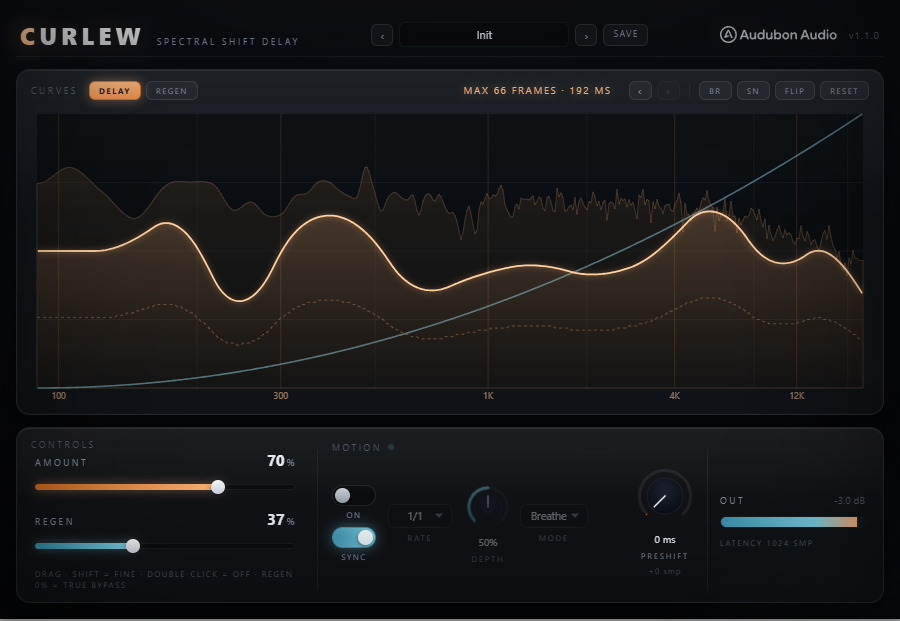
Curlew runs a 1024-point, 8ร—-overlap STFT and delays every FFT bin by its own whole number of spectral frames โ€” up to 128 frames, roughly 371 ms at 44.1 kHz. The per-bin delay amount is a curve you draw by hand on a log-frequency axis, so lows can lag while highs stay tight, or the reverse โ€” any shape you can draw.

VST3 Spectral Delay Drawable Curve Feedback Resonance Spectral Shift

Named for the curlew's long, down-curved bill โ€” the exact shape of the plugin's default delay curve. Real and imaginary parts of each bin travel together through the same integer-frame delay, so this stays a true per-band delay, never a phase mangler.

Draw the curve by hand, or reach for BR and SN to generate a brown-noise or smooth-noise walk, FLIP to invert it, or RESET for the classic falling ramp. A live output spectrum sits behind the curve so you can see exactly which bands you're delaying while you draw.

Curlew full plugin UI
Full Plugin UI
02 โ€” The Engine

Whole frames, not fractions of a sample.

Each of the 512 curve points sets an integer frame delay for its bin โ€” 128 frames maximum, scaled from the Amount macro through a piecewise curve so the top of the knob doesn't slam every band to max delay at once.

Curlew full plugin UI showing the drawable delay curve
โˆฟ
512-Point Curve

Drawn on a hand-calibrated log-frequency axis (100 / 300 / 1K / 4K / 12K), so the curve reads the way your ears hear frequency, not the way an FFT bins it.

โง—
Amount Macro

One knob scales the whole drawn curve up or down through a piecewise-linear law, so you can push the entire shape harder without redrawing it.

โ—
Preshift

Reports up to 4096 extra samples of latency so the host shifts the track earlier โ€” the fastest bands can land before the beat, with the preshift as the curve's new zero line.

โ–ค
100% Wet

No dry path in the base engine โ€” every bin passes through the delay line. Set Regen to 0% for true bypass of the feedback layer on top.

03 โ€” Curve Tools

Draw it, or let Curlew draw it.

Every generator writes a fresh 512-point curve you can keep editing by hand afterward. History remembers the last five, so nothing you generate is ever a dead end.

โœŽ
Draw by Hand

Click and drag anywhere on the graph to sculpt the curve directly โ€” any shape, any band emphasis, no menus in the way.
CurveFreehand
BR
Brown Walk

A free-running brown-noise random walk across the curve โ€” organic, wandering delay amounts band to band.

GeneratorOrganic
SN
Smooth Noise

A slid, overdriven random curve โ€” smoother and more rounded than the brown walk, with its own rhythmic character.

GeneratorRounded
FLIP
Invert

Flips the active curve top to bottom in one click โ€” turn a falling ramp into a rising one instantly.

Tool1 โˆ’ curve
RESET
Falling Ramp

Back to the default curlew's-bill shape โ€” the classic falling ramp the plugin is named for.

ToolDefault
โ€นโ€บ
Curve History

Step back and forward through your last five curves. A hand-drawn curve is parked as its own undo point before any button overwrites it.
History5 deep
04 โ€” Regen

Every band, its own echo.

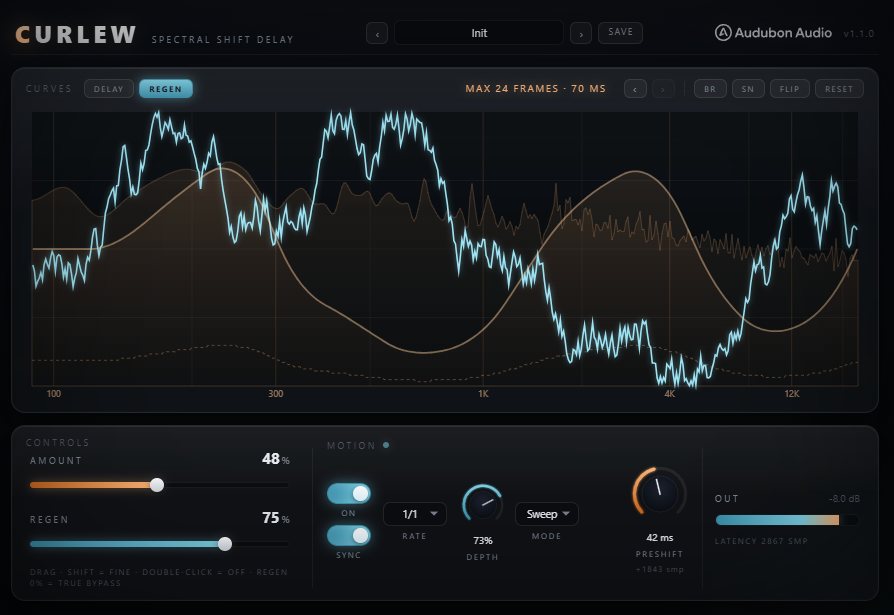
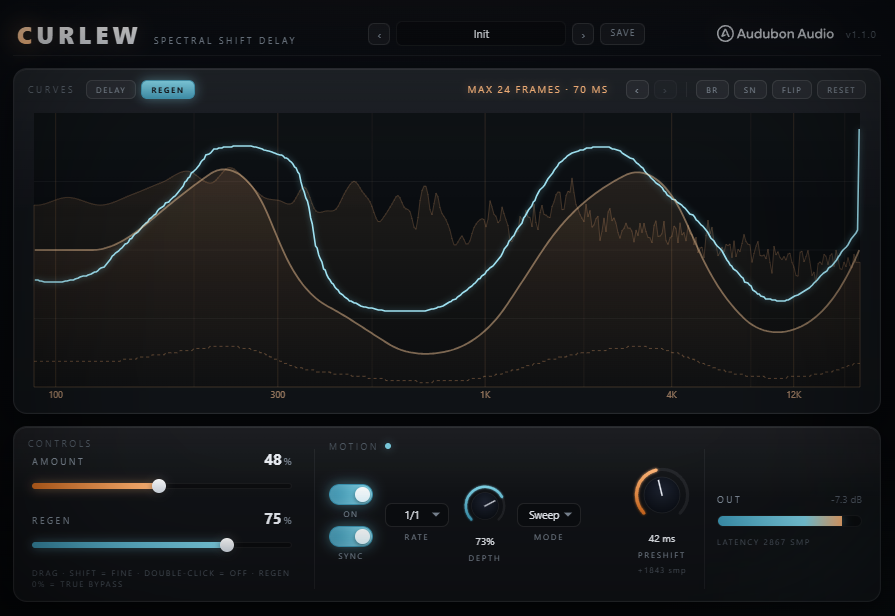
Curlew REGEN feedback curve in cyan
A โ€” Second Curve
A Cyan Curve of Its Own

Regen is a second drawable curve that feeds a fraction of each delayed bin back into the spectral history. Every band becomes its own echo or resonator, repeating every frame and decaying by the amount you draw.

B โ€” Sub-Safe by Default
Capped Below Unity

The feedback gain is capped so it always decays โ€” never a runaway build-up. The default curve keeps the low-mids and below almost untouched, so bass stays clean while highs get the resonance.

C โ€” True Bypass at 0%
Zero Means Zero

Regen at 0% is the literal v1.0 code path โ€” the feedback loop never runs. Bands with no delay never regenerate either way, so a straight pass-through band stays completely untouched.
05 โ€” Shift

Echoes that climb. Or clang.

Curlew SHIFT knob and violet per-band shift curve
A โ€” Harmonic
The Same Interval, Every Note

Regen used to feed each bin back into itself, so echoes stayed put. Harmonic mode moves every repeat by a pitch ratio instead โ€” ±24 semitones โ€” so repeats climb or fall by a fixed interval and the result is key-independent by construction. A proper shimmer, or a riser that never drifts out of key.

B โ€” Linear
Fixed Hz, Musically Wrong on Purpose

Linear mode moves each repeat by a fixed number of bins โ€” ±24, one bin being 43.07 Hz at 44.1 kHz. Because that is a fixed Hz offset, the interval changes with the note: an octave down at 43 Hz, a flat seventh at 55 Hz. This is where the metallic, clangy, detuned character lives.

C โ€” Inert Until You Ask
Zero by Default

Shift ships at 0 and does nothing until you move it โ€” at zero the injection is the literal v1.1 code path. The violet curve is a per-band amount that only ever scales the knob back, flat at full by default: draw a band down to pin it, and the sub can hold still while the harmonics walk off the top. Needs Regen above 0, since with no repeats there is nothing to migrate.

06 โ€” Global Controls

Five controls run the whole engine.

Amount and Regen scale the delay and feedback curves; Shift moves each repeat through the spectrum and the HARM/LIN chip picks how; Preshift pulls the timeline earlier.

Curlew control row: Amount, Regen, Shift, Preshift
Amount
0 โ†’ 100 %

Scales the drawn delay curve. The only automatable parameter carried over from the original patch.

Regen
0 โ†’ 100 %

Scales the feedback curve. 0% is true bypass of the resonance layer โ€” the base delay keeps running underneath.

Shift
โˆ’24 โ†’ +24

How far each echo generation migrates through the spectrum โ€” semitones in Harmonic mode, bins in Linear. Defaults to 0, which is inert. Needs Regen above 0 to do anything.

HARM / LIN
chip toggle

Picks how Shift measures its move: a pitch ratio that holds the same interval on every note, or a fixed number of bins that does not.

Preshift
0 โ€“ 4096 samples

Reported latency, not audio. Saved with the session but not automatable โ€” shifts the whole curve's zero line earlier in the timeline.

07 โ€” Workflow

From insert to shimmer, in six moves.

01
Insert Curlew on any channel โ€” pads, vocals, drum busses, full mixes โ€” anywhere per-band delay could add width or movement.
02
Start with RESET's falling ramp, then raise Amount to hear lows lag behind highs โ€” the plugin's signature default character.
03
Draw over the curve by hand, or try BR or SN for a randomized shape, then FLIP it to hear the delay pattern inverted.
04
Switch to the REGEN chip and raise Regen for spectral resonance โ€” each band starts echoing on its own.
05
With Regen up, raise Shift to send each repeat climbing through the spectrum โ€” HARM for a shimmer that stays in key, LIN for metallic clang. Draw the violet curve down over any band you want held still.
06
Dial in Preshift if you want the fastest bands landing ahead of the beat instead of behind it. Step through Curve History with โ€น โ€บ to compare takes.
08 โ€” Specifications

Everything, on one page.

Format
VST3
Category
Fx ยท Spectral Delay
Platform
Windows 10 / 11 ยท macOS 10.13+ (Universal โ€” Apple Silicon & Intel) ยท 64-bit
Version
1.4.0
Engine
1024-point, 8ร— overlap STFT ยท 128-sample hop
Per-bin delay
0 โ€“ 128 frames ยท โ‰ˆ0โ€“371 ms @ 44.1 kHz
Curve
512 points ยท drawable ยท log-frequency axis
Curve tools
Draw ยท BR (brown walk) ยท SN (smooth noise) ยท FLIP ยท RESET
Curve history
โ€น โ€บ undo/redo, 5 steps deep
Regen
0 โ€“ 100% ยท per-band feedback resonance, second drawable curve
Shift
โˆ’24 โ†’ +24 ยท harmonic (semitones) or linear (bins) ยท third drawable curve ยท 0 by default
Preshift
0 โ€“ 4096 samples reported latency, not automatable
Signal path
100% wet ยท no dry path in the base engine
Base latency
1024 samples (WOLA) + Preshift on top
Value entry
Double-click any knob to type an exact value
State save
Curves and full settings saved with DAW project
09 โ€” Fine Print

Documentation.

DAW
Any VST3-compatible host โ€” Ableton Live 11+, FL Studio 20+, Reaper, Cubase, Studio One, Bitwig, and others. VST3 only โ€” Logic Pro and GarageBand load Audio Units, not VST3, so they are not supported.
Operating System
Windows 10 or 11 (64-bit) โ€” the editor uses WebView2, which is built into Windows 11 and most current Windows 10 installs. macOS 10.13 High Sierra or later โ€” one Universal build runs natively on both Apple Silicon and Intel Macs.
Format
VST3 effect. Insert on any mono or stereo channel where per-band delay, resonance, or spectral shift would help.
Latency
Reports 1024 samples of base latency plus whatever Preshift is dialed in (up to 4096 more). Your host compensates automatically on mixdown.
Recommended Setup
Start with the default RESET curve, Amount around 60%, Regen at 0% to hear the base delay alone, then bring Regen up gradually.
Updates
Current release 1.4.0, including the Regen and Shift engine. Free updates for all future 1.x releases.
v1.4.0 โ€” Shift, and Motion removed
SHIFT is a new knob and a third drawable curve (violet). Regen used to re-inject each bin back into itself, so echoes stayed where they started; now every repeat migrates through the spectrum. Harmonic mode — the default — moves each generation by a pitch ratio, ±24 semitones, so the interval is the same on every note and the effect is key-independent by construction: shimmers and risers that stay in key. Linear moves by a fixed number of bins instead, ±24, which is a fixed Hz offset and therefore a different interval on every note — inharmonic on purpose, and where the metallic clang lives. The violet curve is a per-band amount that only scales the knob back, flat at full by default, so you can pin the sub while the harmonics climb. Shift defaults to 0 and is inert there: at zero the injection is the literal v1.1 code path. It needs Regen above 0, since with no repeats there is nothing to migrate. Stability is unconditional — a feedback cycle's loop gain is the product of its per-bin gains, each capped at 0.98, so any cycle of length n has gain โ‰ค 0.98ⁿ < 1.

MOTION has been removed. Each bin's delay is a whole number of frames read with no blend, so a band whose delay moved by one frame had its phase rotated with nothing to hide it — at the old preset rates that meant on the order of ten thousand phase-scramble events a second. It could not be tuned into sounding good, so the LFO is gone from both the panel and the DSP. The lfo_* parameters stay registered, so sessions saved with older versions still load; nothing reads them.
v1.3.0 โ€” Update check, from the logo
The Audubon Audio wordmark in Curlew’s header is now a button. Click it and Curlew asks audubonaudio.com one question — which build is current — then shows that number beside the one you are running, with a link straight to the members area if there is something newer and a plain “you have the current version” if there is not. If it cannot reach us it says so rather than claiming you are up to date. This is the only moment Curlew touches the internet, it happens only on that click, and nothing about you goes with it — no serial, no licence, no machine id, not even your version or operating system. The comparison happens on your own machine.
v1.0.0 โ€” Initial Release
First public release. 1024-point / 8ร— overlap STFT per-bin delay engine, 512-point drawable curve with BR/SN/FLIP/RESET generators and 5-step undo history, Regen feedback resonance with its own curve, Motion (Breathe / Sweep) with free or tempo-synced rate, and Preshift negative-delay latency reporting.
Full User Guide
Step-by-step walkthrough of the curve tools, Regen, Shift, the global controls, and workflow recipes for width, resonance, and spectral movement.
Open User Guide โ†’
Personal & Commercial Use
Use Curlew in any project โ€” music production, mixing, sound design, post-production, broadcast, and live performance. No royalties, no project restrictions.
Single User
One license per user. Install on the computers you personally own or operate.
Serial Activation
Your license includes a unique serial number tied to your email. Your serial and download are permanently accessible in your Members Area.
Free Updates
All 1.x updates are free. Your serial activates the current version and all future updates in the 1.x line.
No Redistribution
The plugin binaries may not be shared, resold, or redistributed. Each user must obtain their own license.
C
Curlew Spectral Delay ยท VST3
$29