Crossbill Harmonic Wavefolder
Crossbill folds the waveform back on itself every time it crosses the fold threshold, growing dense, resonant, metallic overtones — the west-coast sound for growls and leads. This guide covers every control, both fold shapes, how Drive and Folds interact, the odd↔even Symmetry axis, and four practical workflows.
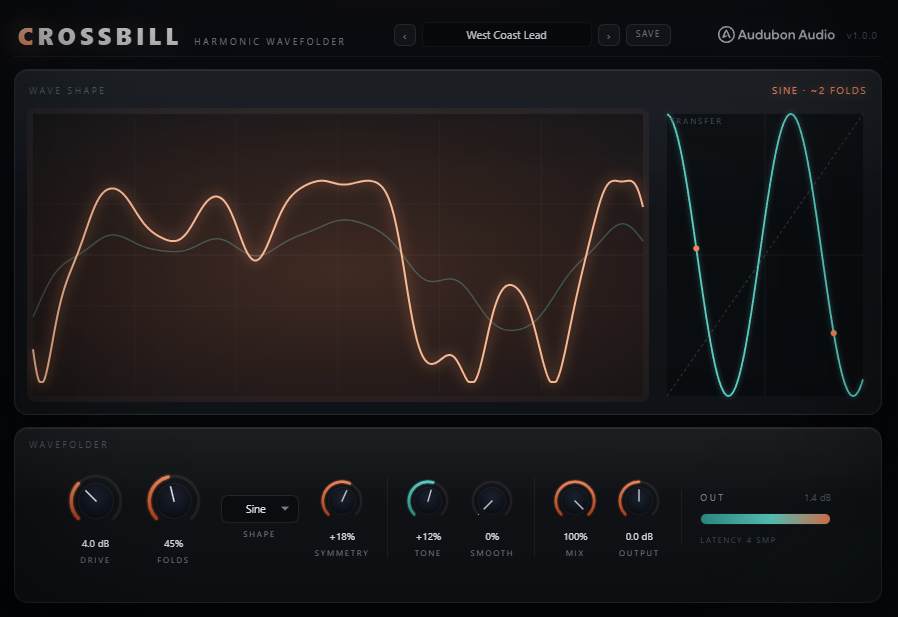
What folding does
A clipper flattens peaks; a wavefolder reflects them. Each time the signal exceeds the fold threshold, it bounces back — adding a new pair of peaks and a new burst of harmonics. Both of Crossbill's fold functions are bounded to full scale with unity slope at the origin, which means two things:
- It's transparent when you back off. Small signals pass through unchanged — folding only kicks in as the level climbs.
- It can't run away. No setting of Drive or Folds pushes the output past full scale. Harder settings add folds (density, brightness), not level.
Watch the hero scope: the faint line is your input, the glowing copper line is the folded output. The teal inset is the transfer curve — the exact input→output map, with a dot showing where your signal currently sits.
Drive & Folds — the fold core
Two controls drive the folding, and they do different jobs:
- Drive — −12…+36 dB, default +3. Input gain into the folder: how hard you hit the fold points. More drive makes the wave cross the threshold more often.
- Folds — 0–100%, default 50. Fold density, mapping to a 1×–8× fold gain. This is the primary "how metallic" control — raise it for a thicker stack of overtones.
Because the folder is bounded, both controls read as brightness and density rather than volume. Push them freely — you're sculpting harmonics against a constant ceiling.
Shape — Sine vs Triangle
The Shape switch picks the fold function, and it's the single biggest tonal decision:
- Sine — wraps the signal through a smooth sinusoid. Rounded folds, gentler harmonic roll-off. The classic west-coast (Buchla) timbre — warmer and more musical for leads and pads.
- Triangle — a reflective period-4 triangle. Sharper corners, harmonics that extend further and buzz harder. The aggressive, metallic reese/growl side.
Set Shape first, then dial Drive and Folds — the same knob positions sound very different between the two shapes.
Symmetry — odd ↔ even harmonics
Symmetry (−100…+100%, default 0) applies a DC bias before the fold so the wave folds off-centre. This is your harmonic-character control:
- Centred (0%) — symmetric folding produces purely odd harmonics: a hollow, square-ish tone.
- Off-centre (±) — introduces even harmonics for a fuller, more vocal or brassy character. Push it further for more even content.
A DC blocker after the fold keeps the output centred no matter how far you bias, so Symmetry never leaves an offset on your signal.
Tone & Smooth — voicing the folder
Two filters shape the sound around the fold core:
- Tone — −100…+100%, default 0. A pre-fold tilt (±6 dB about 700 Hz). Because it's before the folder, it changes which harmonics get generated: tilt bright to feed highs in for fizz, tilt dark to fold mostly low-end for a thicker growl.
- Smooth — 0–100%, default 0. A post-fold lowpass sweeping 20 kHz → 1.5 kHz. Pull it down to tame the fizz and harshness dense folding creates, until the growl sits in your mix.
Mix, Output & presets
Mix (0–100%, default 100) blends the folded signal against the dry — and the dry copy is delay-aligned to the 4× oversampler, so parallel folding never smears phase. This is the key to adding overtone weight to a sub without touching its fundamental (see the Sub Harmonics preset).
Output (±24 dB) is the final trim with a live meter — use it to match levels against bypass. Crossbill ships with 7 factory presets; each resets all parameters to default then applies its overrides, so it's always a clean starting point. Save your own as .crossbillpreset files in your Documents folder.
West-coast singing lead
Feed a simple saw or triangle. Set Shape to Sine, Folds around 40–50%, and Drive to taste. Nudge Symmetry up to ~15–20% for a touch of even harmonics, and tilt Tone slightly bright. You get the classic Buchla-style singing lead — this is essentially the West Coast Lead preset. Automate Folds upward for a swelling timbre.
Metallic dubstep growl
Switch Shape to Triangle for sharp, extended harmonics. Push Folds to 65–80% and Drive hard — the bounded folder keeps it from clipping while the tone gets denser. Pull Symmetry negative for bite, then bring Smooth up to ~25–35% to tame the fizz. Layer over a clean sub. This is Metal Reese / Growl Teeth territory.
Parallel sub-harmonics
To thicken a sub without changing its level, set Drive to 0 and Folds low (~25%), Shape Sine, then pull Mix down to around 40%. The delay-aligned dry keeps the fundamental phase-solid while the folded copy adds gentle overtone weight on top. That's the Sub Harmonics preset — a great "glue" layer for bass.
Brassy tonal fold
For melodic parts, use Sine with strong positive Symmetry (~40%) and a warm Tone. Moderate Folds and a little Smooth give a hollow, brassy, bell-like resonance that tracks pitch musically — the Brass Bell preset. Blend with Mix if you want it to sit as a harmonic layer rather than a full replacement.