Bunting Spectral Chroma
Bunting recolours any sound toward a chord by reshaping its frequency spectrum — energy near lit pitch classes blooms through; energy between notes is dissolved. This guide covers the interface, every control, and practical workflows.
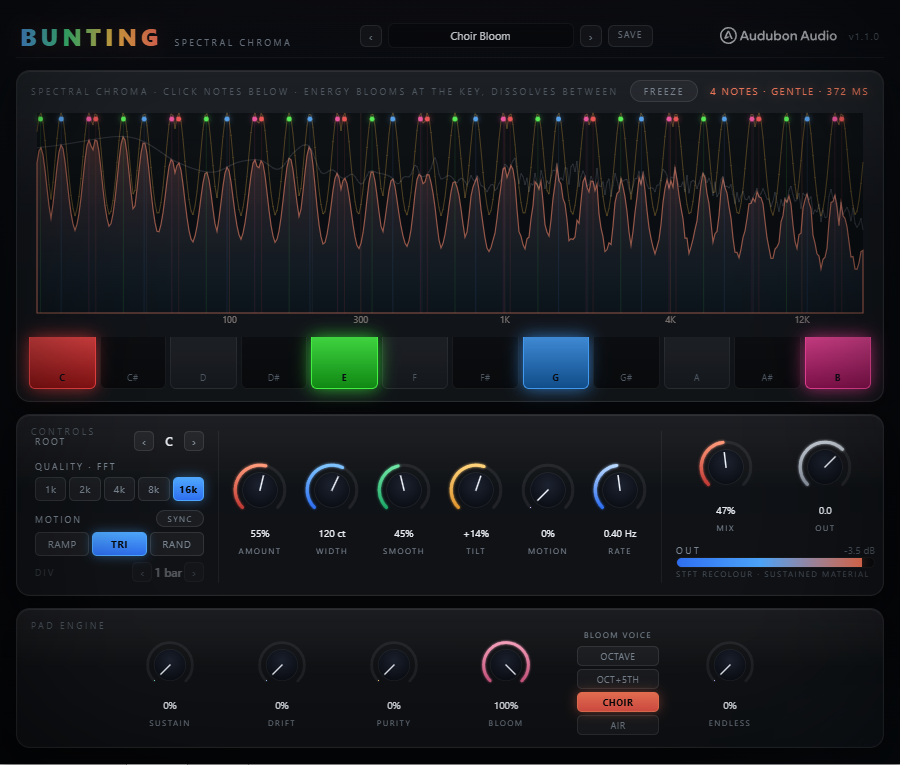
The Chroma Keyboard
The 12-key keyboard at the top of the UI is the heart of Bunting. Each key toggles a pitch class — C through B — on or off. Lit keys pass through at full gain across every octave in the spectrum. Unlocked pitch classes are attenuated by the Amount control.
The keyboard shows standard chromatic layout (C, C♯, D, D♯, E, F, F♯, G, G♯, A, A♯, B). Click any key to toggle it. Multiple keys can be active at once — build any chord, scale, or cluster. Default: C–E–G (major triad).
- Root — transposes the entire lit pattern 0–11 semitones. Set your chord on the keyboard, then use Root to move it to the key of your track without re-clicking keys.
- To move the chord up a fifth — set Root to 7. Your C–E–G becomes G–B–D.
- Automate Root — step through a chord progression by drawing automation in your DAW.
Amount & Width — Depth and Shape
These two controls define how aggressively the chroma mask cuts the spectrum and how wide the Gaussian "bells" around each note are.
- Amount (0–100%) — Sets how deeply the between-note bins are cut. 0% = fully transparent (bypass-equivalent). 100% = bins at maximum distance from any lit note are fully silenced. Default 40% gives a gentle lush wash. Push above 70% for hard spectral snapping.
- Width (10–300 cents) — Half-width of the Gaussian kernel around each lit note. Narrow (10–50 ct): surgical, almost notch-filter-like gaps between notes. Wide (150–300 ct): broad overlapping bells that blend adjacent notes together into a smooth tonal wash. Default 90 ct is a moderate bell shape.
Increase both together for a powerful but musical sound. Lower Amount with very wide Width creates a subtle brightening effect with almost no audible cutting.
Smooth — Temporal Smoothing
Smooth applies a per-bin time-domain low-pass to the chroma gain values across STFT frames. Without it, spectral bins near the edge of a note boundary would flicker as instantaneous pitch drifts between frames — producing a metallic warble or "underwater" effect.
- 0–20% — Safe only on very stable, steady-state sources (pure synth pads, sine-wave content). Fast response to changes.
- 30–50% — Recommended for most use cases. Suppresses warble on vocals, real instruments, reverb tails.
- 60–100% — Very slow gain transitions; chord changes will cross-fade gradually. Use at high Mix levels on complex harmonic sources where stability is more important than immediacy.
When Mask Motion is active, Smooth is automatically floored at a minimum value (~25 ms time constant) so chord steps from the LFO don't produce clicks even at low Smooth settings.
Mask Motion — LFO Chord Sweep
Mask Motion swings the Root semitone value through an LFO pattern, creating a slow or fast chord sweep over time. All Motion parameters are independent of the static Root knob — the LFO offset adds on top of the Root value.
- Motion 0–100% — Depth of the sweep. 0% = no motion. 100% = ±12 semitone full swing.
- Rate 0.02–8 Hz — Free-running LFO speed. Used when Sync is off. Skewed dial (centre at 0.5 Hz).
- Shape — Ramp: rising saw (sweeps up then resets). Tri: rises to +depth then falls back symmetrically. Rand: sample-and-hold, picks a random offset each cycle.
- Sync — Lock the LFO cycle to the host transport. The Rate knob is replaced by Div.
- Div — Sync division: 1/8, 1/4, 1/2, 1 bar, 2 bar, 4 bar. Chord changes land exactly on the grid.
Use Tri synced to 1 bar for a predictable in-key progression sweep. Use Rand at low Motion depth (20–30%) for an organic, breathing chord colour.
Spectral Freeze
The Freeze button engages a full phase-vocoder hold. Bunting captures two consecutive STFT frames, measures the true instantaneous frequency of each bin, and rebuilds the spectrum every frame from the locked magnitudes with continuously advancing phases. The frozen sound sustains indefinitely without metallic artifacts or beating.
The chroma mask is still applied on top of the frozen spectrum. This means you can:
- Freeze a reverb tail or held chord, then change the keyboard to a different chord over the sustained texture.
- Freeze and enable Mask Motion — the frozen sound plays while the chord sweeps through an LFO progression.
- Use Mix below 100% to keep the dry signal running through — the transition from frozen to live is click-free.
When Freeze is released, the engine returns to live STFT processing on the next hop boundary. There is no fade — the engine simply resumes reading new frames.
Tilt, Mix, Output & Quality
- Tilt (−100 to +100%) — A spectral tilt EQ applied only to the wet side of the blend, pivoting at 650 Hz. +100% adds up to +6 dB at the top and −6 dB at the bottom (brighter). Useful for compensating the slight darkening that can occur when a chord mask cuts high-frequency content between notes.
- Mix (0–100%) — Equal-power dry/wet blend. The dry path is delayed by one FFT window (same as the wet latency) so blending at any position is phase-coherent. Default 100%.
- Output (−24 to +12 dB) — Post-blend level trim. Compensate for loudness changes when pushing Amount.
- Quality (FFT Size) — Sets STFT resolution. Larger sizes resolve lower pitch classes more accurately but increase latency by the same proportion. The host compensates via PDC. Not automatable — changing it re-prepares the engine off the audio thread.
- 1024 — ≈23 ms / ≈394 Hz floor
- 2048 (default) — ≈46 ms / ≈200 Hz floor
- 4096 — ≈93 ms / ≈100 Hz floor
- 8192 — ≈186 ms / ≈50 Hz floor
- 16384 — ≈372 ms / ≈25 Hz floor
Key-lock a pad or reverb send
Drop Bunting on a reverb return or a sustained synth pad. Set the chord to match your track key (e.g. F minor: F–Ab–C). Set Amount 45–60%, Width 90–120 ct, Smooth 40%. Pull Mix back to 70–85% to keep some of the original character. The reverb tails will gradually drift into the chord.
Tonal noise pad from white noise
Send a noise generator through Bunting. Set a 5–7 note scale (try pentatonic: C–D–E–G–A). Raise Amount to 85–100%, Width 50–70 ct, Smooth 50%. The noise snaps into a buzzing, tonal pad that follows the lit pitches at every octave simultaneously — no oscillator needed.
Frozen texture as a chord instrument
Feed Bunting a held chord or a lush reverb. Engage Freeze once the sound fills the buffer (it locks after two frames). Enable Mask Motion: Tri shape, synced 1 bar, Motion 40–60%. The frozen sound now plays as a repeating chord that sweeps up and down the scale in time with the bar. Change the keyboard pattern while frozen to shift the chord.
Chord progression on automation
Set your chord voicing on the keyboard (e.g. major triad). In your DAW, automate the Root parameter to step through a four-bar progression: 0 (C) → 5 (F) → 7 (G) → 9 (A). The lit pitch classes follow Root automatically, so a C–E–G on the keyboard plays C maj, F maj, G maj, A maj in sequence. Combine with Smooth 50%+ to cross-fade smoothly between chords.