01
Init
C major triad. Amount 40%, Width 90 ct, Smooth 35%. Gentle default — all controls at centre, transparent feel with a light chroma wash.
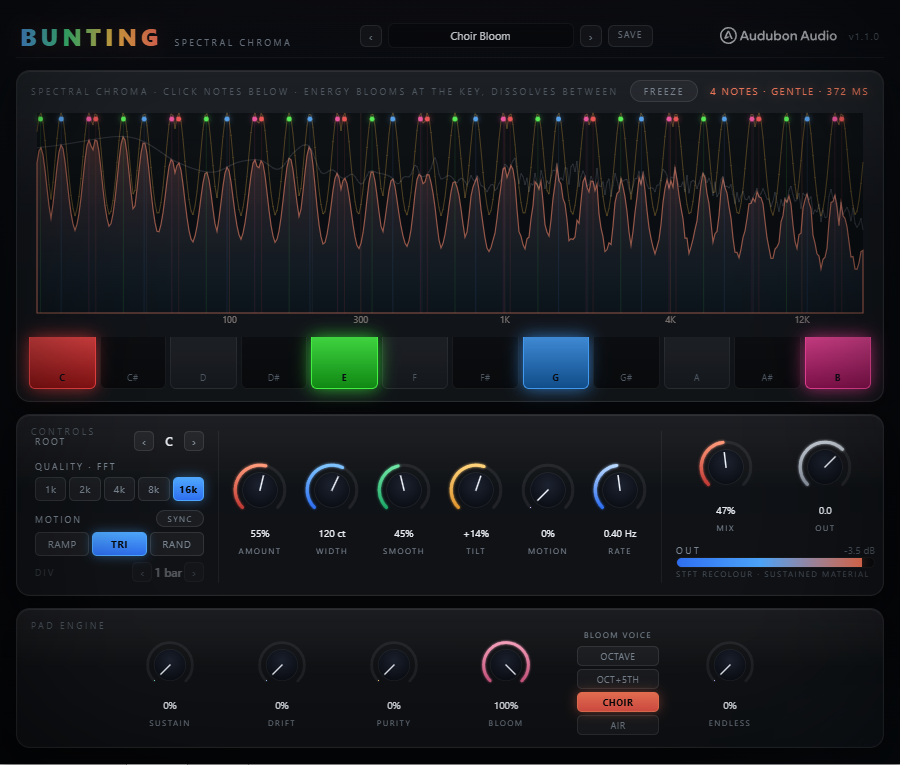
Reshape the frequency spectrum of any sound toward the chord you choose — energy that lands on a lit pitch class blooms through across every octave, energy between the notes is dissolved. Works on pads, textures, synths, reverb tails, and noise.
Bunting reshapes the frequency spectrum of any sound toward the chord you choose — energy that lands on a lit pitch class blooms through across every octave, energy between the notes is dissolved. It works on pads, textures, synths, reverb tails, and noise. This is a spectral mask that follows the chord, not a pitched resonator or a harmonic exciter.
A spectral mask that follows the chord — lit pitch classes bloom, everything between the notes dissolves.
Bunting runs a windowed overlap-add STFT and applies a Gaussian gain to each frequency bin based on how close that bin's pitch class is to the lit notes on the chroma keyboard. Phase is preserved exactly — only magnitudes change. Add spectral Freeze to latch a texture, and Mask Motion to sweep the whole chord through a progression on an LFO.
Bunting runs a windowed overlap-add STFT (Hann, 75% overlap) and applies a Gaussian gain to each frequency bin based on how close that bin's pitch class is to the lit notes on the chroma keyboard. The phase of every bin is preserved exactly — only the magnitudes change. The result is a spectrum that follows the chord.
For each FFT bin, Bunting computes the bin's pitch class (its position within the chromatic octave), finds the minimum circular-semitone distance to any lit note, and applies a Gaussian gain: w = (1−Amount) + Amount × exp(−(d×100/Width)²). At any lit note the gain is exactly 1.0. At maximum distance it falls to (1−Amount). The phase is untouched.
When Amount is 0, or when no notes are lit, or when all 12 notes are lit, every bin's gain is exactly 1.0. The plugin is bit-transparent in bypass: WOLA at overlap-4 with a periodic Hann window reconstructs the input identically (within floating-point precision). No colouration unless you ask for it.
The per-bin gains are smoothed across STFT frames (Smooth parameter). Without smoothing, a bin near a note boundary would flicker as its instantaneous pitch class drifts — creating a metallic warble. Smoothing applies a one-pole low-pass per bin (up to ~100 ms time constant), gliding gains between frames so chord transitions are click-free.
Pipeline latency = one FFT window, PDC-reported to the host. At the default 2048-point FFT this is approximately 46 ms at 44.1 kHz. A latency-matched dry delay (a separate ring of the same size) keeps the Mix blend phase-coherent — the dry signal is delayed to match the wet exactly, so mixing at any level is clean.
The 12-key chromatic keyboard toggles individual pitch classes. Lit keys pass through at full gain; unlit pitch classes are attenuated toward silence (controlled by Amount). The pattern is the same at every octave — a C you light up passes C0, C1, C2, C3 and so on simultaneously.
Twelve toggles for C through B. Any combination is valid: a single note, a major triad, a minor scale, a cluster. The chroma effect applies identically to every octave in the spectrum — you're selecting pitch classes, not absolute pitches. Default: C–E–G (major triad).
Transposes the entire lit pattern 0–11 semitones without changing which keys are toggled. Set your chord on the keyboard, then use Root to move it chromatically. Automatable — step through a progression by automating Root in your DAW. Also the anchor for Mask Motion's LFO sweep.
The half-width of the Gaussian kernel around each lit note, in cents (1/100 of a semitone). Narrow width (10–40 ct) targets only the very centre of each pitch class — surgical, almost notch-filter-like between notes. Wide width (150–300 ct) creates broad overlapping bells that blend the whole scale together. Default 90 ct.
Mask Motion swings the Root through a musical arc — a Ramp, Triangle, or Random sample-and-hold that shifts the entire chord chromatically, ±12 semitones at full depth. While motion is active, Smooth is floored at a minimum glide time so chord jumps never click.
A rising sawtooth that moves the chord from −depth to +depth over one cycle. Use synced to a bar division for a progression that resets on the grid. Use free-running for a gentle, continuous sweep.
A triangle that rises to +depth then falls back. Symmetrical sweep — the chord climbs and descends, landing back at Root at the end of each cycle. Default shape. Tempo-synced gives a predictable V-shaped progression.
Sample-and-hold: picks a new random offset each cycle. When tempo-synced the value is deterministic per bar (same sequence for the same timeline position). Free-running gives an organic, never-repeating chord drift.
When Sync is on, the motion cycle locks to the host bar grid at one of six divisions — 1/8, 1/4, 1/2, 1 bar, 2 bar, 4 bar. Chord changes land on the beat. When off, the free Rate knob (0.02–8 Hz) drives the sweep independently of the host tempo.
When Freeze is engaged, Bunting captures two consecutive STFT frames, measures the true instantaneous frequency of each bin (the phase-vocoder identity), and then rebuilds the spectrum every frame from the frozen magnitudes with continuously advancing phases. The frozen sound sustains indefinitely without metallic gargling or beating — it breathes rather than dying.
The chroma mask is applied on top of the frozen spectrum every frame. Trigger Freeze on a held chord, pad, reverb tail, or noise — then change the keyboard, Root, or let Mask Motion sweep through a progression. The frozen texture becomes a spectral canvas you paint chords over.
Freeze engages over two frames (the capture phase), then sustains. When released, the engine returns to live processing immediately. Mix at less than 100% keeps the dry signal running through — toggling Freeze transitions between frozen-plus-dry and live-plus-dry without a hard cut.
Depth of the chroma effect. At 0% all bins pass at full gain — the plugin is transparent. At 100% bins at maximum distance from any lit note are fully silenced. Default 40%: a subtle, lush wash rather than a hard notch.
Temporal smoothing of the per-bin chroma gains (up to ~100 ms time constant). Higher values prevent warble on spectrally unstable sources. While Mask Motion is on, Smooth is automatically floored at ~25 ms so chord steps don't click. Default 35%.
A gentle spectral tilt applied to the wet path, pivoting at 650 Hz. +100% adds up to +6 dB at the top of the spectrum and −6 dB at the bottom (brighter). −100% is the reverse (darker). Default 0% = flat. Only affects the wet side of the Mix blend.
Equal-power dry/wet blend. The dry path is latency-matched so mixing is phase-coherent at any level. Default 100% (fully wet). Pull back to retain more of the original spectral character while the chroma wash blends in.
Post-processing output trim applied after the Mix blend. Use to compensate for level changes when increasing Amount. Default 0 dB.
FFT size. Larger sizes resolve lower notes more accurately (2048 ≈ 200 Hz floor; 16384 ≈ 50 Hz floor) at the cost of proportionally more latency. Not automatable — switching re-prepares the engine and re-reports latency. Default 2048.
From a barely-there key-lock to aggressive spectral snapping, frozen choirs, and bar-synced chord risers — every preset is a complete starting point you can push in any direction.
C major triad. Amount 40%, Width 90 ct, Smooth 35%. Gentle default — all controls at centre, transparent feel with a light chroma wash.
C major. Low Amount 28%, wide Width 170 ct, Smooth 50%, slight bright Tilt. A barely-there key-lock that adds air without cutting anything noticeably.
C major. High Amount 88%, narrow Width 35 ct, low Smooth 25%. Aggressive spectral snapping — harmonics on the chord snap bright, everything else drops sharply.
Cmaj7 (C–E–G–B). Amount 55%, Width 120 ct, Smooth 45%, bright Tilt. The extra seventh note opens the chord into a lush choral texture.
C major. Amount 45%, Width 100 ct, Smooth 60%, slight bright, Mix 75%. High smoothing + partial dry blend tames warble on complex, pitch-rich vocals.
C minor (C–Eb–G). Amount 60%, Smooth 40%, dark Tilt −24%. Minor chord with spectral tilt pulling energy down. Dense and brooding.
C pentatonic (C–D–E–G–A). Amount 92%, Width 55 ct, Smooth 55%. Five-note pentatonic pulls broadband noise into a musical scale — tonal noise pads.
C major. Amount 34%, Width 210 ct, Smooth 50%, bright Tilt +30%. Very wide Gaussian — broad harmonic sheen with an airy top end. Minimal notching.
Cmaj7. Freeze ON. Motion depth 45%, Tri shape, synced 1-bar. Latch a pad, then let a bar-synced triangle sweep the chord through a four-step progression over the frozen texture.
Cmaj9 (C–E–G–A). Motion 30%, Rate 0.15 Hz, Random shape, free-running. Gentle random drift — a never-repeating organic chord motion over a live signal.
C major. Motion 60%, Ramp shape, synced 2-bar. A rising sweep that takes the chord from the bottom to the top of its range over two bars — a simple, musical build.