Bittern Bass Phattener
Bittern is a bass-colouring multi-effect for heavy dubstep — drive, a filter wobble engine, a Magic EQ, and a compressor — with vintage-voiced Tube and Mech distortion curves solved in closed form and a Sub Guard most distortion boxes never had. This guide covers the drive stack, the three Sub Guard modes, the envelope + LFO wobble engine, the finishers, and four practical workflows.
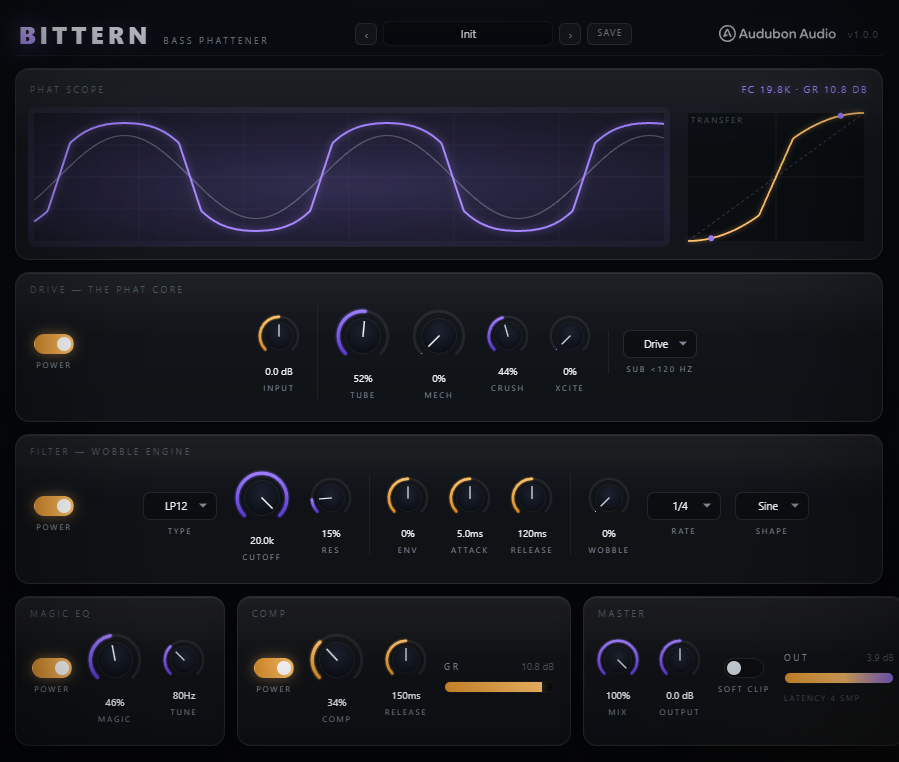
Signal flow at a glance
Bittern is a chain, in this order: Input → Drive (Mech → Tube → Crush → Xcite) → Filter (with envelope + LFO) → Magic EQ → Comp → Master. A Sub Guard wraps the drive stage so the low end can be protected. Each module has a power toggle that hard-bypasses it (state kept primed, so it's click-free), and any module at 0 processes as identity.
Watch the Phat Scope: the violet trace is the processed output against a faint input reference, and the amber transfer inset shows the current drive curve with its operating points. The whole drive stack runs inside 4× oversampling to keep aliasing down.
The drive stack — the phat core
Four controls colour the sound, in series. The first two are the exact closed-form distortion curves:
- Tube — 0–100%, warm valve bite with a tracked low shelf (+4.5 dB @ 180 Hz at full) for fullness. Click-free identity at 0.
- Mech — 0–100%, hard-knee digital grit. The slope-kink at the knee is the character. Runs after Tube.
- Crush — 0–100%, bit-depth reducer (16 → ~2.5 bits). 0% is fully off. Dubstep lo-fi nastiness.
- Xcite — 0–100%, Aphex-style HF exciter above 1.2 kHz, generated content HP'd at 400 Hz so it's bass-safe. Adds presence and air.
Stack Tube and Mech for a full, gritty tone, or use one alone. Input trim before the stack decides how hard you hit the curves.
Sub Guard — protect the low end
Classic full-band distortion drives everything, which wrecks a sub-heavy bass. The Sub selector adds an LR4 crossover at 120 Hz and three modes:
- Drive — the whole signal (sub included) is distorted. Classic full-band behaviour; best on synths and mid-heavy bass.
- Clean — the default. Everything above 120 Hz is driven; the sub bypasses the drive chain untouched and is delay-aligned back in. Your sub stays exactly as it came in.
- Warm — the middle ground. Highs go through the full chain; the sub gets only the Tube shaper for gentle valve weight, no clipping or filtering.
Set this first — it changes what everything else does to your low end.
The wobble engine — filter, env & LFO
After drive, the signal hits a TPT state-variable filter whose cutoff is alive. Three systems shape it:
- Filter — Type (LP12 / LP24 / BP / HP), Cutoff (20 Hz–20 kHz, def open), Res (Q 0.5–8). The base point the modulation moves around.
- Env — a bipolar envelope-follower amount (±4 octaves) with Attack (0.1–100 ms) and Release (10–1000 ms). Positive opens the filter on transients for auto-wah snap; negative ducks it.
- Wobble — one LFO, depth up to 3 octaves, six shapes (Sine, Tri, SawUp, SawDn, Square, Rand) and 12 tempo divisions (4 bar…1/32, incl. dotted and triplet). Beat-locked to the host when playing, free-running at last BPM when stopped.
The amber knobs carry all this motion. Env and Wobble can both drive the cutoff at once — that's how you get dynamic, tempo-locked movement together.
Magic EQ & the compressor
Two one-knob finishers voice and control the result:
- Magic — 0–100%. Voices three bands together: a low shelf at Tune (up to +7.5 dB), a mud-scoop at 5× Tune (up to −3 dB), and a presence lift at 2.8 kHz (up to +4 dB). Tune (40–160 Hz) places the low weight where your bass lives.
- Comp — 0–100%, a 4:1 soft-knee glue compressor with threshold-tracking auto-makeup, so it lands loud and full. Comp Rel (30–800 ms) sets the release; the GR meter is cut-only.
Magic EQ is the fastest way to "phat" — one knob does the work of three surgical bands.
Master, Mix, Soft Clip & presets
The master section blends and caps. Mix (0–100%) blends the whole wet chain against the delay-aligned dry — keep some dry for parallel phattening and punch. Output trims ±24 dB to match bypass.
Soft Clip is an optional tanh ceiling, off by default — Audubon plugins never default a clip or true-peak mode on. Enable it only when you want a hard limit on the output. Bittern ships with 10 factory presets; each resets all parameters then applies its overrides. Save your own as .bitternpreset files in your Documents folder.
Everyday phat bass
Leave Sub in Clean. Push Tube to ~40–50% for warm saturation, add a touch of Xcite for air. Turn Magic up to ~35% with Tune around 80 Hz for instant weight, and bring Comp in to ~25% to glue it. This is the Phat Bass preset — the go-to thicken-and-glue chain that keeps your sub untouched.
Classic dubstep wobble
Drive with Tube, set the filter to LP24, drop Cutoff to ~800–1000 Hz and raise Res to ~40%. Raise Wobble and pick a synced Rate — 1/4 for the classic sweep, dotted 1/8 for syncopation. Add a little Magic and Comp to keep it solid. Automate the Rate across a section for tempo changes. This is the Wobble 1/4 / Dotted Growl territory.
Talking neuro (envelope)
Switch the filter to BP and set Env high (+60–80%) with a fast Attack (~1.5 ms) so the band-pass snaps open on every transient — that's the vocal, "talking" neuro sound. Drive with Mech for grit. Leave Wobble at 0 and let the dynamics do the movement, or add a slow LFO underneath. This mirrors the Neuro Talk preset.
Full-band classic
To get the classic full-band behaviour, set Sub to Drive so the whole band is distorted, then run Tube and Mech both around 50%. Enable Soft Clip for the ceiling. This is the Full Phat preset — the faithful full-band vintage sound. Use it on synths and leads where a saturated sub is part of the character, rather than on a clean sub bass.