Albatross Stereo Widener
Albatross widens the stereo image on the Side of a Mid/Side split, so every widening move is mono-safe by construction. A 48 dB/oct Bass Mono crossover keeps sub and kick locked centre while the tops spread, and a live goniometer plus a banded correlation meter keep mono compatibility on screen. This guide covers every control and four practical workflows.
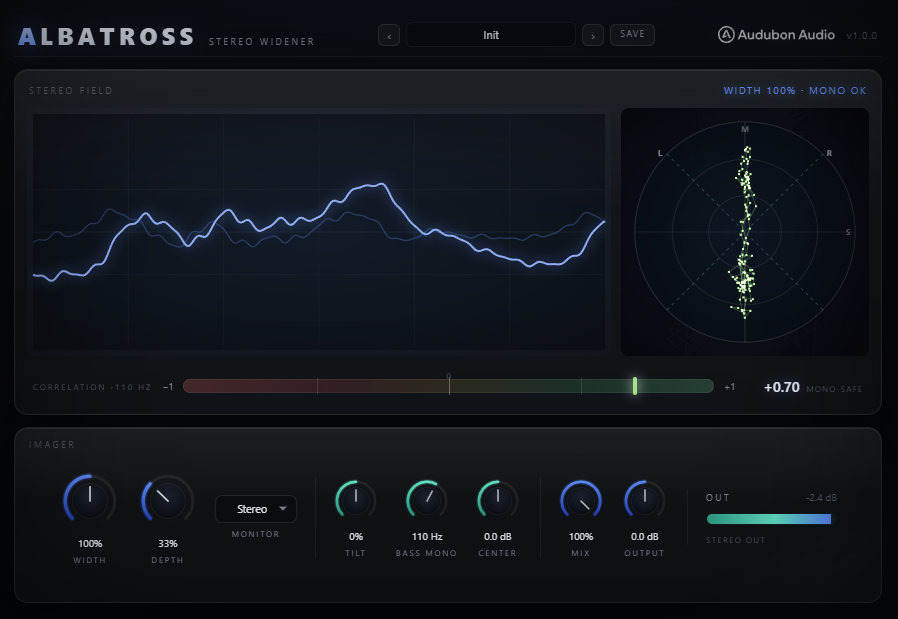
Bass Mono, Width, Depth and Tilt — how to spread the tops without ever wrecking the mono fold-down. · Watch on YouTube ↗
Width — the main spread control
Width is a gain on the Side channel: 0–200%, default 100%. Since the Side is exactly what cancels in a mono sum, changing Width alters the stereo image without ever touching the mono fold-down.
- 0% — The Side is silenced. The track collapses to pure mono.
- 100% — Unchanged. The image passes through as it entered.
- 100–150% — A natural widening. Good on buses and masters where you want more spread without artefacts.
- 150–200% — Aggressive. The sides are boosted hard; watch the correlation meter and check mono.
Width only scales existing Side content, so on a fully mono source (no Side to begin with) it does nothing — use Depth for that instead.
Depth — width from mono
Depth (0–100%, default 0%) disperses a copy of the Mid through a cascade of eight fixed all-pass filters and injects it into the Side. A mono or dead-centre source gains a wide, phasey, moving stereo image that Width alone can't create.
- 0% — Off. No decorrelation. The Side is only the natural stereo content.
- 20–50% — Subtle to moderate. A mono synth or bass gains believable width without an obvious effect.
- 50–100% — Strong. A big, enveloping spread. Best on sustained textures, pads and leads.
Because the injected copy lands in the Side, it too cancels in mono — no comb-filtering of the fold-down. Depth is safe to push hard on bass-friendly material as long as Bass Mono is set above your sub.
Bass Mono — the crossover mono-maker
Bass Mono (20–400 Hz, default 110 Hz) is a true Linkwitz-Riley crossover, not a shelf. The Side gets a 48 dB/oct high-pass and the Mid gets the crossover's matching all-pass, so the two stay phase-aligned. Everything below the cutoff folds cleanly to the centre.
The number is where the image is genuinely mono. That's worth spelling out, because most mono-makers label the crossover corner instead — and a corner is only 6 dB down, meaning half the Side is still there at the frequency on the dial. Albatross puts the corner 1.5× above the dial, so at the number itself the Side is already ~28 dB down (4% of the Mid) and the transition spans the octave above. Dial 110 Hz and you get −28 dB of Side at 110 Hz, −48 dB at 82 Hz, −76 dB at 55 Hz. Set it to where you want mono, not an octave or two higher to compensate.
- 20 Hz — Effectively off. The whole spectrum can be widened.
- 80–120 Hz — Typical for full mixes and masters. Locks the sub while leaving the low-mids free to spread.
- 120–200 Hz — For bass music. Keeps sub, kick and the body of a bassline dead-centre and mono-solid.
The crossover runs last, after the Mix, so "mono below fc" holds even for a partial dry/wet blend. The cutoff sweeps click-free. Set it just above the fundamentals you want to keep centred.
Tilt & Center — shaping the balance
Tilt (−100 to +100%, default 0%) is a ±6 dB shelf about a 700 Hz pivot on the Side — it decides where the width lives. Center (−6 to +6 dB, default 0 dB) trims the Mid.
- Tilt negative — Widens the lows and tightens the highs. A broad, weighty spread.
- Tilt positive — Widens the highs (air and shimmer) while keeping the low-mids focused.
- Center up (+dB) — Pushes the vocal / kick / bass forward through a wide mix.
- Center down (−dB) — Pulls the centre back so the sides breathe wider around it.
Tilt and Center are the fine-tune pair after Width and Depth. Raise Width and lower Center for an airy, spacious feel; reverse them for a focused, upfront one.
Metering — goniometer & correlation
The hero display is a live goniometer (vectorscope) with a −1 · 0 · +1 correlation bar beneath it. The point cloud plots Mid vertically and Side horizontally, and both the cloud and the needle are coloured by correlation — green, amber, red.
- Tall, narrow cloud — Mono-leaning. Little stereo content.
- Wide, round cloud — A healthy, big stereo image.
- Horizontal smear — Out-of-phase content. Check the correlation and your mono fold-down.
- Correlation ›fc Hz — The meter is banded above the Bass Mono cutoff (the label tracks the knob), because the mono lows would otherwise pin a full-band meter near +1 and hide the real image.
Green is mono-safe, amber is very wide, red is phase risk. A little amber on a wide bus is fine; sustained red means partial cancellation in mono.
Monitor, Mix & Output
The Monitor switch (Stereo / Mono / Side, default Stereo) sets what reaches the output. The audition modes force full wet — they ignore Mix — and keep the correlation meter live.
- Stereo — Normal output. This is what you render.
- Mono — The true fold-down. Flip here to hear exactly what a club, phone or vinyl cut hears, and confirm the sub holds.
- Side — Solos only what's being widened. Useful for hearing what Depth and Tilt are adding.
- Mix (0–100%, default 100%) — Dry/wet blend for subtle parallel enhancement, especially on a master.
- Output (−24 to +24 dB, default 0 dB) — Final trim after the crossover; level-match for an honest bypass A/B.
Albatross adds zero latency and is fully parallel and sub-safe, so it's safe to place anywhere in the chain.
Mono-safe master width
Insert Albatross on the master or a wide bus. Set Bass Mono to 90–110 Hz so the sub stays locked. Raise Width to 120–140% and add a slight positive Tilt so the spread favours the air. Use Mix at 60–100% to blend the width against the dry if you want it subtle. Flip Monitor to Mono to confirm the low end and centre survive, then back to Stereo. Level-match with Output for a fair bypass comparison.
Mono synth spread
Insert on a mono synth, lead or vocal. Width alone won't help — there's no Side yet — so raise Depth to 40–70%. The decorrelation engine manufactures a genuine wide, moving image from the mono content. Add a touch of Tilt to place the spread (positive for air, negative for weight). Keep Bass Mono at 120–140 Hz so the fundamentals stay centred. Watch the goniometer open from a vertical line into a wide cloud.
Bass mono lock
For bass-heavy tracks, insert on the low or full mix. Set Bass Mono to 120–150 Hz — the top of where the body of your bass lives — and sub, kick and body all fold to mono. Because the dial marks the real mono point, set it at the frequency you want centred rather than an octave or two above to compensate. Set Width to 130–160% to spread everything above it. The correlation meter, banded above fc, tells you the true image of the tops while the lows stay solid. This is the recipe that lets you go wide without wrecking club, phone or vinyl playback.
Corrective narrowing
When a source is too wide or has phase problems, insert Albatross and pull Width below 100% — down to 60–70% — to reign the sides in. Add a +1 to +3 dB Center lift to push the mono content forward. Watch the correlation needle climb back toward green as you narrow. This is the counterpart to widening: the same Side gain, used to focus a mix rather than spread it. Check Mono to confirm the fix.