01
Init
All defaults. Width 100%, Depth 0%, Bass Mono 110 Hz. A neutral, transparent starting point for building your own image from scratch.
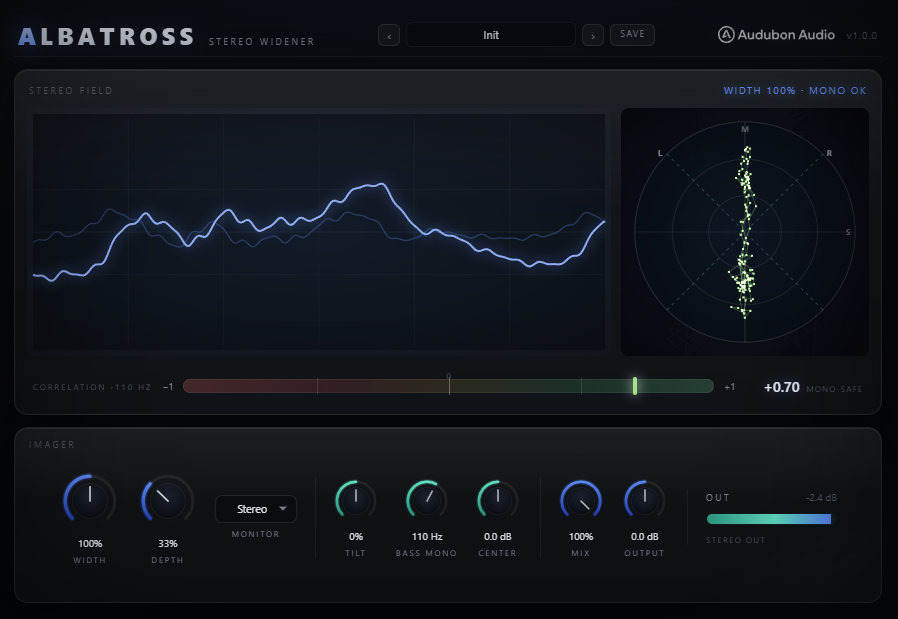
A mono-safe Mid/Side stereo widener and imager. Every widening move happens on the Side channel, so the mono fold-down is never coloured — push the image as hard as you like and it still survives club, phone and vinyl. A true 48 dB/oct Linkwitz-Riley Bass Mono crossover keeps sub and kick locked dead-centre while the tops open up.
Albatross splits the incoming stereo into Mid and Side and does every widening move on the Side alone — Width, Depth and Tilt all live there. Because the Side cancels when L and R are summed, none of them colour the mono fold-down. You get a big, decorrelated image on top and a rock-solid centre underneath, built from the ground up for bass music.
A stereo widener that spreads the tops as hard as you want while the sub and kick stay dead centre and uncoloured.
Width scales the Side, Depth injects an all-pass-decorrelated copy of the Mid into the Side so even a mono source gains a wide, moving image, and Tilt weights that width toward lows or air. Then the Bass Mono crossover runs last, after the Mix: a 48 dB/oct Linkwitz-Riley high-pass on the Side folds everything below the cutoff to the centre. And the dial reads where the image is actually mono, not where the crossover corner sits — set it to 90 Hz and 90 Hz is mono, not 6 dB closer to it. A live goniometer and a banded correlation meter keep mono compatibility on screen the whole time.
Albatross encodes L/R into Mid = (L+R)/2 and Side = (L−R)/2, shapes only the Side, then decodes back to L/R and blends dry into wet with Mix. Because the Side is exactly what cancels in a mono sum, any amount of Width, Depth or Tilt leaves the mono fold-down bit-for-bit uncoloured — verified sample-exact in the DSP sim.
The signal is encoded to Mid (the mono content, L+R) and Side (the stereo difference, L−R). Width, Depth and Tilt only ever touch the Side; Center only touches the Mid. Decode back to L/R is Mid ± Side. The mono sum is 2·Mid — the Side vanishes — so the widening controls physically cannot colour it.
Width is a straight gain on the Side, 0–200%. At 0% the Side is silenced and the track collapses to mono; 100% is unchanged; 200% doubles the sides for maximum spread. Since it scales the Side and nothing else, mono energy is identical at every Width setting — the image gets wider or narrower, the centre never moves.
Depth disperses a copy of the Mid through a cascade of eight fixed first-order all-passes and injects it into the Side. A dead-centre or mono source gains a wide, phasey, moving image out of thin air — and because the injected copy lands in the Side, it too cancels in mono. No comb-filtering of the fold-down.
Mix is a dry/wet blend from 0–100% — the audition Monitor modes ignore it and force full wet so you always hear the true image. Output is a final ±24 dB trim after the crossover. Zero added latency, fully parallel and sub-safe, so Albatross drops onto any bus without shifting timing.
Bass Mono is not a shelf or a simple high-pass on the sides — it's a real Linkwitz-Riley crossover. The Side gets a 48 dB/oct high-pass and the Mid gets the crossover's matching all-pass, so the pair stays phase-aligned through the transition band. Mathematically it's exactly "split at fc, fold the low band to mono, pass the highs." And the dial reads where the image is genuinely mono — most mono-makers label the crossover corner, which is only 6 dB down, so half the Side is still sitting there at the frequency on the knob. Dial 110 Hz here and the Side at 110 Hz is 28 dB down, not 6.
The Side high-pass is a Butterworth biquad cascaded twice — a fourth-order Linkwitz-Riley response. Below the cutoff the stereo width falls off steeply: −24 dB one octave down, −48 dB two octaves down. Everything under fc — natural stereo, injected Depth, even the dry portion of a partial Mix — collapses cleanly to the centre.
Because LP4 + HP4 equals a 2nd-order all-pass, running the Mid through that all-pass keeps Mid and Side phase-locked across the crossover. The mono sum only ever passes through a unity-magnitude all-pass, so the fold-down stays uncoloured — phase-rotated only, exactly as any crossover-based tool.
The crossover sits after the dry/wet blend, so "mono below fc" holds for the blended output too — a 50% Mix can't leak stereo sub. The cutoff sweeps click-free (a ~20 ms glide on the frequency). Range is 20–400 Hz; 20 Hz is effectively off. Set it just above your sub and kick fundamentals.
Width sets how much; Depth and Tilt set what it is and where it sits. Depth manufactures stereo out of a mono source; Tilt biases the width toward the low end or the air. Both act on the Side, so both stay mono-safe no matter how far you push them.
0–100%, default 0%. A cascade of eight fixed all-passes disperses a copy of the Mid across the frequency spectrum before it's injected into the Side. The dispersion spreads phase broadly without ringing on any single note, so a mono synth, bass or vocal gains a genuine wide image rather than a hard-panned double. Fully mono-safe.
−100 to +100%, default 0%. A ±6 dB shelf about a 700 Hz pivot on the Side. Negative widens the lows (a broad, weighty spread) and tightens the highs; positive widens the highs — air and shimmer — while keeping the low-mids focused. At 0% the width is spectrally flat.
−6 to +6 dB on the Mid, default 0 dB. Push the centre — vocal, kick, bass — forward to punch through a wide mix, or pull it back to let the sides breathe around it. It's the counterweight to Width: raise Width and lower Center for an airy, spacious feel, or the reverse for a focused, upfront one.
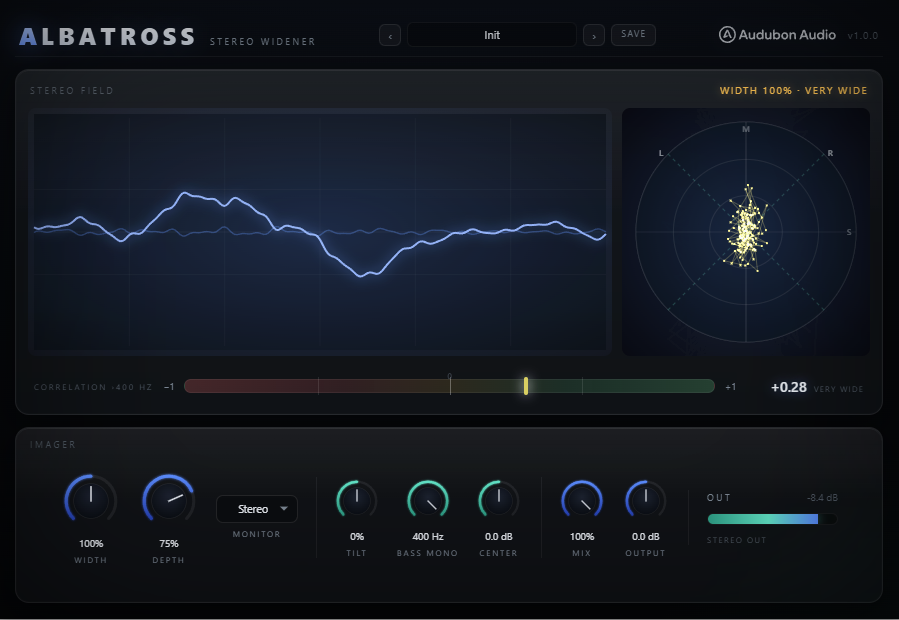
The hero display is a live goniometer (vectorscope) with a classic −1 · 0 · +1 correlation bar directly beneath it. Both are coloured by correlation — green through amber to red — so a phase problem is visible before it's audible. Three Monitor modes let you audition the mono sum or solo the Side at a click.
Mid on the vertical axis, Side on the horizontal — the classic 45°-rotated point cloud fed by a decimated L/R stream from the audio thread. A tall, narrow shape is mono-leaning; a wide, round cloud is a big stereo image; a horizontal smear warns of out-of-phase content. The dots are coloured by correlation so risk reads at a glance.
The correlation is measured above the Bass Mono cutoff — the readout label tracks the knob (e.g. Correlation ›110 Hz). The lows are mono by construction, so on bass-heavy program a full-band meter would pin near +1 and tell you nothing; banding it makes the needle track the part of the spectrum the widener actually shapes. At 20 Hz (Bass Mono off) it degrades gracefully to full-band.
Stereo is the normal output. Mono sums to the true fold-down so you can check what a club or phone hears. Side solos exactly what's being widened. The audition modes force full wet (ignoring Mix) and keep the correlation meter live, so you can flip to Mono, confirm the sub holds, and flip back without touching a fader.
Side gain. 0% folds the track to mono, 100% is unchanged, 200% doubles the sides. The primary spread dial. Mono energy is identical at every setting.
All-pass-decorrelated Mid injected into the Side. Manufactures genuine width from a mono or centred source. Mono-safe — it lands in the Side and cancels in the fold-down.
±6 dB shelf about 700 Hz on the Side. Negative widens the lows and tightens the highs; positive widens the air. 0% is spectrally flat width.
48 dB/oct Linkwitz-Riley crossover. Everything at and below the dial folds to the centre while the tops spread. 20 Hz ≈ off. Set it to where you want mono — the number means what it says.
Mid trim. Push the centre (vocal / kick / bass) forward or let the sides breathe around it. The counterweight to Width.
Dry / wet blend. Automate it like a parallel send. The Mono and Side audition modes ignore Mix and force full wet.
Final trim after the crossover. Match levels for an honest bypass comparison or gain-stage into the next processor.
What reaches the output. Mono checks the true fold-down; Side solos what's being widened. Audition modes force full wet and keep the meter live.
Factory presets span a barely-there glue to a huge, engineered pad width — every one of them mono-safe by construction. Applying a preset resets all parameters to default first, then dials in only what it changes, so there are no hidden leftovers.
All defaults. Width 100%, Depth 0%, Bass Mono 110 Hz. A neutral, transparent starting point for building your own image from scratch.
A light spread with the crossover pulled a touch lower. Adds a subtle sense of width and air to a bus without an obvious effect. Safe on a full mix.
Master-bus width with a positive Tilt so the spread favours the air. The Bass Mono at 120 Hz keeps the low end mono-solid while the tops open up.
A firm 150% spread with the crossover raised to 160 Hz — everything below stays dead-centre. Built for bass music where the sub must never wander.
Width at unity but Depth at 55% — a mono synth or bassline gains a wide, moving image entirely from the decorrelation engine. Crossover at 140 Hz.
Maximum-character width: 165% Width, 70% Depth, +35 Tilt. Sustained pads and strings become enormous and airy while the fundamentals stay anchored.
A modest 112% Width with Tilt pushed hard to +85 and the crossover at 180 Hz. Only the top end spreads — a shimmering high-frequency width with a tight body.
Width down to 65% with a +2 dB Center lift. Pulls a too-wide source in and pushes the centre forward — a corrective preset for mono-leaning focus.